
Full notes
Full The True Slime King update
Read the full published notes in a cleaner layout. The original post stays linked below.
What changed
- Gameplay
- Compatibility
- Performance
- UI and audio
The True Slime King changes
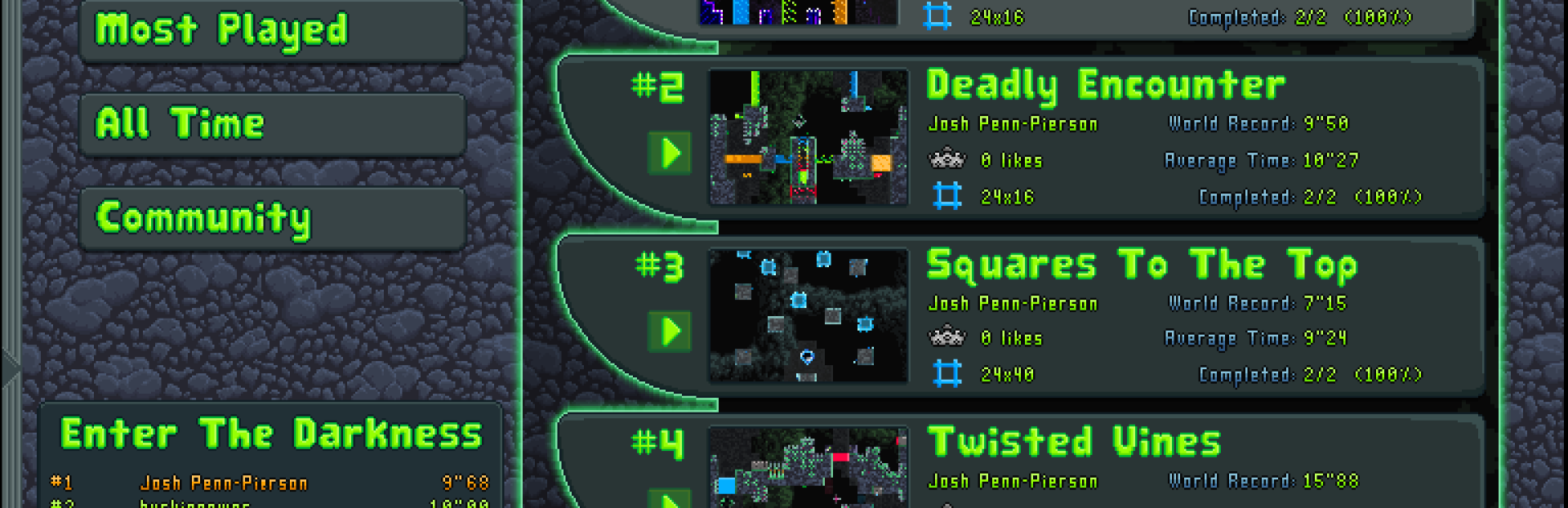
This update brings the much anticipated online level exchange (for sharing and playing community-made levels directly in-game). There has also been a big update to the story mode, with the addition of faucets that let you teleport between any completed levels. This teleportation system should alleviate frustrations of having to navigate through tricky sections the overworld, since you now only have to navigate these sections once. https://steamcommunity.com/sharedfiles/filedetails/?id=2235416932
In order to access the level exchange, you will need to create a slime king account. https://steamcommunity.com/sharedfiles/filedetails/?id=2235337169
Once logged in, you can browse through endless pages of levels (well... there are only 7 levels on the level exchange right now, but you get the idea). https://steamcommunity.com/sharedfiles/filedetails/?id=2235334743
Use the left and right arrow buttons to navigate through the pages of levels. https://steamcommunity.com/sharedfiles/filedetails/?id=2235335631
Sort the levels by using the filter options to find the perfect level to play for any occasion. https://steamcommunity.com/sharedfiles/filedetails/?id=2235336301 https://steamcommunity.com/sharedfiles/filedetails/?id=2235336560
Submit your own levels (created in the level editor) to the level exchange so that other people can play them. https://steamcommunity.com/sharedfiles/filedetails/?id=2235337647
Make sure to give a 'like' to any levels you enjoyed playing. https://steamcommunity.com/sharedfiles/filedetails/?id=2235342460
Also, thanks to Forrest Leon for the large Slime King blinking animation that's been added in this update! https://steamcommunity.com/sharedfiles/filedetails/?id=2235330299
Changes and additions:
Added Forrest Leon to credits.
Completely reworked quick play to include an in-game online level exchange with high score boards. Upload, browse, and fight for the fastest times on community created levels. The level exchange currently requires mouse and keyboard, but levels can be played with a controller. For now, quick play doesn't support playing levels offline, but future updates will bring this feature back. The keyboard functionality will be improved with the next update which will bring full controller/keyboard support to the entire game.
Added faucets to the Story Mode overworld. Faucets allow players to teleport between any completed levels.
All interactable objects (overworld doors, in level doors, and faucets) now have an display popup (if the option is turned on) and display a glow animation when the player is able to interact with them. Added option for turning on/off the interaction display for interactable objects (interactable objects used to only be displayed as a tutorial).
Changed controller deadzone size from 0.04 to 0.25. This should solve most controller deadzone issues for now. Customization options for controller deadzone size are planned for the full controller support update.
Until full controller/keyboard support is provided for the level editor and quick play areas, the mouse cursor is now always visible in these areas (even if the controller is plugged in), allowing for easier use of the controller while playtesting levels when playing levels in quick play).
FPS display is no longer obscured by the instant replay GUI.
Buttons and button blocks are now affected by the colorblind options.
Increased resolution of large friendly slime sprites.
Large slime king in menu now blinks.
Known bugs:
Skipping the cutscenes can occasionally cause the audio volumes to not get reset back to the values they were at before the cutscene.
When screen is stretched by a non-integer multiple, tiles can draw parts of neighboring tiles. See this GameMaker: Studio documentation page for more information: https://docs.yoyogames.com/source/dadiospice/001_advanced%20use/more%20about%20backgrounds/designing%20tiles.html
Moving the sound or music slider too fast doesn't update the volume.
Source
Changelog.gg summarizes and formats this update. How we read updates.