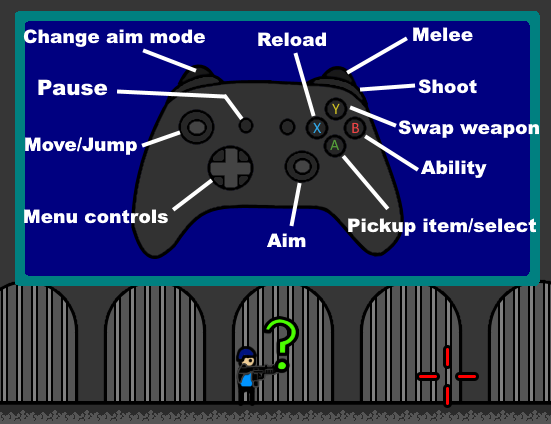
Controller support is finally here! There is 2 aim modes available. Free aim mode that works similiar to mouse and locked mode where crosshair spins around player at fixed distance.
Full notes
Full The Struggle of Combat update
Read the full published notes in a cleaner layout. The original post stays linked below.
What changed
1 fix1 addition3 changes0 removals
Compatibility
Store
Gameplay
UI and audio
changedController support is finally here!
fixedThere is 2 aim modes available. Free aim mode that works similiar to mouse and locked mode where crosshair spins around player at fixed distance. Aim speed can be changed from control options to suit you preference. Selecting shop items will work slightly differently to keyboard controls. Instead of hovering with mouse, description will open soon as you stand under it.
changedGame wasn't originally planned for gamepad controls, so there are some things that might not work perfectly. Some things will require using free aim mode, such as selecting difficulty switches or opening weapon description.
addedAdded Gamepad controls -Added Keyboard & Gamepad tabs to control options -Fixed incorrect information in bullet upgrade descriptions -Fixed watergun having more ammo than intended in first clip -Fixed "Language" text in language options not being visible with some languages selected
changedNote: If controller is not responding, you may have to disable controller from Steam's Big Picture Mode Big Picture Mode > Controller Settings > disable configuration support for you controller
The Struggle of Combat changes
changedController support is finally here!
fixedThere is 2 aim modes available. Free aim mode that works similiar to mouse and locked mode where crosshair spins around player at fixed distance. Aim speed can be changed from control options to suit you preference. Selecting shop items will work slightly differently to keyboard controls. Instead of hovering with mouse, description will open soon as you stand under it.
changedGame wasn't originally planned for gamepad controls, so there are some things that might not work perfectly. Some things will require using free aim mode, such as selecting difficulty switches or opening weapon description.
addedAdded Gamepad controls -Added Keyboard & Gamepad tabs to control options -Fixed incorrect information in bullet upgrade descriptions -Fixed watergun having more ammo than intended in first clip -Fixed "Language" text in language options not being visible with some languages selected
changedNote: If controller is not responding, you may have to disable controller from Steam's Big Picture Mode Big Picture Mode > Controller Settings > disable configuration support for you controller
Controller support is finally here!
There is 2 aim modes available. Free aim mode that works similiar to mouse and locked mode where crosshair spins around player at fixed distance. Aim speed can be changed from control options to suit you preference. Selecting shop items will work slightly differently to keyboard controls. Instead of hovering with mouse, description will open soon as you stand under it.
Game wasn't originally planned for gamepad controls, so there are some things that might not work perfectly. Some things will require using free aim mode, such as selecting difficulty switches or opening weapon description.
-Added Gamepad controls -Added Keyboard & Gamepad tabs to control options -Fixed incorrect information in bullet upgrade descriptions -Fixed watergun having more ammo than intended in first clip -Fixed "Language" text in language options not being visible with some languages selected
Note: If controller is not responding, you may have to disable controller from Steam's Big Picture Mode Big Picture Mode > Controller Settings > disable configuration support for you controller