
HomeGamesUpdatesPricingMethodology
Steam News4 February 20242y ago

Online Multiplayer Added to the Demo!

After last week's playtest, online multiplayer has been added to the Sumo Tanks demo. Thank you to all the playtesters who gave feedback and helped catch bugs!

Full notes

Full Sumo Tanks update

Read the full published notes in a cleaner layout. The original post stays linked below.

What changed

0 fixes2 additions0 changes0 removals
  • Gameplay
addedAfter last week's playtest, online multiplayer has been added to the Sumo Tanks demo. Thank you to all the playtesters who gave feedback and helped catch bugs! Thanks to them, everyone can now enjoy online multiplayer with their friends.
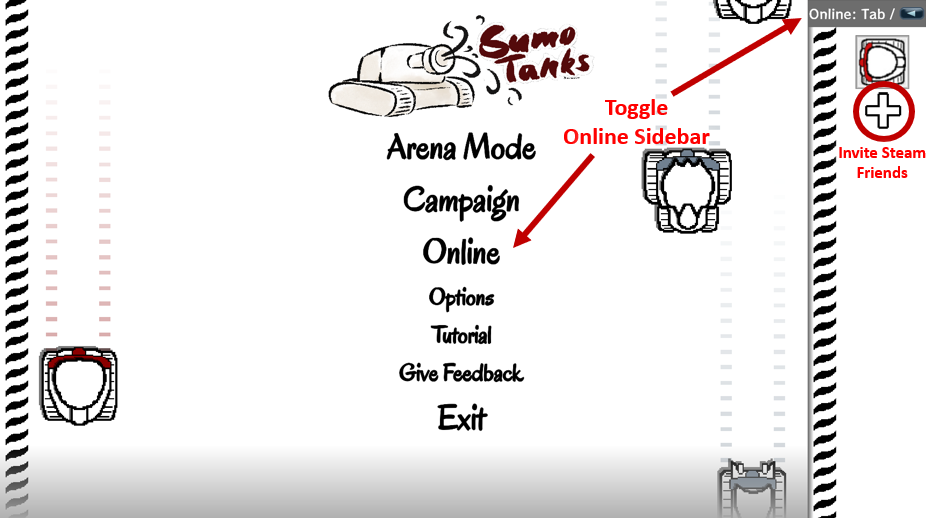
addedHow to access online multiplayerThere is a new "Online" sidebar that can be accessed anywhere at anytime . To invite a friend to join you, just open the sidebar, click the plus, and select them. Friends can also join you through Steam via the normal "Join Game" option on the friends list.

Sumo Tanks changes

addedAfter last week's playtest, online multiplayer has been added to the Sumo Tanks demo. Thank you to all the playtesters who gave feedback and helped catch bugs! Thanks to them, everyone can now enjoy online multiplayer with their friends.
addedThere is a new "Online" sidebar that can be accessed anywhere at anytime . To invite a friend to join you, just open the sidebar, click the plus, and select them. Friends can also join you through Steam via the normal "Join Game" option on the friends list.

After last week's playtest, online multiplayer has been added to the Sumo Tanks demo. Thank you to all the playtesters who gave feedback and helped catch bugs! Thanks to them, everyone can now enjoy online multiplayer with their friends.

How to access online multiplayer

There is a new "Online" sidebar that can be accessed anywhere at anytime. To invite a friend to join you, just open the sidebar, click the plus, and select them. Friends can also join you through Steam via the normal "Join Game" option on the friends list.

This sidebar can be toggled open and closed by clicking it in the top right, pressing tab, or by clicking "Online" on the main menu.

Source

Steam News / 4 February 2024

Open original post

Changelog.gg summarizes and formats this update. How we read updates.