
Full notes
Full Sumo update
Read the full published notes in a cleaner layout. The original post stays linked below.
What changed
- UI and audio
- Performance
- Maps
Sumo changes
In our first update purely focused on game polish (and just in time for the Steam Summer Sale, where Sumo is slated to be 50% off), we present a massive overhaul to some of the game’s older or placeholder UI elements, updated environment quality, and introduced a new post-process shader to enhance the in-game visuals.
In-Game Shader
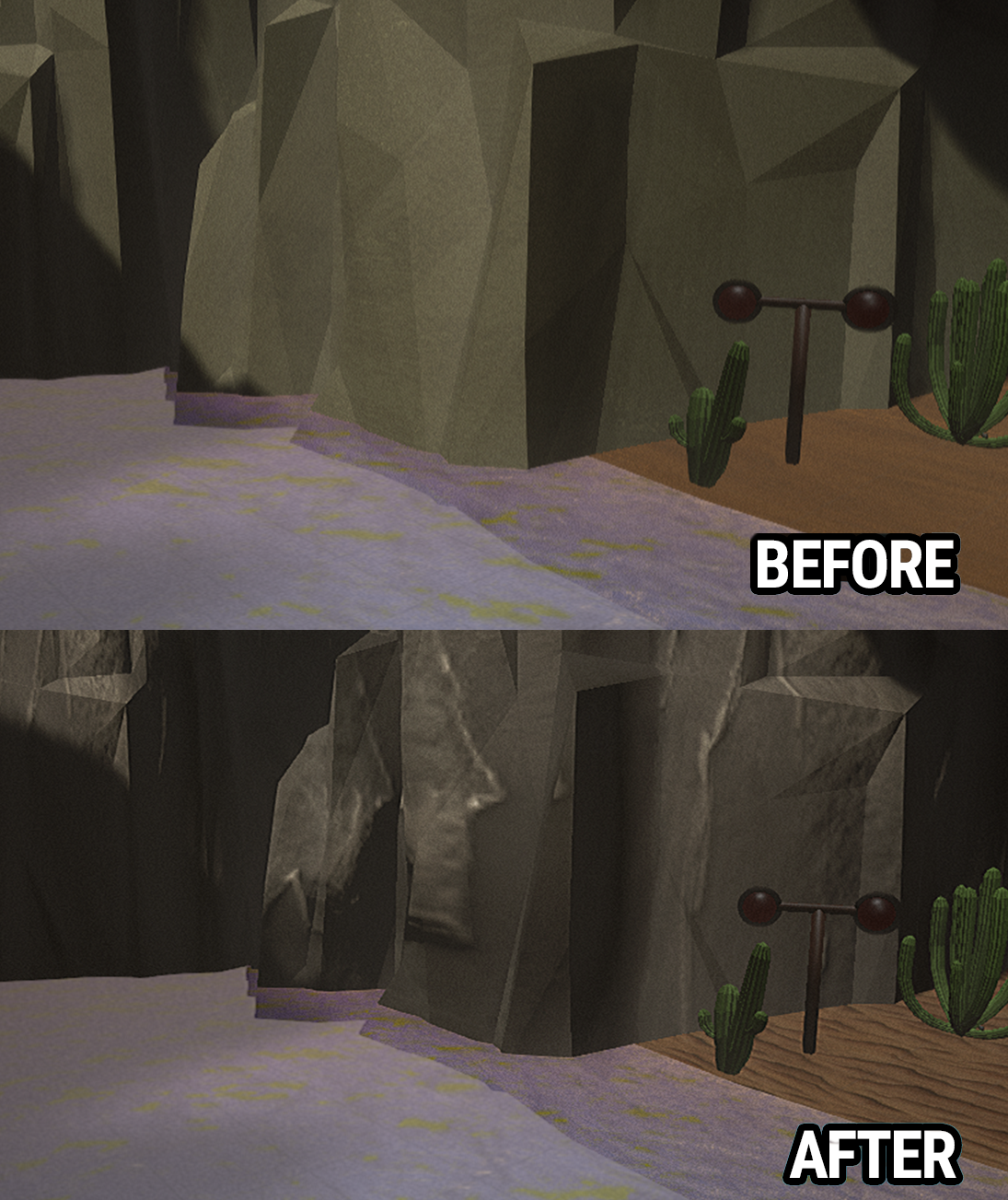
Prior to Early Access, Sumo used a cel shader to stylize the game’s visuals, but it was too large of an impact on performance. We have introduced a brand new shader that is better on performance, creates the cel outline we wanted, and improves the game’s overall visual quality. If you have any performance issues with this build, please let us know.
Environment Textures
The Skirmish Arenas ‘Classic’, ‘Railway Rumble’, and ‘WaterWorks’ have been updated with all-new textures and materials on the environment and arena components, giving them a fresh updated look. These new materials also have a much lower performance impact than the previous textures. The other maps will also have a texture and material pass in the next update.
User Interface
All UI elements and game inputs are now handled by a master UI class, resolving a large number of bugs related to inputs being sent to the wrong UI under certain cases. Button Prompts - All button prompts are now directly integrated into the UI itself rather than having a list of button prompts at the bottom of the screen at all times. Pre-Game UI - The entire UI from the Main Menu to Level Select has new transition animations when moving from one screen to the next. Game Mode Select - Brand new UI. The preview movies are now loaded at all times in this new version, reducing some performance issues when rapidly cycling through modes.
Character Select - Brand new UI. Each character now shows an icon summarizing their character ability, and multiple players can highlight the same character while scrolling through the list. When a character has already been selected, anyone else who has highlighted that character will not be able to pick them, but can still review their character ability. The ability previews will be re-recorded in a future update to fit in this new UI size.
Victory Screen - Brand new UI, complete with new animations for the intro to the victory screen.
Other Changes
Pausing while in online multiplayer will now actively suspend the game, rather than just displaying the pause menu. The game can no longer be paused while in certain animated sequences, such as the opening ceremony or the presenting of the round score at the end of a round. In an online multiplayer game, pausing the game will no longer show the pause buttons for the other players who did not pause. The pausing player retains full control over resuming the game. Significantly reduced the memory and disk load of the Blaze game mode’s environment. Fixed the Opening Ceremony skipping all players beyond player 1 in any games beyond the first played in a game session. Fixed an issue in Respawn-enabled maps where dashing, jumping, and using abilities was not disabled while respawning. The multiplayer friends list and lobby no longer pull avatars from user’s Steam profiles. This may return in the future, but is being removed for now. Fixed an issue where character inputs were still processed during a pause, resulting in unintended dashing and ability use after unpausing.
Known Issues / What’s Next
The in-game videos need to be re-recorded across the board to show the latest visual game style, and to fit within the new UI windows. The character ability previews in particular are very difficult to see in the new character select UI. Many new features require more localization work, so non-English language support is spotty for awhile. Button prompts may not immediately switch off of Controller mode for keyboard users. If this happens, try clicking in the window anywhere to switch to Mouse mode. Future button prompts should then always switch to the correct images. The size on disk requirements have jumped with this update. We will work to get this reduced in future patches. The next update will continue to focus on polish similar to what we have done in this patch, including more focus on gameplay elements.
Source
Changelog.gg summarizes and formats this update. How we read updates.