
Full notes
Full Summoners War update
Read the full published notes in a cleaner layout. The original post stays linked below.
Repeated intro
Greetings from Com2uS!
What changed
- Gameplay
- Performance
- Server
- UI and audio
- Maps
- Fixes
Summoners War changes
v8.6.6 has been updated on Steam today, and an auto update will be held to install the new version.
The process won't take long, but you may experience a sudden crash if you are logged in when the update begins. Please make sure to come back to the Village and end your game safely to save your game data before the update starts.
======================== [Update Schedule by Server] Global - 12:45 AM PDT Europe - 8:45 AM CET Asia - 3:30 PM TST Korea - 4:00 PM KST Japan - 4:30 PM JST China - 3:30 PM CST ======================== ※ You won't be able to enter [World Arena, Arena Interserver Battle, and World Guild Battle] during [12:00 AM - 12:45 AM PDT], and other content can be played normally.
======================== v8.6.6 Update Details ========================
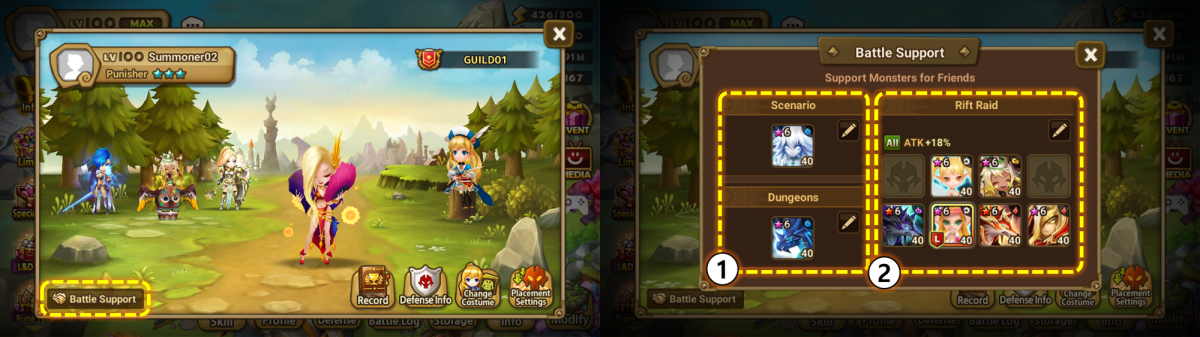
▶ Support Monsters Improved - A unified management feature for Support Monsters has been added.
: The newly added Battle Support button on the profile screen allows you to check and modify the Monsters you support for friends and the support deck used in Rift Raids. ① Previously, the Rep Monster was used as the Support Monster. Now, you can designate separate Support Monsters for Scenario and Cairos Dungeon. ② Instead of automatically using the first Raid deck set by a friend, mentor, or guild member, you can now manually assign a support deck through the Battle Support pop-up.
Updates to the support deck system in Rift Raids:: The daily limit for using support decks has increased from 5 times to 30 times. : The number of times support can be received from a single friend, mentor, or guild member has increased from 1 time to 10 times. : Support decks can now be used in Repeat Battle.
Support Monsters have been improved in World Arena.
: You can now view the currently registered World Arena Support Monsters under [World Arena > Monster].
▶ [Trial of Ascension (Hell)] Strategy Info Added to Battle Preparation Screen
You can now check stage details and recommended decks in the strategy guide. - For 10th floor's boss stage, information on boss Monsters for each wave is available.
▶ [Crafting] Rune and Material Display Improved - Runes that lack required materials are now grayed out, making it easier to identify craftable Runes.
▶ Monster Info Pop-up Improved - Pressing a skill in the Monster info pop-up now displays how it changes at each skill power-up level.
▶ Other Improvement and Changes - When attempting to summon with an insufficient number of Mystical Scrolls, a quick shop pop-up will now appear within the Summonhenge instead of redirecting to the Shop. - The Rune Power-up process has been streamlined. : After powering up a specific Rune property, you can now immediately select another property. - [Power-up Circle] The animation for skill level-ups has been improved, and skill power-up sound effects will now play even when skipping the animation. - [Monster > Awaken] For Collaboration and Original Monsters that only have an awakened form, the previously inactive [Awaken] button is now displayed as an interactive button.
▶ Bug Fix - [Craft Building > Special] Fixed incorrect text in the selection pop-up for Grindstones and Gems.
Source
Changelog.gg summarizes and formats this update. How we read updates.