What changed
0 fixes3 additions1 change2 removals
- UI and audio
- Store
- Gameplay
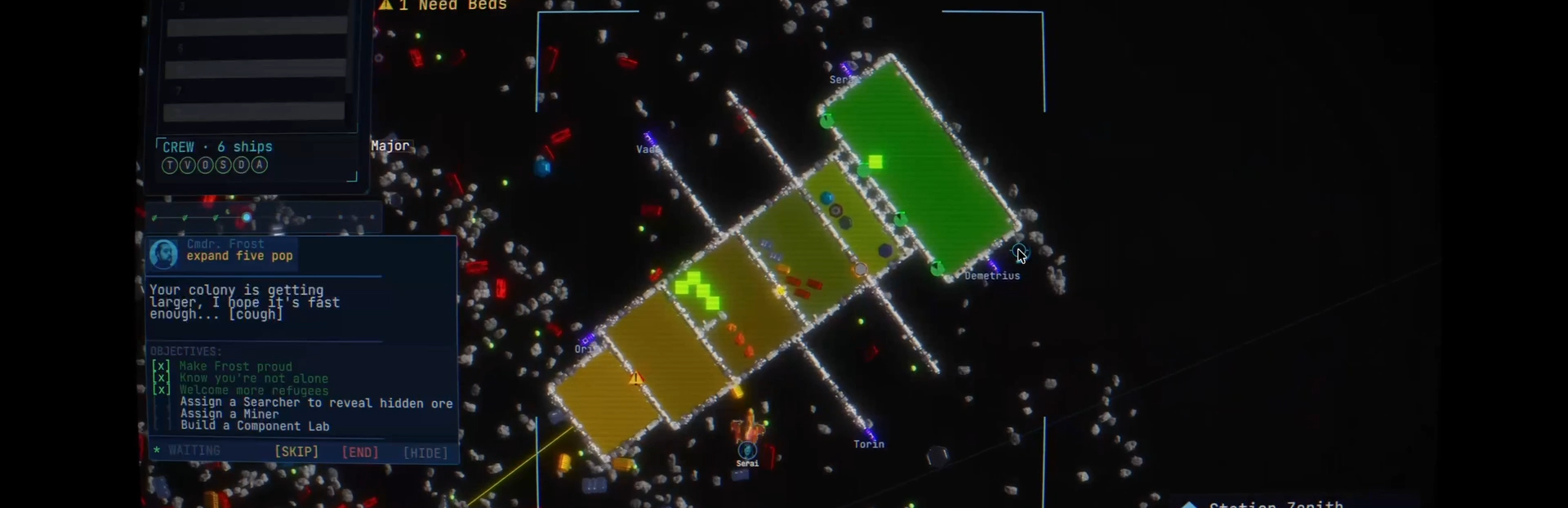
addedGood afternoon from Mountain View everyone :) I've been working to listen to community feedback as closely as possible as I'm developing Stella Nova. As we're heading into Steam Next Fest this week, one of our Discord members was kind enough to test and report on UI Scaling problems they were facing on their 1080p hardware. It's important to me as a developer that Stella Nova is as accessible as possible , across languages, hardware, and visual perception capabilities. I really think that you shouldn't be locked out of gameplay for these kind of simple reasons. The community has done an amazing job to support this goal so far. I am strongly committed as a developer to that stance, so the final bug fixing patch before Next Fest for Stella Nova primarily focuses on making the UI scaling visually accessible across hardware. In addition, it also focuses to ensure that save persistence of these settings is respected from session to session. You can now scale the User Interface within Stella Nova just like you do with a browser: Simply hold Ctrl & (+/-) together to scale the user interface. It's also still available in the esc menu, with a lot of different new preset scaling options. 50% Scaling
addedUI Scaling & Accessibility Features (Complete) New input scheme : Simply hold Ctrl & (+/-) together to scale the user interface. Journal no longer overlaps close button on colony management panel. Characters now scale in size along the bottom row to accommodate shrinking/growing timescale slider. Timescale slider no longer overlapped by colony management by default. Ship List no longer obscured from view by default. Journal Panel now extends to show entire panel, general visual redesign. Using the scroll wheel in the crew panel now scrolls horizontally. This however did not leave the ability to scroll vertically, but a new vertical scroll bar has been added for when the GUI is at 100% or above in scale.
changedModule art is now consistent During my playthrough with @GenXGeorge, he pointed out that module artwork was inconsistent across different module types. I used this info to solve a longstanding bug with the colony management panel. Now all modules are shown as their artwork version, rather than default squares. Be sure to check out George's channel and give your fellow crewmate a follow! View store page
addedQuests now part of save persistence Active quests are no longer removed after a game has been saved. Initially, the active quests were removed when a game was saved and reloaded. I have added appropriate serialization layers into the engine to ensure that the active quests are safe.
removedExpired and declined quest cards no longer move the camera.
removedJournal panel notification and citizen messages redesign to no longer overflow the panel.
Stella Nova changes
addedGood afternoon from Mountain View everyone :) I've been working to listen to community feedback as closely as possible as I'm developing Stella Nova. As we're heading into Steam Next Fest this week, one of our Discord members was kind enough to test and report on UI Scaling problems they were facing on their 1080p hardware. It's important to me as a developer that Stella Nova is as accessible as possible , across languages, hardware, and visual perception capabilities. I really think that you shouldn't be locked out of gameplay for these kind of simple reasons. The community has done an amazing job to support this goal so far. I am strongly committed as a developer to that stance, so the final bug fixing patch before Next Fest for Stella Nova primarily focuses on making the UI scaling visually accessible across hardware. In addition, it also focuses to ensure that save persistence of these settings is respected from session to session. You can now scale the User Interface within Stella Nova just like you do with a browser: Simply hold Ctrl & (+/-) together to scale the user interface. It's also still available in the esc menu, with a lot of different new preset scaling options. 50% Scaling
addedUI Scaling & Accessibility Features (Complete) New input scheme : Simply hold Ctrl & (+/-) together to scale the user interface. Journal no longer overlaps close button on colony management panel. Characters now scale in size along the bottom row to accommodate shrinking/growing timescale slider. Timescale slider no longer overlapped by colony management by default. Ship List no longer obscured from view by default. Journal Panel now extends to show entire panel, general visual redesign. Using the scroll wheel in the crew panel now scrolls horizontally. This however did not leave the ability to scroll vertically, but a new vertical scroll bar has been added for when the GUI is at 100% or above in scale.
changedModule art is now consistent During my playthrough with @GenXGeorge, he pointed out that module artwork was inconsistent across different module types. I used this info to solve a longstanding bug with the colony management panel. Now all modules are shown as their artwork version, rather than default squares. Be sure to check out George's channel and give your fellow crewmate a follow! View store page
addedQuests now part of save persistence Active quests are no longer removed after a game has been saved. Initially, the active quests were removed when a game was saved and reloaded. I have added appropriate serialization layers into the engine to ensure that the active quests are safe.
removedExpired and declined quest cards no longer move the camera.
Good afternoon from Mountain View everyone :) I've been working to listen to community feedback as closely as possible as I'm developing Stella Nova. As we're heading into Steam Next Fest this week, one of our Discord members was kind enough to test and report on UI Scaling problems they were facing on their 1080p hardware. It's important to me as a developer that Stella Nova is as accessible as possible, across languages, hardware, and visual perception capabilities. I really think that you shouldn't be locked out of gameplay for these kind of simple reasons. The community has done an amazing job to support this goal so far. I am strongly committed as a developer to that stance, so the final bug fixing patch before Next Fest for Stella Nova primarily focuses on making the UI scaling visually accessible across hardware. In addition, it also focuses to ensure that save persistence of these settings is respected from session to session. You can now scale the User Interface within Stella Nova just like you do with a browser: Simply hold Ctrl & (+/-) together to scale the user interface. It's also still available in the esc menu, with a lot of different new preset scaling options. 50% Scaling
Steam post image 100% Scaling Steam post image 200% Scaling
Steam post image thanks so much for all your help, Discord :) There's a bunch of other bugfixes and stuff too. Here goes! Major Fixes
UI Scaling & Accessibility Features (Complete)
New input scheme : Simply hold Ctrl & (+/-) together to scale the user interface.
Journal no longer overlaps close button on colony management panel.
Characters now scale in size along the bottom row to accommodate shrinking/growing timescale slider.
Timescale slider no longer overlapped by colony management by default.
Ship List no longer obscured from view by default.
Journal Panel now extends to show entire panel, general visual redesign.
Using the scroll wheel in the crew panel now scrolls horizontally. This however did not leave the ability to scroll vertically, but a new vertical scroll bar has been added for when the GUI is at 100% or above in scale.
Module art is now consistent
During my playthrough with @GenXGeorge, he pointed out that module artwork was inconsistent across different module types. I used this info to solve a longstanding bug with the colony management panel. Now all modules are shown as their artwork version, rather than default squares. Be sure to check out George's channel and give your fellow crewmate a follow! View store page
Quests now part of save persistence
Active quests are no longer removed after a game has been saved. Initially, the active quests were removed when a game was saved and reloaded. I have added appropriate serialization layers into the engine to ensure that the active quests are safe.
Quests and Story
Clicking a citizens' name when completing a quest focuses the camera to their position.
Expired and declined quest cards no longer move the camera.
Journal panel notification and citizen messages redesign to no longer overflow the panel.
Tutorial quests are now correctly considered in save persistence as a part of this patch.
That's all for now! Please reach out via our Discord if you have any suggestions, I'm reading very closely ;) https://discord.com/invite/SkJDmnRmdJ Looking forward to seeing you all at Steam Next Fest! Please wishlist if you haven't already, can't wait to keep making Stella Nova. dave :)