
In this update15
Full notes
Full Stay in the rhythm update
Read the full published notes in a cleaner layout. The original post stays linked below.
What changed
- Gameplay
- UI and audio
- Workshop
Stay in the rhythm changes
How to make music
In short:
You need to convert the midi file into json. Then, in the "Your Music" menu, select the converted file. Then write titles, descriptions and select an image.
Details:
Step 1
You need a file with a .midi or .mid extension. You can find it on the Internet and download it or make it yourself, for example at signalmidi.app.
Step 2
Convert the midi file to json. This can be done on the website visipiano.com. It is advisable to rename the resulting file (for easier navigation of the file).
Step 3
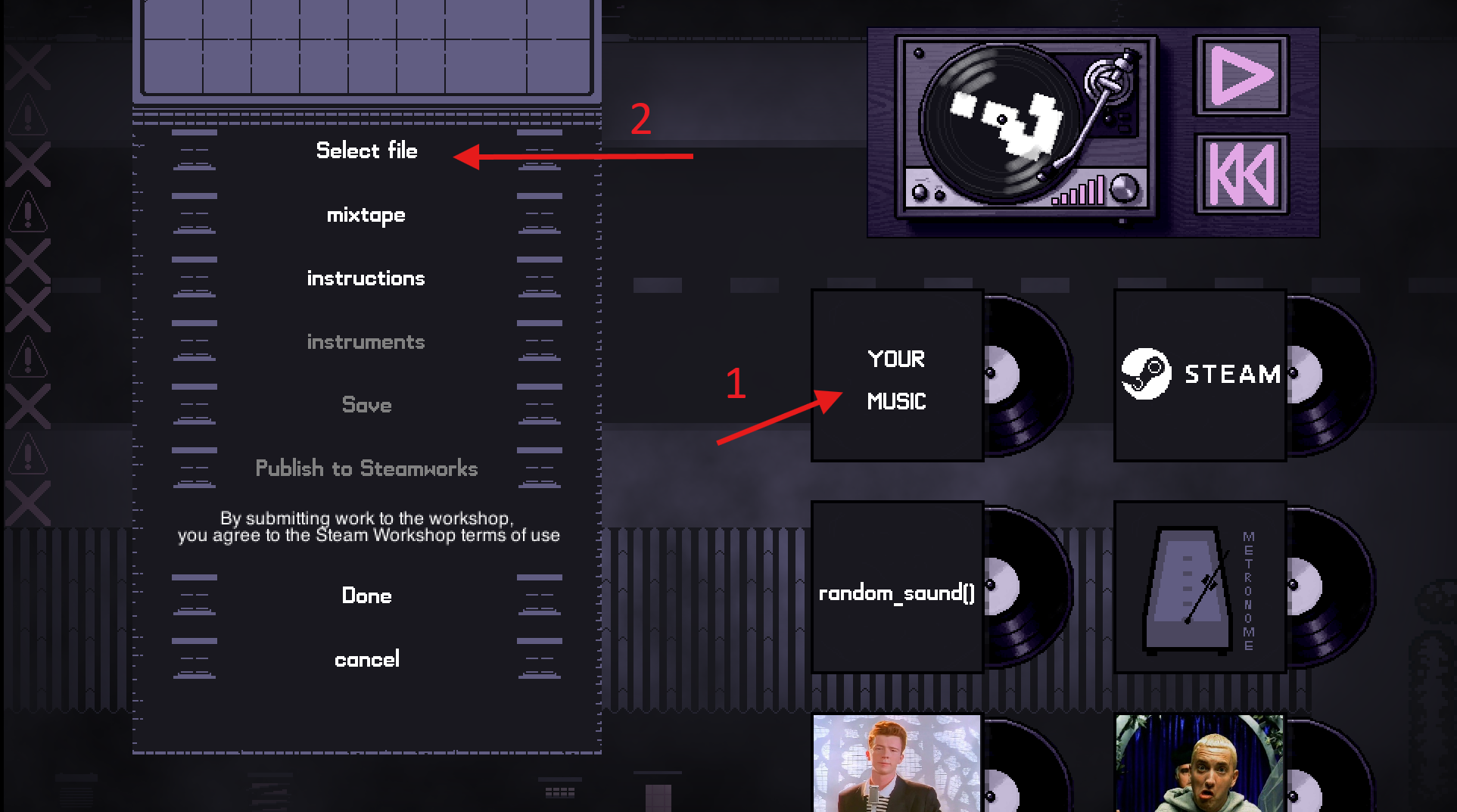
Enter the game. Press the ESC button, then in the menu on the right select "Your music" and "Select file". In the pop-up window, select your JSON file.
Step 4
To save music locally, you need to click the "Save" button. Now the file is saved locally and you will have access to it inside the game (and the next time you launch it too). Then you can go to the "Instruments" items where you can change musical instruments, change the volume of musical instruments or delete tracks.
If you don't want to contribute music to the Steam Workshop, you can leave it at that.
Step 5
Click on the "Publish to Steam workshop" button. Next, pop-up windows will appear for you to write a title, description, select publicity and select an image. This image will be shown in the Steam Workshop and will appear in the game instead of the vinyl plate.
Also, your work will automatically be given the "midi" tag.
Your work has now been published to the Steam Workshop.
How to create instrument
In short:
You need to turn the audio file (mp3, wav, etc.) into ogg. Then select this instrument file in the Piano menu. Then write titles, descriptions and select an image.
Details:
Step 1
You need a file that contains sound. You need a short sound (less than a second),
for example: pressing a piano key, a sliver of a string on a guitar, a fragment of a bird's song, a short cry. You can find it on the Internet and download or record it yourself. Ideally, the sound should be in the key of C4.
Step 2
Convert the file to ogg. This can be done at audio.online-convert.com
Step 3
Enter the game.
In the starting room, go to the piano in the bushes and press the E button. In the opening menu, click “new instrument” and in the pop-up window, select your OGG file.
Step 4
Now the file is saved locally and you will have access to it inside the game (and the next time you launch it too). You can use it as an instrument for music.
You can also play it using the piano keys.
If you don't want to contribute music to the Steam Workshop, you can leave it at that.
Step 5
Click on the "Publish to Steam workshop" button. Next, pop-up windows will appear for you to write a title, description, select publicity and select an image.
This image will be shown on the Steam Workshop
Also, your work will automatically be tagged with "sound".
Your work has now been published to the Steam Workshop.
Source
Changelog.gg summarizes and formats this update. How we read updates.