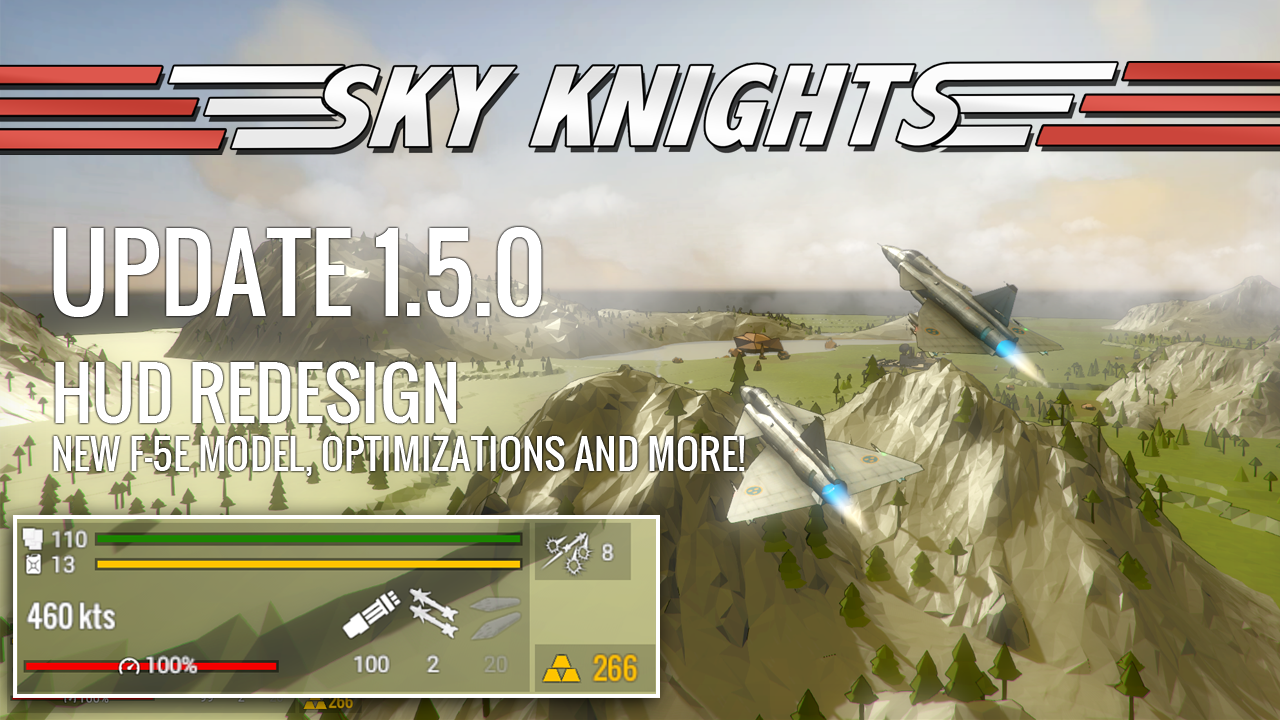
New HUD This is something I've wanted to take care of for a long time. The original HUD was inspired by a fighter aircraft hud, with bars along the edges, indicating speed and such things.
Full notes
Full Sky Knights update
Read the full published notes in a cleaner layout. The original post stays linked below.
What changed
3 fixes6 additions4 changes0 removals
UI and audio
Gameplay
Performance
Fixes
addedNew HUDThis is something I've wanted to take care of for a long time. The original HUD was inspired by a fighter aircraft hud, with bars along the edges, indicating speed and such things. While this certainly made sense, given the theme of the game, it was quite problematic that important elements (such as the health bar and the ammo counters) were located very far from each other. This required the eye to constantly look in different places. The new HUD is more inspired by a classic RTS/MOBA HUD grouping all the important elements in one place. Hopefully this will be much more efficient. Since this is a rather drastic change, and it might take a while before things are perfected, I have provided an option to use the classic HUD until we feel completely confident that the new HUD works as well as we intend!
addedNew F-5E ModelThe old F-5E model and texture didn't really live up to the quality of the other aircraft models, so I've replaced them with new ones. Hope you like this classic USAF style!
addedOptimized tree rendering!This might be less important for people running the game on gaming rigs, but for our laptop gamers every little bit of performance improvement is important. What I've done is that I've batched all the trees in the levels into groups bases on their locations. What this means is that instead of rendering 100 tree models, we're now rendering 1 model with 100 trees, which is much more efficient. Furthermore, I've added LODs (levels of detail) to these tree batches, meaning that when the trees are seen from very far away, a simpler model with fewer polygons is used, improving performance. Some results (tested on a three year old laptop with a GT940 GPU)
changedOptimized tree rendering!Average FPS improvement: ~12.7%
changedOptimized tree rendering!Worst case (takeoff with PiP camera) FPS improvement: ~18%
changedOptimized tree rendering!I'm always interested in your feedback, so please leave a comment here and join us on Discord ! Best regards //Bankler
Sky Knights changes
addedThis is something I've wanted to take care of for a long time. The original HUD was inspired by a fighter aircraft hud, with bars along the edges, indicating speed and such things. While this certainly made sense, given the theme of the game, it was quite problematic that important elements (such as the health bar and the ammo counters) were located very far from each other. This required the eye to constantly look in different places. The new HUD is more inspired by a classic RTS/MOBA HUD grouping all the important elements in one place. Hopefully this will be much more efficient. Since this is a rather drastic change, and it might take a while before things are perfected, I have provided an option to use the classic HUD until we feel completely confident that the new HUD works as well as we intend!
addedThe old F-5E model and texture didn't really live up to the quality of the other aircraft models, so I've replaced them with new ones. Hope you like this classic USAF style!
addedThis might be less important for people running the game on gaming rigs, but for our laptop gamers every little bit of performance improvement is important. What I've done is that I've batched all the trees in the levels into groups bases on their locations. What this means is that instead of rendering 100 tree models, we're now rendering 1 model with 100 trees, which is much more efficient. Furthermore, I've added LODs (levels of detail) to these tree batches, meaning that when the trees are seen from very far away, a simpler model with fewer polygons is used, improving performance. Some results (tested on a three year old laptop with a GT940 GPU)
changedAverage FPS improvement: ~12.7%
changedWorst case (takeoff with PiP camera) FPS improvement: ~18%
New HUD
This is something I've wanted to take care of for a long time. The original HUD was inspired by a fighter aircraft hud, with bars along the edges, indicating speed and such things. While this certainly made sense, given the theme of the game, it was quite problematic that important elements (such as the health bar and the ammo counters) were located very far from each other. This required the eye to constantly look in different places. The new HUD is more inspired by a classic RTS/MOBA HUD grouping all the important elements in one place. Hopefully this will be much more efficient. Since this is a rather drastic change, and it might take a while before things are perfected, I have provided an option to use the classic HUD until we feel completely confident that the new HUD works as well as we intend!
New F-5E Model
The old F-5E model and texture didn't really live up to the quality of the other aircraft models, so I've replaced them with new ones. Hope you like this classic USAF style!
Optimized tree rendering!
This might be less important for people running the game on gaming rigs, but for our laptop gamers every little bit of performance improvement is important. What I've done is that I've batched all the trees in the levels into groups bases on their locations. What this means is that instead of rendering 100 tree models, we're now rendering 1 model with 100 trees, which is much more efficient. Furthermore, I've added LODs (levels of detail) to these tree batches, meaning that when the trees are seen from very far away, a simpler model with fewer polygons is used, improving performance. Some results (tested on a three year old laptop with a GT940 GPU)
Average FPS improvement: ~12.7%
Worst case (takeoff with PiP camera) FPS improvement: ~18%
I'm always interested in your feedback, so please leave a comment here and join us on Discord ! Best regards //Bankler
Patch notes
1.5.0
New aircraft HUD where important numbers are grouped together in one single panel instead of being separated in different corners.
Optimized tree rendering with better static batching and LOD techniques.
Fixed scrolling in the scrapyard, so that it works even if you have lots of modifications.
New F-5E Tiger II model and texture.
Added option to use classic HUD instead of new HUD.
Fixed some smaller issues related to Twitch integration.
Pressing TAB in the post-match screen now toggles between stats screen and scoreboard.
Fixed some collision issues in the race level where you could run through the mountains at a few places.