
Full notes
Full Simulator Z update
Read the full published notes in a cleaner layout. The original post stays linked below.
What changed
- Maps
- Gameplay
Simulator Z changes
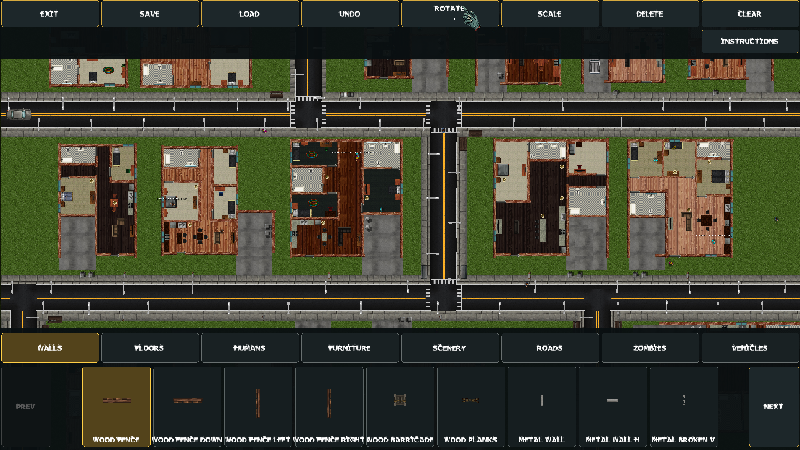
The Map Editor has arrived in Zombie Simulator Z!
Create your own maps from the ground up and bring your ideas to life. Build fortified survivor settlements, military checkpoints, overrun cities, zombie-infested compounds, or completely original scenarios.
With the Map Editor, you can:
Place and arrange walls, doors, floors, roads, furniture, and scenery.
Add humans, zombies, vehicles, and other available units.
Move, rotate, scale, confirm, or remove placed objects.
Drag across the grid to place larger road and floor sections.
Undo placements and restore objects that were accidentally deleted.
Navigate the map while building using mouse, keyboard, or mobile touch controls.
Save multiple custom maps with your own map names.
Edit and update maps you previously created.
View snapshot previews of your saved creations.
Play maps made with the editor.
Upload your maps for the community to discover and download.
Browse community maps by latest uploads or top-rated creations.
Search for maps, vote for your favorites, and report inappropriate submissions.
Community maps can display useful information including the creator, rating, download count, upload date, supported game mode, object count, and map version.
Every playable map must include at least one player spawn point. Uploaded maps remain connected to their original creator, preventing other players from uploading someone else’s work as their own.
Open the Room Editor from the game-mode selection screen and start creating your own version of the zombie apocalypse!
Source
Changelog.gg summarizes and formats this update. How we read updates.