
HomeGamesUpdatesPricingMethodology
Steam News30 April 20262mo ago

Shards of the Heart – UI Update

Shards of the Heart – UI Update This update focuses on improving the overall look and readability of the game’s interface.

In this update3

Full notes

Full Shards of the Heart update

Read the full published notes in a cleaner layout. The original post stays linked below.

What changed

0 fixes2 additions7 changes0 removals
  • UI and audio
  • Gameplay
changedShards of the Heart – UI Update
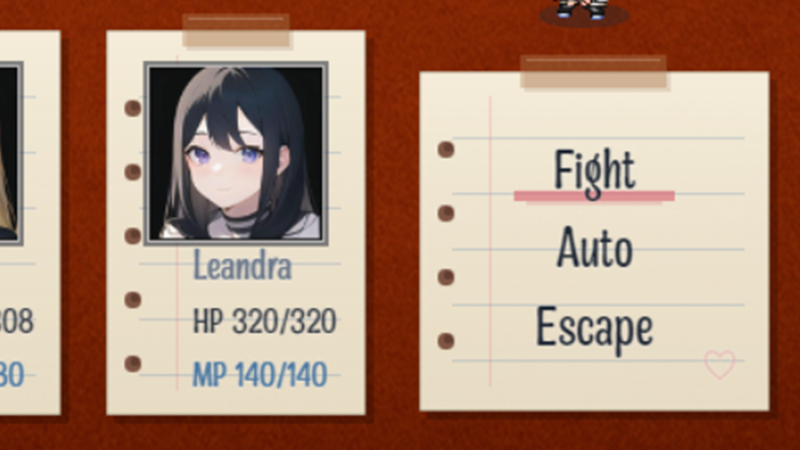
changedThis update focuses on improving the overall look and readability of the game’s interface. A large portion of the UI has been redesigned to better match the notebook-style aesthetic and provide a cleaner, more consistent experience.
changedUI ImprovementsComplete overhaul of the Shop UI Notebook-style layout with updated panels Improved item readability and organization Custom highlight system for selections
changedUI ImprovementsUpdated Save/Load UI Redesigned to match the notebook theme Clearer file layout and readability
changedUI ImprovementsUpdated Item Menu UI Cleaner layout with improved spacing Better separation between item list and descriptions
changedUI ImprovementsUpdated Character Page UI Displays current and required XP more clearly

Shards of the Heart changes

changedShards of the Heart – UI Update
changedThis update focuses on improving the overall look and readability of the game’s interface. A large portion of the UI has been redesigned to better match the notebook-style aesthetic and provide a cleaner, more consistent experience.
changedComplete overhaul of the Shop UI Notebook-style layout with updated panels Improved item readability and organization Custom highlight system for selections
changedUpdated Save/Load UI Redesigned to match the notebook theme Clearer file layout and readability
changedUpdated Item Menu UI Cleaner layout with improved spacing Better separation between item list and descriptions

Shards of the Heart – UI Update

This update focuses on improving the overall look and readability of the game’s interface. A large portion of the UI has been redesigned to better match the notebook-style aesthetic and provide a cleaner, more consistent experience.

UI Improvements

  • Complete overhaul of the Shop UI

    • Notebook-style layout with updated panels

    • Improved item readability and organization

    • Custom highlight system for selections

  • Updated Save/Load UI

    • Redesigned to match the notebook theme

    • Clearer file layout and readability

  • Updated Item Menu UI

    • Cleaner layout with improved spacing

    • Better separation between item list and descriptions

  • Updated Character Page UI

    • Displays current and required XP more clearly

  • Updated Message Log UI

    • Styled to match the notebook aesthetic

Visual Improvements

  • Added black outlines to tilesets

    • Improves object visibility and separation

    • Gives environments a more stylized look

Additional Changes

  • Added Auto mode to battle. Characters will do basic attacks until battle is completed or Stop Auto is selected

  • Minor dialogue and story adjustments

This update is focused on making the game feel more cohesive and easier to read while keeping everything visually consistent with the notebook theme.

As always, thank you for playing the demo!

Source

Steam News / 30 April 2026

Open original post

Changelog.gg summarizes and formats this update. How we read updates.