
Full notes
Full sfsim update
Read the full published notes in a cleaner layout. The original post stays linked below.
What changed
0 fixes0 additions1 change0 removals
- Compatibility
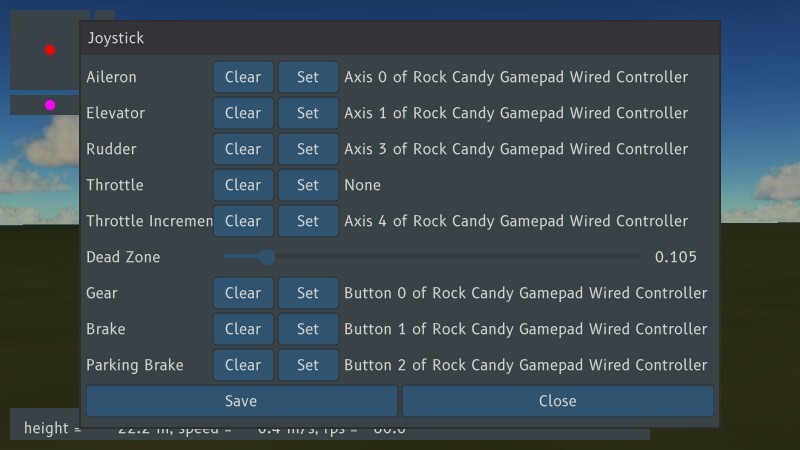
changedI finally got the first version of the joystick configuration dialog working. One can configure axes and buttons in the dialog. There also is a common dead-zone setting for all joystick axes. The configuration can be saved using the save button. The config gets saved in the ~/.config/sfsim directory under GNU/Linux. Under windows the configuration directory is %APPDATA%/sfsim.
sfsim changes
changedI finally got the first version of the joystick configuration dialog working. One can configure axes and buttons in the dialog. There also is a common dead-zone setting for all joystick axes. The configuration can be saved using the save button. The config gets saved in the ~/.config/sfsim directory under GNU/Linux. Under windows the configuration directory is %APPDATA%/sfsim.
Hi,
I finally got the first version of the joystick configuration dialog working. One can configure axes and buttons in the dialog. There also is a common dead-zone setting for all joystick axes. The configuration can be saved using the save button. The config gets saved in the ~/.config/sfsim directory under GNU/Linux. Under windows the configuration directory is %APPDATA%/sfsim.
See keyboard shortcut page for up-to-date keyboard bindings.
Edit: Thrust key is not space any more, sorry!
Enjoy!
Source
Changelog.gg summarizes and formats this update. How we read updates.