
In this update1
Full notes
Full Sandboxels update
Read the full published notes in a cleaner layout. The original post stays linked below.
What changed
- Gameplay
- UI and audio
- Performance
- Fixes
- Events
Sandboxels changes
Our new update to Sandboxels, v1.13.2, is out now! Let’s dive right into the new features and changes.
Edit Mode
Remember all those weird miscellaneous tools in the Special category? They have been moved to the new “Edit” tab!
The “Edit” button is where the “TPS” option used to be, which is now in Settings.
We expect to add a lot more editing tools to this tab in the future, but for now we added TWO - Group and Ungroup!
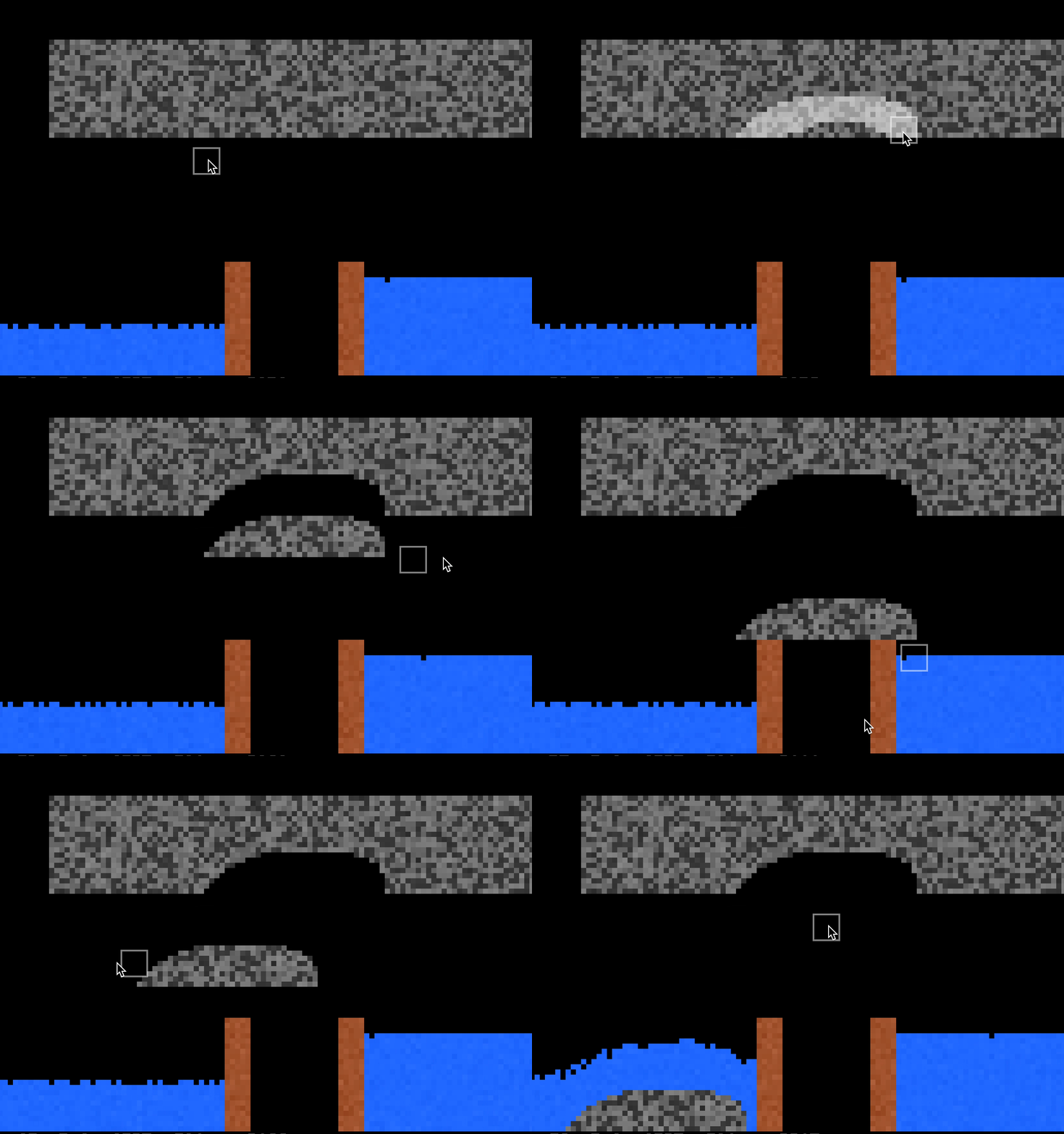
Use the Group tool to merge multiple pixels into a single structure, which will make them all move together - even Solids which are usually stationary. They can be dragged and can displace fluids.
And if you attach something like a Fly…
Graphical Updates
Fire has been given a better transition from yellow to red as it burns. This applies to Cold Fire, too!
Liquids and Gases will appear less grainy than other pixels.
When placing Lightning near certain elements, such as Neon or Copper, it will change color!
We also tried optimizing a lot of the rendering and simulation code, hopefully it makes a difference on your end.
More Features
Fillers can now be painted and will fight other colors:
And some more:
Icing (also known as Frosting or Buttercream) - a new element made by mixing Butter and Sugar
Shift-Select can set the frequency of a Battery or the element of the Image tool
Portals show destination lines when hovered over or selected
Worms can compost more organic materials, like Paper
We also fixed 15 bugs, including a couple nasty ones involving the new Filters and Gates.
That’s not all!
We have some even bigger things planned. Stay tuned and, in the meantime, read the whole changelog for this update below.
[c][Version 1.13.2 - January 11, 2026][/c]
[c]+ Edit Mode[/c]
[c] ~ Moved Special tools to the edit tab[/c]
[c] ~ Expect more tools in the future[/c]
[c]+ Relations - Multiple pixels as a single entity[/c]
[c] + Group and Ungroup tool in edit tab[/c]
[c] + Grouped pixels fall and move as one structure[/c]
[c] + Grouped pixels are ungrouped when broken or changing states[/c]
[c] + Grouped pixels can displace fluids (Experimental)[/c]
[c]+ More Shift-Select functionality:[/c]
[c] + Battery can set a frequency to create timers[/c]
[c] + Image tool can set element[/c]
[c]~ Fire begins more yellow and gets redder quicker[/c]
[c]+ Icing (Hidden) made with Butter and Sugar[/c]
[c]~ Liquids and Gases appear less grainy[/c]
[c]~ Settings changes[/c]
[c] + Speed option in Settings to replace TPS button[/c]
[c] + Keybind: T to change TPS[/c]
[c] ~ Renamed E button to Elem button[/c]
[c]~ Improved simulation speeds[/c]
[c]- Removed World Gen[/c]
[c] ~ We recommend the PRNGworldgenlib.js mod, a much better world generator[/c]
[c]- Removed Cheerful Mode[/c]
[c][Changes][/c]
[c]+ Escape can be pressed to cancel while drawing a line[/c]
[c]+ Fillers can be painted and will fight other colors[/c]
[c]+ Portals show destination lines when hovered over or selected[/c]
[c]+ Portal In can be selected with the Elem button by typing 'Portal'[/c]
[c]+ Lightning placed near certain elements will change color[/c]
[c]+ Worms can break down Flour, Dough, Adobe, Paper, Confetti, Cellulose, Cheese, and Potato[/c]
[c]+ Worms can move through Mulch[/c]
[c]+ Radiation will radiate Batter[/c]
[c]+ Rad Steam causes Cheese to rot[/c]
[c]~ Filters and Gates are Acid-resistant[/c]
[c]~ Portals no longer teleport Fuse[/c]
[c]~ Ruler measures diagonal lines as a pixel count instead of hypotenuse[/c]
[c]~ Unique flame colors for Nickel, Iron, and Mercury[/c]
[c]~ Rearranged Special category[/c]
[c]~ Opening the Info, Mods, or Settings menus will pause the game[/c]
[c]~ Steam: All canvas sizes now stretch to the full screen width[/c]
[c]+ Assigned densities to many solids[/c]
[c]+ Keybind: Quote (") to toggle Edit Mode[/c]
[c][Bug Fixes][/c]
[c]~ Fixed: Dragging pixels through Filters creates ghost pixels[/c]
[c]~ Fixed: Filters can break when transporting to Gates or Pipes[/c]
[c]~ Fixed: Pixels are rendered in incorrect position when mixing with Pipe, Filter, or Gate[/c]
[c]~ Fixed: Broken modded saves are loaded every bootup[/c]
[c]~ Fixed: Precision Dot is misaligned with 2- and 4-wide brushes[/c]
[c]~ Fixed: Portals can't transmit electricity if surrounded by pixels[/c]
[c]~ Fixed: E-cloner can't be set to Fuse by clicking on it[/c]
[c]~ Fixed: Some saves throw TypeError "Cannot set properties of undefined"[/c]
[c]~ Fixed: Prop tool always unpauses after dialog[/c]
[c]~ Fixed: Z and Backspace keys select Heat by default instead of Sand[/c]
[c]~ Fixed: Random can't place Fire, Plasma, Ink, Bless, Rock Wall, Cold Fire, Sun, Pointer, or Art[/c]
[c]~ Fixed: Elem dialog doesn't close if button is pressed again[/c]
[c]~ Fixed: Wrong font when language set to Italian[/c]
[c]~ Fixed: Magnesium melts at a much lower temperature than expected[/c]
[c]~ Fixed: Shift-selecting Random and inputting 'random' causes errors[/c]
[c][Technical][/c]
[c]~ Note: Optimizations mean a lot of code was rewritten, please report any issues and be patient[/c]
[c]~ Note: Don't pass an 'rgba' color to drawSquare, use the 'alpha' argument instead[/c]
[c]+ Pixel relations system[/c]
[c] + Used to group pixels together[/c]
[c] + '_r' pixel property to identify its relation (should be an integer)[/c]
[c]+ 'trackPaint' element property (boolean)[/c]
[c] + 'painted' pixel property (color code) given to these elements when painted[/c]
[c]+ "Failed to load" message instead of hanging forever[/c]
[c]~ 'con' contents only render if element has existing 'canContain' property[/c]
[c]~ 'onMouseDown' element event only triggers with left clicks[/c]
[c]~ Acid Gas 'ignore' property is now identical to Acid[/c]
[c]~ Elements with a set density but no state are set to solid[/c]
[c]~ Fuse no longer shows hidden element[/c]
[c]~ Save version is now sb7[/c]
Source
Changelog.gg summarizes and formats this update. How we read updates.