
In this update3
Full notes
Full Rushaug: Feline Warfare update
Read the full published notes in a cleaner layout. The original post stays linked below.
What changed
- UI and audio
- Fixes
Rushaug: Feline Warfare changes
Update v0.8.80 is finally live! This is a big one, introducing Localization and a completely overhauled Controller-system! This update took quite some time to develop – a lot more time than anticipated, as I had to go through all text-elements in the game and fundamentally change them, to set up a framework for multiple languages. Now that the framework is in place, it will be significantly faster to add new languages in the future.
LOCALIZATION
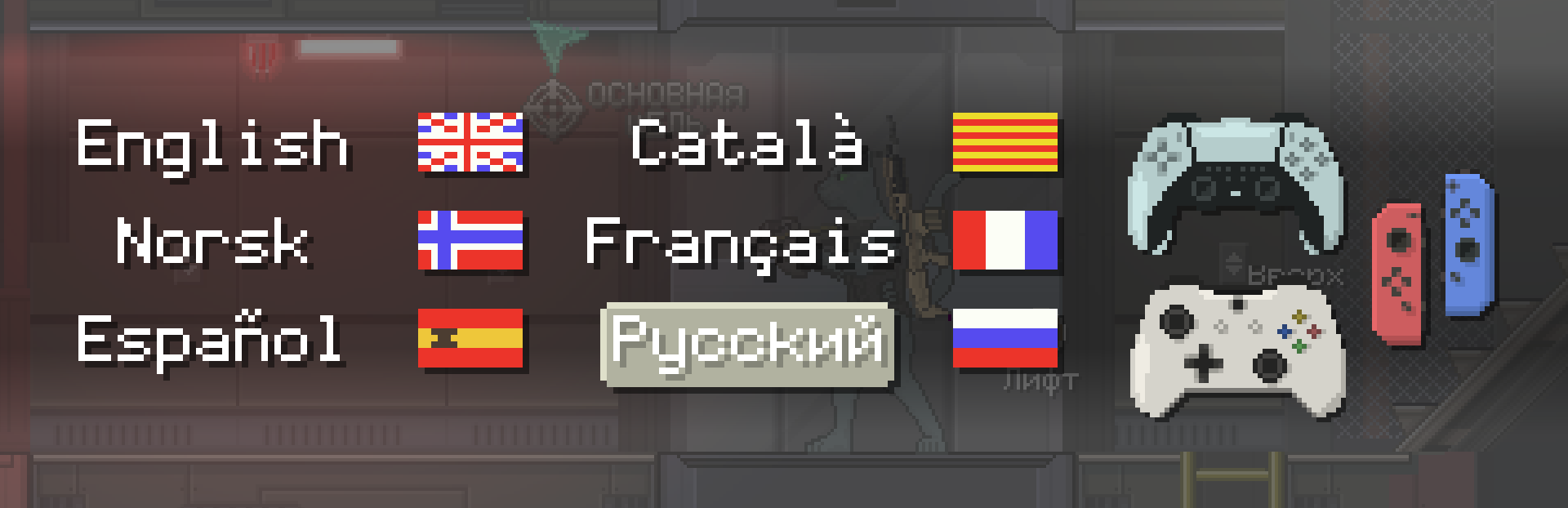
Translations have been broken down into three portions: UI, Dialogue, and Descriptions. The purpose of this update has been to build the fundamental framework for switching between languages, and retrofit all UI-elements to be able to switch between languages displayed according to an index. This has been a slow and tedious process, as I never had localization in mind from the start, while programming my game. Now that the system is in place, adding new languages will be significantly faster. Another factor for this taking so long, is that most of these UI-elements are rasterized and have been delicately intertwined with respective glyphs;
X,Circle, Square,Triangle, L2 & R2 for Dualsense (PS5/4)
A, B, X, Y, LT & RT for XBox Gamepad
B, A, Y, X, ZL & ZR for Joy-Cons/Nintendo-controller
To allow for these variations across six languages (and counting), I’ve set up an array-data structure. The game can now be played in:
English
Norwegian
Spanish
Catalan
French
Russian
Chinese & Japanese are confirmed to be added in the future.
NOTE: Dialogue has still not been translated (with few exceptions). This is left for last, when the script has been error-proofed and completely finalized, so I won't have to painstakingly update every language and ask my translators to look at the same scripts again, if I make edits.
VERSATILE GAMEPAD COMPATABILITY
And now for the controllers – In the last update, the XBox Gamepad was the only supported controller outside of mouse/keyboard. Now, the underlying system has been completely overhauled, utilizing the API; Simple DirectMedia Layer (SDL). This allows any inputs to be read and interpreted from almost any controller-device you plug into the computer. The new system will read your device, and display the appropriate glyphs and button mapping accordingly. I’ve also made seamless transitions a priority, so the game will update its glyphs/mapping in real-time, if you press the mouse/keyboard-key and a controller button/joystick interchangeably. After doing some QA and extensive playtesting, I can confidently recommend the PS5 Dualsense-controller as the Developer’s choice.
The R1/Right Bumper is vacant right now, so I am open to suggestions on what action to map to this button.
QUALITY-OF-LIFE / MORE ADDITIONS
The Options Menu has been upgraded to have tabs divided into Settings/Language/Hardware. Some contextual prompt-texts have been replaced with more aesthetic icons. The Mission Objectives-tab has received a facelift. You can now assign any unlocked gun as an “ AIRDROP ”, so you can retrieve it during the mission at landing zones. The Laser Kit-item served no significant purpose besides vanity, so it’s been repurposed into the new Upgrade Kit-item. Apply it to your current gun to increase the firerate. A new Ammo Overview UI-element has been added; displaying all ammunition carried, not limited to the guns you're carrying – and can be viewed by accessing inventory.
The Recon Drone has received some love;
Fixed the annoying bug that caused it to get stuck or bounce unpredictably.
The Battery Bar drains by the pixel instead of cells
Source
Changelog.gg summarizes and formats this update. How we read updates.