
HomeGamesUpdatesPricingMethodology
Steam News19 September 20259mo ago

v[1.1.006] Object Snapping

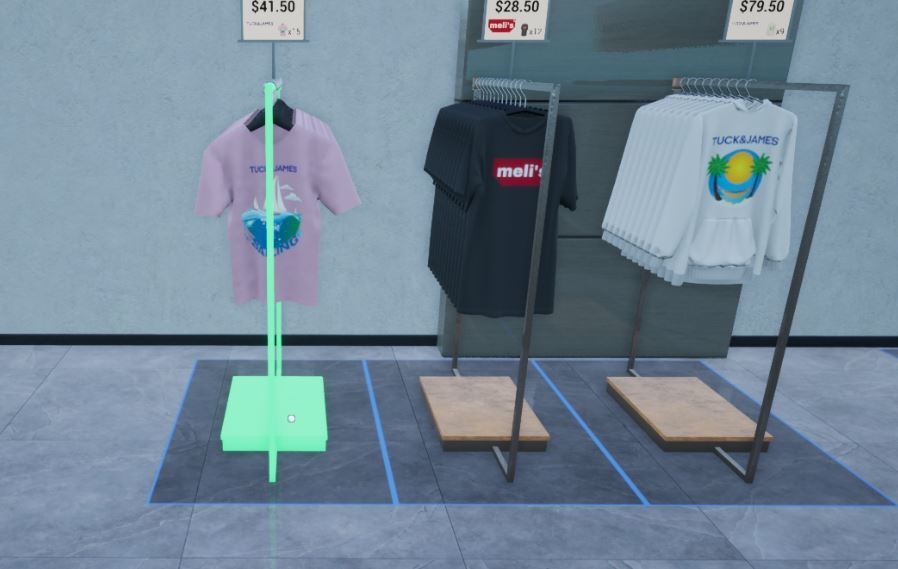
Object Snapping You can use the object snapping feature while placing store racks, warehouse racks, decorations, cash registers, speakers, and fitting rooms. (You can disable it in the Options - Gameplay settings.

In this update1

Full notes

Full Retail Company Simulator update

Read the full published notes in a cleaner layout. The original post stays linked below.

What changed

0 fixes0 additions4 changes0 removals
  • Store
  • Gameplay
changedObject SnappingYou can use the object snapping feature while placing store racks, warehouse racks, decorations, cash registers, speakers, and fitting rooms.
changedObject Snapping(You can disable it in the Options - Gameplay settings.)
changedObject SnappingIf you don't want to use the object snapping feature, you can disable it in the Options - Gameplay settings.
changedSporting Goods Shop is now available in Early Access![dynamiclink href="https://store.steampowered.com/app/3653250/Sporting_Goods_Shop/"]

Retail Company Simulator changes

changedYou can use the object snapping feature while placing store racks, warehouse racks, decorations, cash registers, speakers, and fitting rooms.
changed(You can disable it in the Options - Gameplay settings.)
changedIf you don't want to use the object snapping feature, you can disable it in the Options - Gameplay settings.
changed[dynamiclink href="https://store.steampowered.com/app/3653250/Sporting_Goods_Shop/"]

Object Snapping

You can use the object snapping feature while placing store racks, warehouse racks, decorations, cash registers, speakers, and fitting rooms.

(You can disable it in the Options - Gameplay settings.)

If you want to use the object snapping feature on wall racks, you should know that they are only functional with other wall racks.

Align Snapping Objects

If you "Hold Left Shift (by default)" while placing an object, you can align the object.

(It's Left Shift by default, but you can change it in the Options-Controls.)

If you don't want to use the object snapping feature, you can disable it in the Options - Gameplay settings.

Sporting Goods Shop is now available in Early Access!

[dynamiclink href="https://store.steampowered.com/app/3653250/Sporting_Goods_Shop/"]

Source

Steam News / 19 September 2025

Open original post

Changelog.gg summarizes and formats this update. How we read updates.