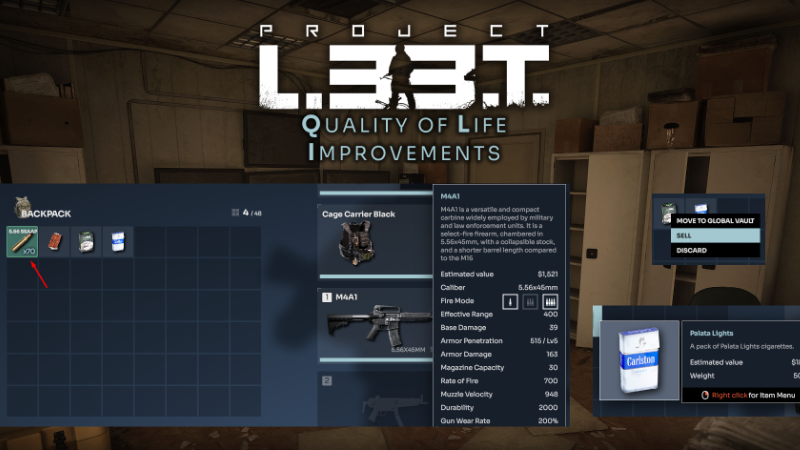
In our most recent patch we have made some important improvements to players' Quality of Life. These changes were mostly done through collecting feedback from our Discord, which can be found here: discord.
In this update1
Full notes
Full Project L33T: Prologue update
Read the full published notes in a cleaner layout. The original post stays linked below.
What changed
0 fixes5 additions4 changes0 removals
Gameplay
Balance
UI and audio
Server
changedIn our most recent patch we have made some important improvements to players' Quality of Life.
addedQuality of Life ImprovementsYou can now see an estimated value of the items looted in their pop-up descriptions (when you hover your mouse over their icons). This aims to help you figure out which items to extract with.
addedQuality of Life ImprovementsMore stastistics have been added to the inventory and the Health Stats Screen. You can now see immediate effects on movement speed, hearing, stamina and injuries from consumable items and equipped gear. Steam post image
changedQuality of Life ImprovementsWhen hovering your mouse over a weapon in the inventory screen, ammo in your backpack and global vault will be highlighted. That should speed up the process of gearing up and choosing which ammo to pick up from bodies.
addedQuality of Life ImprovementsAdded an "Unload Everything" option to the inventory screen. This allows you to quickly transfer items from your backpack to your Global Vault. Steam post image
addedQuality of Life ImprovementsAdded a "Sell" button from the context menu (right-click on the item).
Project L33T: Prologue changes
changedIn our most recent patch we have made some important improvements to players' Quality of Life.
addedYou can now see an estimated value of the items looted in their pop-up descriptions (when you hover your mouse over their icons). This aims to help you figure out which items to extract with.
addedMore stastistics have been added to the inventory and the Health Stats Screen. You can now see immediate effects on movement speed, hearing, stamina and injuries from consumable items and equipped gear. Steam post image
changedWhen hovering your mouse over a weapon in the inventory screen, ammo in your backpack and global vault will be highlighted. That should speed up the process of gearing up and choosing which ammo to pick up from bodies.
addedAdded an "Unload Everything" option to the inventory screen. This allows you to quickly transfer items from your backpack to your Global Vault. Steam post image
In our most recent patch we have made some important improvements to players' Quality of Life.
These changes were mostly done through collecting feedback from our Discord, which can be found here: discord.gg/l33tgame
You can now see an estimated value of the items looted in their pop-up descriptions (when you hover your mouse over their icons). This aims to help you figure out which items to extract with.
More stastistics have been added to the inventory and the Health Stats Screen. You can now see immediate effects on movement speed, hearing, stamina and injuries from consumable items and equipped gear. Steam post image
When hovering your mouse over a weapon in the inventory screen, ammo in your backpack and global vault will be highlighted. That should speed up the process of gearing up and choosing which ammo to pick up from bodies.
Added an "Unload Everything" option to the inventory screen. This allows you to quickly transfer items from your backpack to your Global Vault. Steam post image
Added a "Sell" button from the context menu (right-click on the item).
Ammo now explicitly informs you what level of armor it can penetrate, that way it's easier to understand and faster to choose.
Added a visual display on how many repair kits will be used when dragging them over the item you want to repair.
Keep up with our latest news and join our Discord Server now!