What changed
0 fixes0 additions9 changes0 removals
changed🧭 PostApo – Alpha Update 0.3.9 ⚙️ "Stability, Smoothness, and a Better Experience for Everyone" Hey there, survivors! 💀 Update 0.3.9 is the result of a deeper optimization phase, built not only on internal testing, but—most importantly—on your feedback. The goal was to increase FPS, smooth out performance drops, and keep the immersive PostApo atmosphere, even on weaker machines.
changed🛠️ What’s Changed? 🔧 Graphics & Performance Optimizations • Refined visibility distances and LODs for trees, fog, and distant objects • Simplified some heavy post-processing effects without sacrificing atmosphere • Reworked structure of all default graphic profiles (Low → Epic) • Improved GPU and CPU usage – your graphics card now “knows it needs to work,” even on lower settings
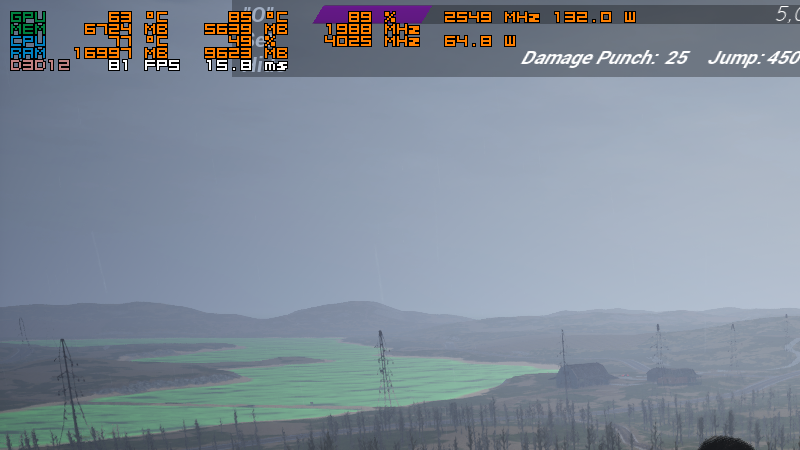
changed📈 Real-world performance gains Test system: Ryzen 5 3600, RX 6700 XT, 32 GB RAM Profile Before Optimization After Optimization High/Epic 45–50 FPS 65–75 FPS Balanced Mix ~55 FPS 70–80 FPS stable ➡️ The game now runs smoother without any significant quality loss.
changed🖥️ Recommended Graphics Presets 🔻 Low – for lower-end systems 💻 i3/i5 4th gen, Ryzen 3, GTX 1050, RX 560, 8–12 GB RAM Setting Value Resolution 1280×720 / 1920×1080 Screen % 100% Anti-Aliasing FXAA Textures Medium Shadows Low Post-Processing Low Foliage Low Effects Low View Distance Medium FSR OFF 🎯 Performance: 40–60 FPS
changed🟡 Medium – for standard PCs 💻 Ryzen 5 2600, i5 9th gen, GTX 1660, RX 580, 16 GB RAM Setting Value Resolution 1600×900 / 1080p Screen % 100% Anti-Aliasing FXAA Textures High Shadows Medium Post-Processing Medium Foliage Medium Effects Medium View Distance High FSR OFF 🎯 Performance: 55–80 FPS
changed🔵 High – for performance systems 💻 Ryzen 5 3600, i5 11th gen, RX 6600 / RTX 3060, 16–32 GB RAM Setting Value Resolution 1080p Screen % 100% Anti-Aliasing FXAA / TAA Textures Epic Shadows High Post-Processing Medium–High Foliage Medium–High Effects High View Distance High FSR Optional (Quality) 🎯 Performance: 70–90 FPS
PostApo changes
changed🧭 PostApo – Alpha Update 0.3.9 ⚙️ "Stability, Smoothness, and a Better Experience for Everyone" Hey there, survivors! 💀 Update 0.3.9 is the result of a deeper optimization phase, built not only on internal testing, but—most importantly—on your feedback. The goal was to increase FPS, smooth out performance drops, and keep the immersive PostApo atmosphere, even on weaker machines.
changed🛠️ What’s Changed? 🔧 Graphics & Performance Optimizations • Refined visibility distances and LODs for trees, fog, and distant objects • Simplified some heavy post-processing effects without sacrificing atmosphere • Reworked structure of all default graphic profiles (Low → Epic) • Improved GPU and CPU usage – your graphics card now “knows it needs to work,” even on lower settings
changed📈 Real-world performance gains Test system: Ryzen 5 3600, RX 6700 XT, 32 GB RAM Profile Before Optimization After Optimization High/Epic 45–50 FPS 65–75 FPS Balanced Mix ~55 FPS 70–80 FPS stable ➡️ The game now runs smoother without any significant quality loss.
changed🖥️ Recommended Graphics Presets 🔻 Low – for lower-end systems 💻 i3/i5 4th gen, Ryzen 3, GTX 1050, RX 560, 8–12 GB RAM Setting Value Resolution 1280×720 / 1920×1080 Screen % 100% Anti-Aliasing FXAA Textures Medium Shadows Low Post-Processing Low Foliage Low Effects Low View Distance Medium FSR OFF 🎯 Performance: 40–60 FPS
changed🟡 Medium – for standard PCs 💻 Ryzen 5 2600, i5 9th gen, GTX 1660, RX 580, 16 GB RAM Setting Value Resolution 1600×900 / 1080p Screen % 100% Anti-Aliasing FXAA Textures High Shadows Medium Post-Processing Medium Foliage Medium Effects Medium View Distance High FSR OFF 🎯 Performance: 55–80 FPS
🧭 PostApo – Alpha Update 0.3.9 ⚙️ "Stability, Smoothness, and a Better Experience for Everyone" Hey there, survivors! 💀 Update 0.3.9 is the result of a deeper optimization phase, built not only on internal testing, but—most importantly—on your feedback. The goal was to increase FPS, smooth out performance drops, and keep the immersive PostApo atmosphere, even on weaker machines.
🛠️ What’s Changed? 🔧 Graphics & Performance Optimizations • Refined visibility distances and LODs for trees, fog, and distant objects • Simplified some heavy post-processing effects without sacrificing atmosphere • Reworked structure of all default graphic profiles (Low → Epic) • Improved GPU and CPU usage – your graphics card now “knows it needs to work,” even on lower settings
📈 Real-world performance gains Test system: Ryzen 5 3600, RX 6700 XT, 32 GB RAM Profile Before Optimization After Optimization High/Epic 45–50 FPS 65–75 FPS Balanced Mix ~55 FPS 70–80 FPS stable ➡️ The game now runs smoother without any significant quality loss.
🖥️ Recommended Graphics Presets 🔻 Low – for lower-end systems 💻 i3/i5 4th gen, Ryzen 3, GTX 1050, RX 560, 8–12 GB RAM Setting Value Resolution 1280×720 / 1920×1080 Screen % 100% Anti-Aliasing FXAA Textures Medium Shadows Low Post-Processing Low Foliage Low Effects Low View Distance Medium FSR OFF 🎯 Performance: 40–60 FPS
🟡 Medium – for standard PCs 💻 Ryzen 5 2600, i5 9th gen, GTX 1660, RX 580, 16 GB RAM Setting Value Resolution 1600×900 / 1080p Screen % 100% Anti-Aliasing FXAA Textures High Shadows Medium Post-Processing Medium Foliage Medium Effects Medium View Distance High FSR OFF 🎯 Performance: 55–80 FPS
🔵 High – for performance systems 💻 Ryzen 5 3600, i5 11th gen, RX 6600 / RTX 3060, 16–32 GB RAM Setting Value Resolution 1080p Screen % 100% Anti-Aliasing FXAA / TAA Textures Epic Shadows High Post-Processing Medium–High Foliage Medium–High Effects High View Distance High FSR Optional (Quality) 🎯 Performance: 70–90 FPS
🔴 Epic – for high-end setups 💻 Ryzen 7 5800X, i7 12700K, RTX 3080 / RX 7900 XTX, 32 GB RAM+ Setting Value Resolution 1920×1080 / 1440p / 4K Screen % 100% Anti-Aliasing TAA / TSR Textures Epic Shadows Epic Post-Processing Epic Foliage Epic Effects Epic View Distance Epic FSR Recommended: Quality / Balanced 🎯 Performance: 70–170+ FPS
✅ When Should You Enable AMD FSR? ✨ We recommend enabling FSR especially when: • You're playing at 1920×1080, 1440p, or 4K • Your GPU is reaching its performance limit on higher settings • You prefer higher FPS even at the cost of some softness in image quality GPU Recommended FSR Mode RX 6600 / RTX 2060 Quality RX 6700 XT / RTX 3060 Ti Quality / Balanced RX 6800 / RTX 3080 Balanced / Auto RX 7900 XT / RTX 4070 Ti Ultra Quality / Off (plenty of raw power)
💬 Final Words Thank you for playing and testing! This update is all about smooth gameplay, accessibility, and comfort, no matter what hardware you’re using. Your performance = our motivation. 💛 The next update will be about content, not numbers — but today we’ve laid the groundwork for a better experience across the board. Stay alive – The PostApo Dev Team