
Full notes
Full MR FARMBOY update
Read the full published notes in a cleaner layout. The original post stays linked below.
What changed
- Compatibility
- Gameplay
- UI and audio
MR FARMBOY changes
If you haven't already please leave me a Steam review, it really helps me a lot!
Reminder that Beta Builds are not final!
⚠️⚠️⚠️!!!IMPORTANT READ!!!⚠️⚠️⚠️
It is recommended that you make a new savefile If you choose to join Public Beta, but if you join with an existing savefile, do not try to use that savefile on the Stable version, it will may get corrupted.
You can also backup your savefiles, by going to %appdata%/Godot/app_userdata/MR FARMBOY/game_data
Public Beta can be accessed by going to your Library → right-click the game → Properties → Betas → Public Beta.
v1.0.6 - BETA Part 1
DEFAULT KEYBINDS HAVE CHANGED!
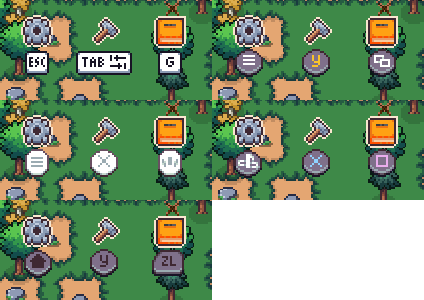
INPUT/KEYBINDS Rework
Complete rework of Input System, the keybinds, will be reset.
All controls have glyphs now for keyboard/mouse, steamdeck, xbox, ps, switch.
Complete Decoration Placement Rework
Decorations work like Buildings now.
You can move them or remove them on the spot.
UI Polish
Added glyphs to menu buttons
Move between tabs using Shoulder buttons on controller
QoL
You can now close menus with right click, can also be changed in Input Setting.
For Crafting Menu is set to Crafting Cancel.
(Developer Note: If its too clunky let me know and I can remove it from Crafting Cancel)
Moving a building removes collision from the building until you place it down.
Canceling Moving will teleport you back.
Bug Fixes & Tweaks
Fixed a bunch of clunky Interactions.
Trees no longer leave ghosts behind, when they are fully harvested.
Adjusted the Roll requirement for decorations on Incremental Mode.
Fixed an issue with highlights in advancements where it wouldn't save them as shown when using a controller.
Fixed an issue where steam decoration achievements wouldn't be given on Incremental Mode.
Fixed an issue where if you planted a crop for the first time and you didn't water it, it wouldn't register for the Farmer to Water it.
Fixed an issue with the Markets/Warehouses/Coops/Barns where the Warning Visual Message wouldn't clear properly if the buildings were reachable.
Fixed an issue where Items wouldn't display properly on the Right side of the screen.
Source
Changelog.gg summarizes and formats this update. How we read updates.