
In this update3
Full notes
Full Morbid Mailroom update
Read the full published notes in a cleaner layout. The original post stays linked below.
What changed
- Maps
- Performance
- Gameplay
Morbid Mailroom changes
The more I share Morbid Mailroom the more people send me this video...
Here's how I'm making this game resemble a "claymaysh"
Sculpting: Imperfection is the Point
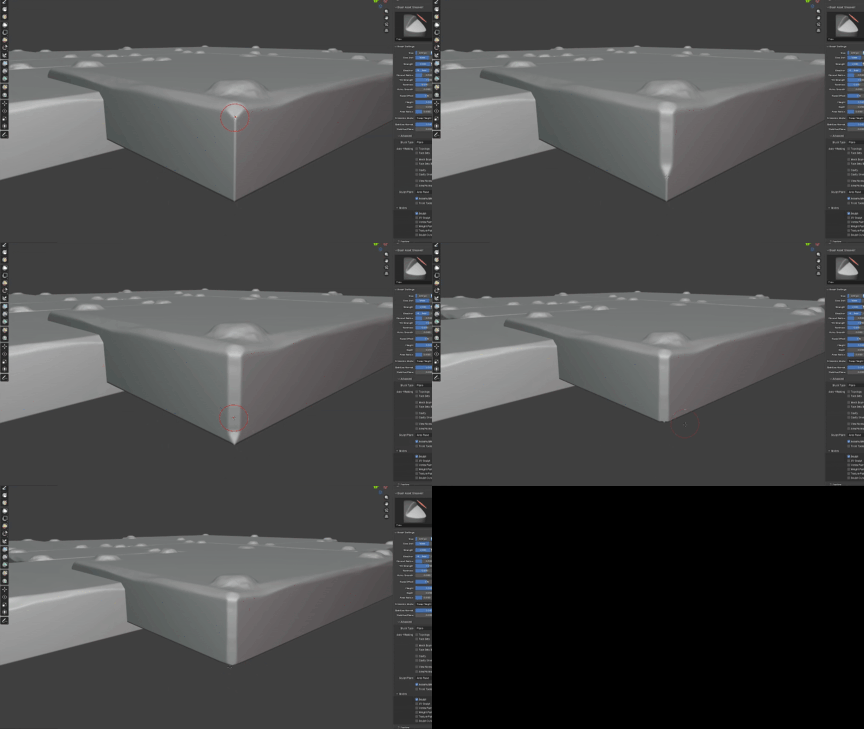
Smooth is the enemy. When I sculpt the models in Blender, I am not looking for perfection. I am looking to re-introduce human error. I deliberately leave indents in the mesh to simulate where an artist’s hands would have gripped the clay. Straight lines are also really hard to get right with real clay so I make sure to go through and rough up all the edges.
The Stop-Motion Shader
To make the materials really look like clay, I made a custom claymation shader that allows to me quickly mix bump maps and roughness textures. Then I use a script to scroll said textures in sync with each other if the object they're assigned to is moving. That, mixed with the attention to detail for things like fingerprints, divots near creases etc. really sells the effect.
The Framerate: Choppy by Design
Nothing kills the stop motion vibe faster than buttery smooth 60 FPS animation. To get that tactile feel, I am doing something called 'animating on twos'.
While the engine itself runs at a high refresh rate for smooth camera movement and physics interactions, the character animations (and some prop animations) are locked to 12 or sometimes even 6 FPS.
Why 12 FPS?
Standard film is 24 FPS. Animating "on twos" means holding each frame for two counts. This creates that jitter that makes the characters feel like they are being physically moved by invisible hands between every frame.
If you have questions about the tech or just want to talk art, hmu in the comments, I'd love to hear form you guys.
For more new, updates, videos, chats, whatever follow me on X or Bluesky
— Joshua Allin
Source
Changelog.gg summarizes and formats this update. How we read updates.