
HomeGamesUpdatesPricingMethodology
Steam News27 February 20242y ago

Steam Deck Improvements

When Mooselutions first launched, I knew about the Steam Deck. I figured it might be cool to eventually launch the game there, but it would require porting the game over to Linux, and I didn't have time to do that befor

Full notes

Full Mooselutions update

Read the full published notes in a cleaner layout. The original post stays linked below.

What changed

0 fixes0 additions4 changes1 removal
  • Compatibility
  • Maps
  • Gameplay
changedWhen Mooselutions first launched, I knew about the Steam Deck. I figured it might be cool to eventually launch the game there, but it would require porting the game over to Linux, and I didn't have time to do that before (or after) the game went live.
changedI had no idea there's this thing called Proton, which allows you to run pretty much any Steam game that also runs on Windows.
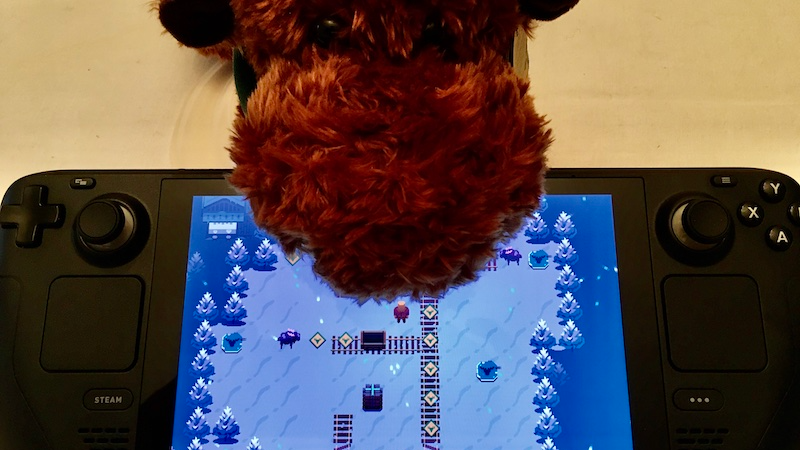
changedAt first, I was concerned that you won't be able to see the entire puzzle at all times. But I tried it out, and it still feels very playable. You can get a feel for a puzzle by walking around. Most puzzles give you the freedom to explore in this way, and if you're in the center of the map, you can usually see the whole puzzle.
changedThe only real problem I noticed happens when there is an angry moose offscreen. You might have angered him and not know about it. To make this more clear, I turned on the game's moose danger map by default. That way, you can always see which areas will cause a moose to get angry, even if he's offscreen. This only happens in a handful on puzzles.
removedThe controls should work just fine out of the box. There is no need to use Steam Input on Steam Deck. You can keep it disabled.

Mooselutions changes

changedWhen Mooselutions first launched, I knew about the Steam Deck. I figured it might be cool to eventually launch the game there, but it would require porting the game over to Linux, and I didn't have time to do that before (or after) the game went live.
changedI had no idea there's this thing called Proton, which allows you to run pretty much any Steam game that also runs on Windows.
changedAt first, I was concerned that you won't be able to see the entire puzzle at all times. But I tried it out, and it still feels very playable. You can get a feel for a puzzle by walking around. Most puzzles give you the freedom to explore in this way, and if you're in the center of the map, you can usually see the whole puzzle.
changedThe only real problem I noticed happens when there is an angry moose offscreen. You might have angered him and not know about it. To make this more clear, I turned on the game's moose danger map by default. That way, you can always see which areas will cause a moose to get angry, even if he's offscreen. This only happens in a handful on puzzles.
removedThe controls should work just fine out of the box. There is no need to use Steam Input on Steam Deck. You can keep it disabled.

When Mooselutions first launched, I knew about the Steam Deck. I figured it might be cool to eventually launch the game there, but it would require porting the game over to Linux, and I didn't have time to do that before (or after) the game went live.

I had no idea there's this thing called Proton, which allows you to run pretty much any Steam game that also runs on Windows.

Needless to say, it came as a surprise to me that people were even able to play the thing, let alone that some of them were having a good time doing it.

I wasn't able to do much about the Steam Deck while I was in the hospital recovering from heart valve surgery, but once the doctor cleared me to drive, I made it my mission to see what's going on. I met up with a friend in town who happened to have a copy of the game running on his Steam Deck.

The game mostly played how it should. It's just that the puzzles looked really squished on the small screen.

Normally, on large screen devices like my Windows gaming PC, I can fit the entire puzzle on the screen in high resolution. It looks beautiful, and I can see every element in the puzzle.

That's not the case on the Steam Deck. You've only got 1280 by 800 pixels. Fitting the entire puzzle on the screen and making it look good wasn't going to work.

That's why I've decided to have a camera that centers on the player and scrolls, like in Zelda games.

At first, I was concerned that you won't be able to see the entire puzzle at all times. But I tried it out, and it still feels very playable. You can get a feel for a puzzle by walking around. Most puzzles give you the freedom to explore in this way, and if you're in the center of the map, you can usually see the whole puzzle.

The only real problem I noticed happens when there is an angry moose offscreen. You might have angered him and not know about it. To make this more clear, I turned on the game's moose danger map by default. That way, you can always see which areas will cause a moose to get angry, even if he's offscreen. This only happens in a handful on puzzles.

The controls should work just fine out of the box. There is no need to use Steam Input on Steam Deck. You can keep it disabled.

As always, thanks for playing the game! I'm so thrilled to see so many of you enjoying it.

Source

Steam News / 27 February 2024

Open original post

Changelog.gg summarizes and formats this update. How we read updates.