
In this update8
Full notes
Full Mix Universe update
Read the full published notes in a cleaner layout. The original post stays linked below.
What changed
- Workshop
- Performance
- Gameplay
- Maps
- UI and audio
Mix Universe changes
Mix Universe has a universe!
This update initially was going to be more of a rework of the original steam workshop support, but given the limitations of steam workshop and not having the ability to expand to other platforms easily in the future, I took this opportunity to implement mod.io instead from the ground up (Also the workshop support I had currently was really hacky!). What this means is that sometime in the next 2 months, the steam workshop will be turned off completely in favor of mod.io.
Nothing is lost!
Everything you uploaded to the steam workshop already will be auto-downloaded and added to the list of mixes you can add to your galaxy allowing you to add them to the universe seamlessly in-game using mod.io. You also are not required to make a new account for mod.io, it will automatically do this using your steam account when accepting the privacy policy and EULA when entering the galaxy map.
In a nutshell, using mod.io instead of the steam workshop allows this.
Easier to develop and maintain. (Steam requires you to play in standalone mode to test anything.. which is a HUGE pain for unreal dev)
If / When Mix Universe goes to other platforms, the universe support will work with all content uploaded on all platforms! This is the biggest win.
Overall speed and stability of mod.io when it comes to searching and downloading mixes is much better!
For some credibility, mod.io is also used in Besiege, Space Engineers, and Baldurs Gate. I wish I would have known about it sooner!
Anyhow, I hope this is only a minor upset as you have to manually re-upload anything you had on the steam workshop before. I have also downloaded everything locally so if you for whatever reason have issues getting your mix off of the steam workshop, please ping me in discord or the contact form.
Ok here's what is new!!
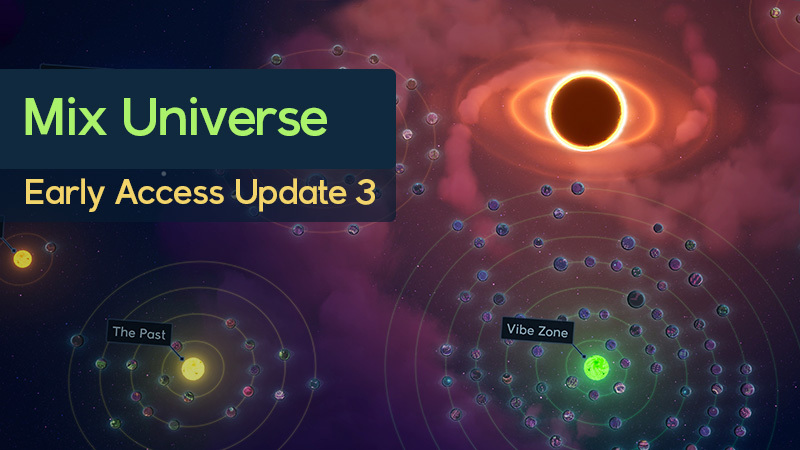
The Galaxy and Universe Map
A complete "workshop" overhaul using mod.io now called the Universe in-game.
3 Different world modes right now. Map screen, Headquarters, and an opened Mix. All of which can be switched to seamlessly.
The Galaxy map has 2 different galaxies, your galaxy where you can edit, open, upload, or move around your mixes to organize them and the explore galaxy which is more for when you are looking for mixes to gain inspiration from!
The Universe map is where everyone's uploaded mixes will be displayed for everyone to see! After uploading, you can then place your mix anywhere in the universe!
Cool art things
Completely streamlined transitions and visuals from going to HQ, Galaxy Map, and an opened Mix.
Added collision and shadows to planets, drum rings, and other various meshes that are part of the batched particle FX system.
Another Major Gamepad Pass
Some players have given some great feedback on how terrible the gamepad support was before. I’ve spent a lot of time trying to make the gamepad support is much better now so PLEASE once again tell me how much you hate or love it haha!
By default, left stick now moves around instead of moving the cursor.
The cursor is only movable when you have something selected (To help click on UI’s)
You can use the D-Pad to navigate buttons quicker, but sometimes it might be hard to navigate to where you want it, instead the left stick cursor should help in those spots.
I highly recommend re-playing the intro tutorial to learn the gamepad buttons or heavily check the bottom left corner when hovering over things.
Other Fixes and Optimizations
All save data is now in your %LocalAppData%/MixUniverse folder INSTEAD of your documents. All data is copied upon first launch with the new update its up to you to delete the old data in your documents. This is a precautionary just in-case something goes wrong and you lose data during the copying process, but it should be rather stable and safe! This fixes issues with controlled folder access on windows not allowing people to save OR OneDrive not allowing Mix to edit documents.
Mixes are now 1/10th the size they were before and load 10 times faster!
Backups and Auto saves for mixes now are stored per individual mix (Up to 10 at a time per mix) This way you can easily restore a backup or autosave without having to load into the mix, and save as.
Fixed issues related to elements and sounds getting stuck and not playing anymore.
Fixed first time loading issues where it would skip certain sounds.
Fixed double click times not registering properly OR registering on objects you didn’t double click.
Mix visuals are now limited by a certain amount of compute time in order to keep the audio and movement as smooth as possible. This results in less smooth audio synced visuals on mixes that are more intensive to your CPU.
Added ability to start and stop a mix during flight mode and walking (Control or X + SpaceBar)
Added a skip tutorial button in the pause menu when playing a tutorial.
Added a pivot visual for the edit camera. The pivot will auto re-adjust if you get to close to it or if you stop rotating the camera. You can also hit F to re-focus the pivot at any point when something isn't selected.
Added optional camera auto center on selection for both keyboard and mouse and gamepad separately. Can be useful for folks who don’t like navigating around with WASD as much.
Updated icons for main UI buttons so they are easier to know what they are.
like and that position will show for others.
Removed ability to “save as” to reduce accidental overwriting of mixes you don’t have open.
Intro tutorial now includes a section at the end that goes over how to use the galaxy map, create new mixes, and have fun. Now it blends into gameplay much better when it finishes.
Known Issues
Achievements are completely borked. (Hopefully will fix this one soon!)
Currently, I am hunting down a click issue where sometimes the first time you click something doesn't select it. Seems to be some order of when you click off of something else, but haven't been able to reproduce consistently yet.
Editing the name of a mix after uploading can sometimes result in very long sync times until going to the HQ and back into the map screen.
What is next?
The next updates will be arguably the coolest in the game's development because the core of the game is starting to harden a bit. The last year or so I have been just grinding away at very very core implementations and features that don't really push any of the boundaries of the musical aspect of the game, but that's about to change!
Each of these bullet points I consider to be their own updates.
Upgrading to UE5.5 for Megalights and Voxel Plugin 2.0. This should hopefully be the shortest interval between updates we've had so far!
Modulation and First MetaProgression pass. I'll give more details on this later, but you can expect to see some cool updates along the way as I start upgrading and finalizing the different FX and other ways you can manipulate the sound being played. I have been daydreaming about doing this for the past 2 years so IT'S FINALLY TIME!
Midi import/export support
Keep an eye on the roadmap on main page for more. As always thank you so much for your support so far and please join the discord
Source
Changelog.gg summarizes and formats this update. How we read updates.