
In this update15
Full notes
Full Mix Universe update
Read the full published notes in a cleaner layout. The original post stays linked below.
What changed
- UI and audio
- Performance
- Gameplay
- Fixes
- Maps
- Balance
Mix Universe changes
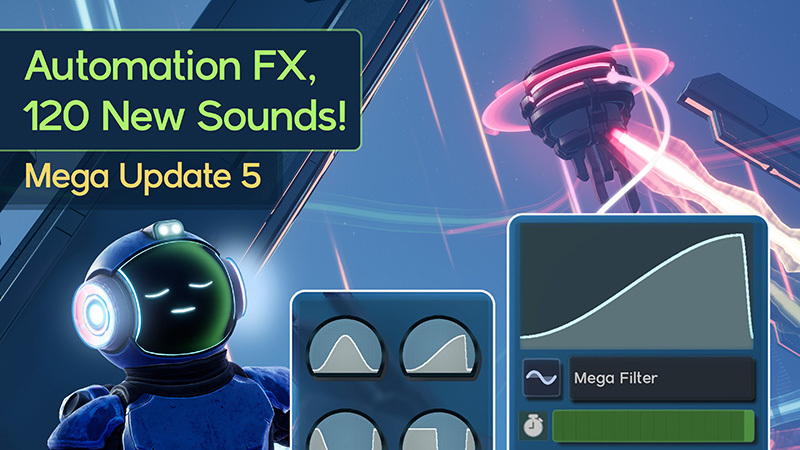
Automation, Sound Library, and Universe Update
Automator Nodes, New Visuals, Sounds, Modulations, Royalty Free Instruments, and a bunch more! It has been a long time, but I have been working hard to get this update out and stable. It’s a LOT so bare with me! Full update video here to go along with the post!
Completely Custom Volumetric Fog
Fog once again has been completely reworked. This time however I have written my own custom volumetric fog that works better for nodes cutting away at it. In the past, 1000’s of nodes would eat away at the cpu. Now, everything is budgeted to around 1-2ms total for the GPU and cpu. This means fog should never eat away most of the frame budget while also being reactive and smooth looking!
Steam post imageSteam post image
Sound Nodes and Allowing Mixonauts to Use their Mixes for Commercial Content (Legal Fun Times)
I am excited to announce that I have added 120 instruments recorded from my own hardware to the game that are all Royalty Free. I also signed a deal with the company where I sourced the drum samples to allow Mixonauts to use them for commercial use as well! This means that you have a TON of options now to create music for your own game, Spotify, or anywhere else commercially so long as you are using the royalty free samples.
Legal Jargon See the the https://www.mixuniverse.net/eula/ Sections 3 and 4.
You can tell which ones based on the symbols and tooltips in-game. The “Play” Icon indicates royalty free while the Copyright symbol indicates that you can use it but for non-commercial purposes.
Automator Nodes and New Tutorial
New Automator Tutorial ( VERY IMPORTANT ) this shows you the nuances behind using the Automator Nodes
Steam post imageAutomator nodes are fun, but also need a bit of training before you can make full use of them. Please consider doing the automator tutorial in the HQ. I think in the future you will have to do the training in order to unlock node types.
New Curve Automator Node
These nodes allow you to use curves to adjust sliders real-time indicated by the yellow region on sliders. Most sliders in the game accept Automators ( Even Visualizers ).
New Automator Panel (Helps find and organize automator nodes)
New Reactive Automator
These Automators derive their value from nearby playing nodes. Can be used for things like side-chaining or just making visuals look cool!
Modulation System and Elements
The Modulation System has been completely redesigned from the ground up. With the introduction of automator nodes, I knew I nested approach to applying values on the parameters for sounds. Not only is this way much faster than before, it’s also wayyy easier to debug and easier to manage more complex scenarios like.. say multiple modulator rings.
Live Updating Sounds
Fully live-updating sound system. When adding and removing elements on already playing sounds, the system will auto add and fade in their blend values. Should make things like moving modulator rings around, adjusting their sizes, and adding newer elements nice and smooth.
New Modulation Panel
The Modulation Panel now has sliders to allow for Automator nodes to attach to them while also making it easier to adjust their settings. Some of this is also prep for elements to have multiple sliders in the future.
New Global Modulation Slider for Every Sound Node and Modulator Node
The Modulation Panel also has a global modulation for that node that affects all modulation elements on that node.
New color control for every sound node (Supports Automators)
Midi Support Fixes
Fixed dropdown list for midi options.
Fixed applying note values to selected nodes. If you select say 10 nodes in a row and push this button. You can then play 10 notes and it will record that note value to each node. Makes making melodies a bit faster. (The note editor I do still want to update a bit more to make it easier)
Moving away from Mod.io and changes to the galaxy map.
https://www.mixuniverse.net is now the official website for hosting mixes. After many nights battling mod.io's api limits, downtime, and the inability to perform backups easily. I made the hard choice to create my own Mix Cloud service. Everything you uploaded to the universe has been migrated to Mix Cloud. The first time you open the game after this update, it will automatically find your existing mod.io mixes and claim them in the Mix Cloud. Everything SHOULD feel rather seamless, however you might have to resubscribe or resync certain mixes depending on when the last time it was you updated them. Your local versions should be ok though.
Adding mixes to library (Subscribing) is now realtime. If you log into https://www.mixuniverse.net/mixes with the game open, your changes to your library will sync in-game.
Other Notes
Finding all of the Universe Mixes is 10x faster, the main benefit from switching is now I have 100% control on how I query mixes based on your view in-game. I only query mixes you can actually see.
Making new mixes will automatically assign a starting universe position so the “Find in Universe” button will actually take you to your mix in the universe. You can choose from there whether or not you want to move it.
You can now open and play mixes directly from the universe tab. Makes it much easier to check out mixes on the universe quickly without polluting your galaxy map.
Quick Pass At Key Binding
A lot of these likely would need a bit more overhaul to allow more flexibility for each of the modes, (Edit, walking, flying, etc) but for now, this should hopefully help those who might want to rebind certain basics to different keys.
Feedback Form
You can quickly submit feedback in-game now. This will send an image, the message you type, and your current logs to the Mix Cloud privately so that I can take a look and potentially fix issues.
Experimental Attack Decay Sustain controls
These controls adjust how the sounds fades in and out. It’s marked experimental mostly because I am not sure if I like how these work. Feedback or ideas on this would be helpful. Any values you set atm should transfer over to new versions regardless of UI changes.
Better filtering options for the galaxy map
You can now filter your searches based on type.
All Mixes
My Universe - Which shows all of your uploaded universe mixes.
Other Mixes - Shows everyone elses universe mixes.
Optimizations
Collision rendering and updates have been moved to a frame limited process. Moving nodes and links around is 10x faster.
Lighting and background optimizations for mix worlds.
Sound Libraries disk cost is 1/10th using RAD compression (Can have way more sounds now without eating up your hard drive space.
Complete Refactor of the Batched-FX node system to reduce CPU and GPU cost for 1000’s of nodes. Increased FX limit from 10k to 30k.
Nearby node gather system is an async process now. Things like modulator rings used to be really expensive when you had more than 10 or 15 nodes in them. Now can handle 1000’s of nodes all asking who is nearby them.
Reverb cost is is reduced when rendering sound.
The Future
This update knocks out quite a few core gripes I've had with the game for a long time. There will likely be hotfixes that need to go along with this because it IS so much, but I am hoping to move forward with mover nodes. Mover nodes in combination with automators and modulators will hopefully complete the triangle that is needed to make mixes feel more alive. The idea is they can attach and move nodes and nearby node chains when activated.
After that, I've still got a decent list to tackle in no particular order.
Midi Export / Import
SECRET
More Exploratory type mixes and modes.
Expanded HQ and fun extra things to do.
Unlocking System
Expanded sound library (MOAR!)
There's many different ways things could go, but I am excited for them all! Thanks again folks for all of your support and patience throughout this process. I hope everyone has fun and happy Mixing! Every review helps steam push the game so if you haven't already, reviewing the game would mean a ton to me!
Unreal Fest
June 17th at unreal fest in Chicago I will be doing a talk on the stack-based FX system the game uses. If you are going to unreal fest, here is the session info.
Source
Changelog.gg summarizes and formats this update. How we read updates.