
In this update14
Full notes
Full Megastore Simulator update
Read the full published notes in a cleaner layout. The original post stays linked below.
Repeated intro
Hello everyone,
What changed
- Gameplay
- Balance
- Store
- UI and audio
- Fixes
Megastore Simulator changes
The Cold Storage Update(v0.5.0) is here, introducing one of the biggest new systems added to Megastore Simulator so far: temperature-based product storage.
With this update, many products now have specific storage requirements. Some products need to stay cool, some need to be refrigerated, and some must be kept frozen. If they are stored incorrectly, they can now spoil, take freeze damage, or lose their cold chain.
This update adds Walk-in Freezers, new box types, box shelves, compact pallet racks, cold storage requirements, generic boxes, warehouse expansion improvements, and a new foundation for future freshness and temperature-based gameplay systems. Don’t worry, your existing stock will not spoil.
You can take your time transitioning to Walk-in Freezers without rushing or losing your current products.
Cold Storage System
Products that require special storage now have a safe temperature range.
If a product is stored too warm, it will undergo spoilage damage.
If a product is stored too cold, it will freeze damage. Frozen products work differently: if they are not kept cold enough, they begin to thaw. Once the cold chain is broken, they become unusable and must be disposed of.
Products are grouped into clear storage types:
Cool: 6°C - 12°C / 43°F - 54°F
Fridge: 0°C - 5°C / 32°F - 41°F
Freezer: -18°C - -1°C / 0°F - 30°F
You do not need to memorize every temperature. Walk-in Freezer control panels show the current storage mode based on the temperature you set.
Each product also has a temperature sensitivity level. This determines how long it can survive in unsafe conditions.
Low: 96h warm / 36h cold
Medium: 48h warm / 24h cold
High: 24h warm / 12h cold
Critical: 12h warm / 6h cold
Cold damage usually happens faster than warm spoilage, so putting fresh products into a freezer can become a serious problem quickly.
The purchasing screen shows where each product should be stored, how long it can survive in unsafe temperatures, and how sensitive it is. Sensitivity is color-coded from green to red.
A total of 132 products are currently included in the Cold Storage system. You can check which storage mode a product needs by hovering over the product, box, or pallet UI. In most cases, it also follows common sense.
As a general rule:
All Produce products require Cool storage.
Grocery products sold as freezer items require Freezer storage.
Grocery products sold as fridge items and all Bakery products require Fridge storage.
The UI will always show the required storage type and current damage amount, so you do not need to guess or memorize every product. Please note that eggs, luncheon meat, and soups do not require any special storage conditions. Their display shelving will also be changed to regular shelves soon.
To help you set up, existing items will not spoil. Special-storage products will be placed in white Perishable Boxes. Wooden boxes also need Cool storage for bakery and produce items. Spoilage is calculated in in-game minutes, so your items will not start spoiling until you begin the next day. The goal of this system is not to add stress but to add a nice management layer. I always want to keep the gameplay cozy, relaxing, and enjoyable.
How Spoilage Works
Products only start degrading when they are in an unsafe environment.
To keep the system relaxed and avoid punishing players unfairly, degradation is paused in several cases:
Products that are stored correctly inside the cold storage
Products placed on the display shelves
Products placed on trays
Products being carried by the player
Products being carried by restockers or unloaders
Products inside delivery trucks
Products in the return area
Basically, products only spoil if they are stored at the wrong temperature on pallet racks or box shelves, or if they are taken from a truck and left on the ground for too long by the player.
Products that are already out of boxes will not spoil, and your employees will not cause products to spoil either. Your existing inventory is safe; only newly ordered boxed products are affected by this system.
The product spoilage is progressing with in-game minutes, meaning if you haven't started the day, your products won't start spoiling. Giving you time to organize your warehouse without stressing about the spoilage factor.
Every area outside temperature-controlled storage is currently treated as room temperature, around 25°C / 77°F
If a product requires cold storage and is left in these areas, it will begin degrading based on its sensitivity.
This also gives us a flexible foundation for future systems. Right now, room temperature is fixed for simplicity, but in the future, weather or seasonal temperatures could affect storage conditions. For example, cold winter hours could make it safer to keep some Cool-storage products outside Walk-in Freezers for a while.
The system is also built to support expiry dates and stricter difficulty settings in the future. For now, these features are not enabled because the default game mode is meant to stay cozy and relaxing. That will always remain the focus of the standard experience, but this system gives us more room for optional harder modes later.
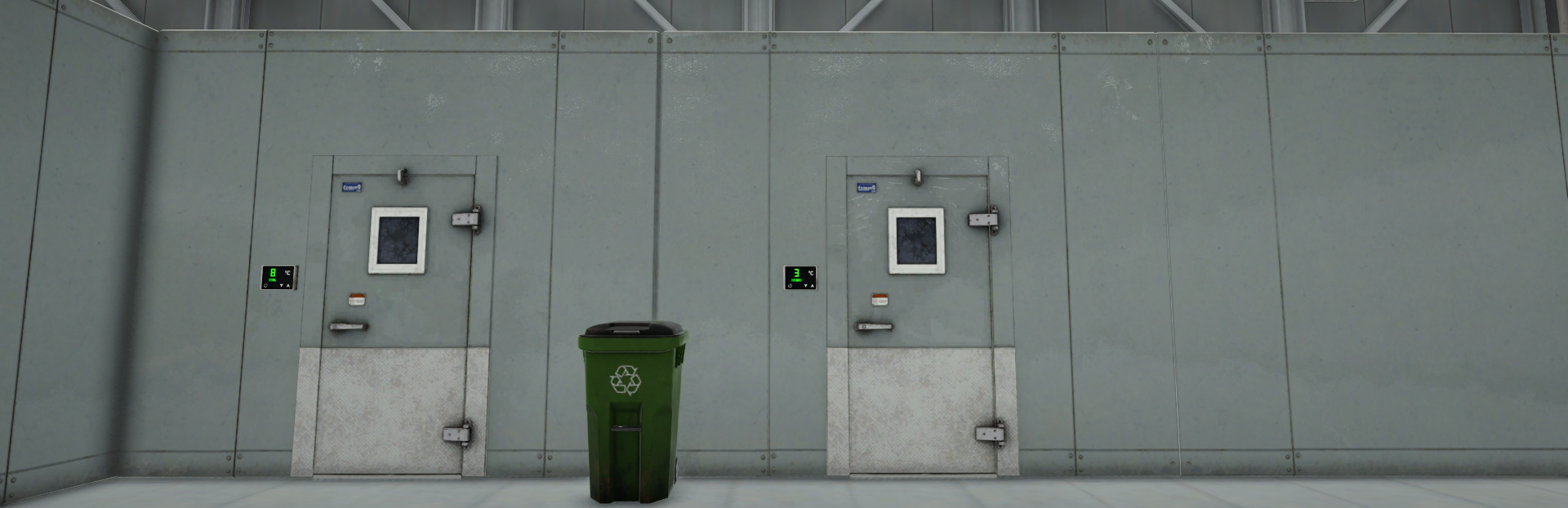
Walk-in Freezers Steam post image
Walk-in Freezers are new temperature-controlled storage rooms.
They create a temperature zone around them, and everything inside that zone is affected by the temperature you set. You can place boxes directly inside them, or organize them using the new box shelves and compact pallet racks.
There are three sizes:
Small Walk-in Freezer: 1×1 tile footprint
Medium Walk-in Freezer: 1×2 tile footprint
Large Walk-in Freezer: 2×2 tile footprint
Each Walk-in Freezer has its own control panel. You can adjust the temperature from this panel and see the current mode directly on its screen.
To avoid accidental interactions and unnecessary room highlighting, Walk-in Freezers are moved or packed by right-clicking the control panel near the door, not the room itself.
Walk-in Freezers can be moved together with their contents inside, including furniture, boxes, and pallets. They must be completely empty before being packed.
New saves now start with 1 free Small Walk-in Freezer, so new players can start using the Cold Storage system immediately.
Generic Box
A new Generic Box has been added.
Generic Boxes can hold many different product types, so you no longer need to search for the exact box type every time you want to move products around.
You can select which product to restock from the side window that shows the contents of the generic box by using the mouse wheel. They can also hold a large number of items, especially if the products are small enough. This should make sorting, reorganizing, and moving mixed products much easier.
The Generic Box is assigned to hotkey slot 4.
While holding a Generic Box, you can use the middle mouse button to navigate between the products stored inside and choose which product you want to place.
New Box Types
Cold Storage also comes with new box visuals and handling improvements.
Products that require cold storage now arrive in visually distinct cardboard box types, white Perishable Boxes. These boxes make it much easier to identify products that need temperature-controlled storage.
Perishable Boxes are mainly a visual category. They help you recognize cold-storage products more easily, but they still work like normal boxes. You can also place non-perishable products inside them if the product fits.
Perishable Boxes are also separated by size, just like other box types.
For existing saves, old cardboard boxes that contain cold-storage products are converted into white Perishable Boxes. This should make the transition much easier: focus on moving your white Perishable Boxes, Insulated Boxes, and Wooden Boxes into Walk-in Freezers or proper cold storage areas.
Box Shelves
Box shelves have been added for better box storage.
There are two types:
Box Shelf: 8 box slots
Small Box Shelf: 4 box slots
Box shelves are designed to fit inside Walk-in Freezers. If you place a box shelf inside a cold storage room, the boxes stored on it are also affected by that room’s temperature. You can fit up to 5 box shelves into a small walk-in freezer
Restockers and unloaders can use box shelves similarly to pallet racks, so they can become part of your normal storage workflow.
Compact Pallet Racks
New compact pallet racks have been added.
These are 3-tier pallet racks designed to fit inside Walk-in Freezers. They give you a better way to organize cold-storage pallets without needing the larger standard pallet rack setup.
Damaged Product Visuals Steam post image
Spoiled and freeze-damaged products now visually change.
Spoiled products appear degraded and may have flies around them, making them easier to notice. Freeze-damaged products gain a blue, icy damaged look, so you can clearly tell when something was stored too cold.
If a restocker picks up a spoiled or freeze-damaged product, they may still carry it to the shelf first. Once they open the box and realize the product is unusable, they will put it back on their trolley and dispose of it.
This means you do not have to manually track every damaged product yourself.
UI Improvements
The box info window now shows storage-related information when you hover over products or boxes.
You can see:
How much the product has degraded
Which storage type does the product require
Whether it is currently stored correctly
The purchasing screen also shows each product’s required storage type, warm spoilage time, cold damage time, and temperature sensitivity.
Warehouse Expansion Improvements
The warehouse has been expanded with this update.
By moving the docks forward, the warehouse depth has been increased by 20%, giving everyone more storage space without purchasing any additional expansions.
The original plan was to increase the depth by 40%, but after testing, we decided against it because it could make workers less efficient over long warehouse distances.
Instead, 5 new warehouse expansions have been added. Expansions now provide 20% more space than before, and if you purchase all 5 new areas, your total warehouse space can increase by up to 44% compared to the previous maximum.
The expansion count changed from 30 to 29 because the first warehouse expansion is now given as the default.
Fahrenheit Support
Fahrenheit support has been added.
It is automatically enabled for players in the US region. For now, this cannot be changed manually in settings yet.
Small Fixes & Improvements
Fixed action menu names for taking boxes
Fixed a redundant “E Collect” action appearing on the buttons window at the start
Removed the second-door placement blocker for the main entrance until the door is unlocked
Fixed unloaders/restockers complaining about an already existing product as if it were missing
Added snapping support for freezers
Updated the Pallet Robot description to clearly show that it is Coming Soon
Improved box return handling for cases where boxes may go missing
What’s Next
I will be watching feedback closely and releasing more hotfixes and polish updates for the Cold Storage system soon. I also want to improve the feeling of being inside a Walk-in Freezer with more atmosphere and small details over time.
A Segway is also coming soon, which should make moving around larger stores and warehouses much more convenient.
I will also continue improving existing departments with new shelves, visual polish, bug fixes, and quality-of-life updates.
After the current systems reach a stable point, I plan to begin work on the next major departments: Butchery and Deli. A lot of the foundation for those departments has already been prepared through recent updates, especially with cold storage, product condition, and more flexible storage systems.
As a solo indie developer, your feedback, support, and patience mean a lot to me. Every bug report, suggestion, and discussion helps me understand what the game needs next and makes it possible to keep improving it step by step.
As always, I’ll keep listening and improving the game based on your feedback.
Thank you for playing, supporting the game, and being part of this journey.
Source
Changelog.gg summarizes and formats this update. How we read updates.