
In this update15
Full notes
Full Mall Craze update
Read the full published notes in a cleaner layout. The original post stays linked below.
What changed
- Store
- Gameplay
- Events
- UI and audio
- Performance
- Fixes
Mall Craze changes
Hello everyone! 👋
The second major update to Mall Craze is here! It brings a completely new shop, improvements to Build mode, and lots of other changes and additions!
Let's see what's in store for us today:
Primary Changes
Flower Shop 💐
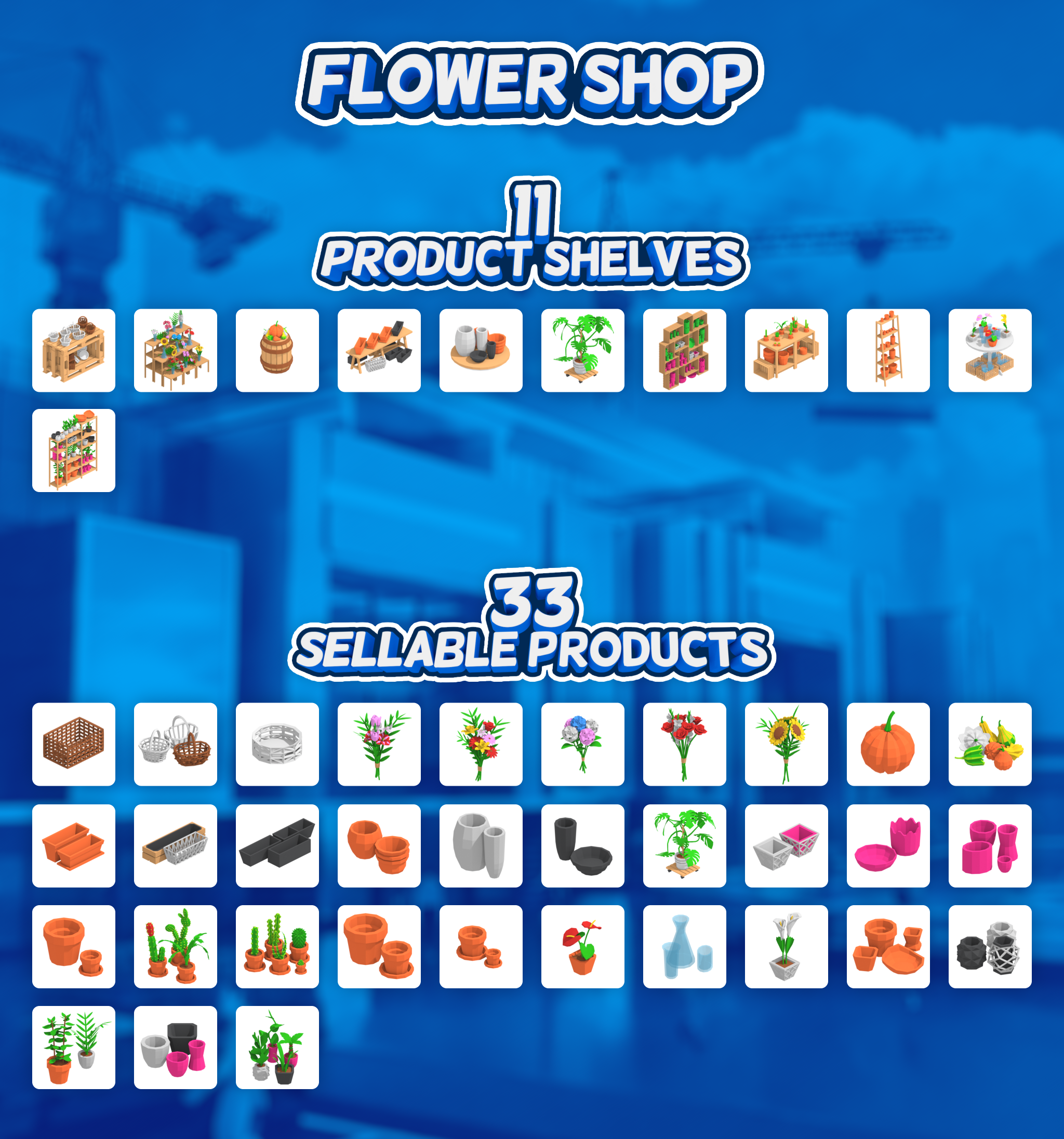
I'm happy to share that another big shop is now in the game: the Flower Shop! It consists of 11 placeable product shelves, which together contain 33 sellable products. These include colorful bouquets, cute tabletop plants, decorative pumpkins, a variety of plant pots with unique styles, and much more.
If you're looking to add some greenery and life to your mall, this shop will definitely do the trick!
Build & Move Mode Grid Overlay 🚧
Although objects in Mall Craze snap to a grid of various sizes (mostly 50cm and 25cm, which can be temporarily turned off for most things), there was previously no visual indication of this. Grid placement naturally leads to a desire to build things precisely and symmetrically, which could sometimes be difficult, given that, until now, there was no visual representation of this grid, as I stated above.
Update 0.3.0 addresses this by introducing a grid overlay that will be visible during Build & Move mode. A positive side effect of this is that it will now be easier to tell whether you're currently in Build or Move object mode.
Secondary Changes
Starting Cash Slider for Pre-Made Malls 💵
To extend the sandbox options for pre-made malls, I've added a cash slider that will allow you to choose the level of challenge you'll face when starting a new mall. The slider has a range of $50,000 to $5,000,000.
New Customers Overview List
It's time to yet again start introducing deeper simulation and management options. Update 0.3.0 does so with the improved customers overview list inside the Mall Management window. Below, you can see the comparison between the old and new versions.
0.2.7
0.3.0
Currently, only age, money spent, and current cash are the three new pieces of information provided, but the new UI is ready to host a lot of other useful information in the future.
Concept
Construction Design UI Moved 🎨
Although there’s an option in-game to change the design of an object that's currently being built, it was hard to find, and many people were therefore unable to easily change the design of a floor, for example. And no wonder— it was tricky to find. When you selected an object to build from the Mall or Shop construction menu, the left blue area switched from Object Categories to the Construction Design panel. To make the Construction Design panel more visible and easier to navigate, it’s now been given its own small pop-up window above the construction menu.
0.2.7 0.3.0
Other Changes
New Character Mesh Shading
The character design of Mall Craze has evolved many times over its development, and today it takes another small step forward. The low-poly design of in-game 3D models works great for inanimate objects, but it showed its shortcomings on the character models. Here’s the comparison between the 0.2.7 and 0.3.0 shading:
Controls Visualization Improved
I've made it easier to view keybindings inside the Settings menu.
0.2.7 0.3.0
Renaming of Various Elements
In the name of simplicity and better understanding, I’ve decided to rename a few aspects of the UI, such as renaming the material parameter “Emission” to “Luminance.” The full list can be found below in the Full Patch Notes under the Small Changes category.
"How can I support Mall Craze?"
I occasionally get questions about how you can support the game even further, given that there are no DLCs or microtransactions. The best way to help is by sharing Mall Craze with others—friends, your favorite YouTuber or streamer, etc. If you like the game, writing a review here on Steam naturally also helps a lot ❤️.
What's Coming in Updates 0.3.x 👀
The main focus for the next couple of updates will be adding new content, along with additional management features. The next big milestone for management is adding the Business game mode (name may change). Business mode will introduce progression in the form of Research. To have something to research, we need more content. New content will therefore come in the form of new shops, kiosks, vending machines, scenery, object designs, and so on.
Thank you, everyone, for your support, and I will see you in the next update! - Milan, developer
Full Patch Notes 🔧
Flower Shop Added (33 new products)
Bouquets (Colorful Bouquet, Bouquet of Love, Cutie Tulips Bouquet, Sunflower Bouquet, Bouquet d’Hortensia)
Tabletop Plants (Large Plant, Small Plant, Plastic Table Plant Pot, Clay Table Plant Pot, Decorative Table Plant Pot)
Plastic Pots (Medium Plastic Pot, Small Plastic Pot, Decorative Plastic Pot)
Small Flowers (Arthurium, Calla Lily, Glass Vase)
Small Cacti (Medium Tabletop Cactusm, Small Tabletop Cactus, Cacti Clay Pot)
Decorative Pumpkins (Large Decorative Pumpkin, Small Decorative Pumpkin)
Monstera
Small Pots (Medium Clay Pot, Small Clay Pot)
Flower Boxes (Clay Flower Box, Plastic Flower Box, Decorative Flower Box)
Handmade Baskets (Large Basket, Regular Basket, Small Basket)
Large Pots (Large Concrete Pot, Large Clay Pot, Large Plastic Pot)
Additions & Improvements
Grid overlay added for object Build & Move modes;
- Level Selectorstarting cash slider added for Pre-Made malls;
Mall Management: customer overview list improved and new info added:
age
money spent
current cash
Construction Design UI re-designed (now having it's own small UI window).
Settings UI & Controls UI - controls visualization improved.
New character mesh shading;
Small Changes
Settings UI graphical options renamed:
Global Illumination -> Dynamic Lighting
TSR (Anti-Aliasing) -> Anti-Aliasing (TSR)
all Screenshot options renamed to Epic
Material Designer UI - material parameters renamed:
Specular -> Reflections
Emission -> Luminance
Material Designer UI - notification added on Design Save;
Lumen dynamic lighting brightness improved;
Volumetric Fog marked as Experimental;
Pavement Decoration Blocks renamed to Floor Decoration Blocks;
Default entrance text size & position adjusted;
Bug Fixes
Fixed: Painting StallTable crashes the game.
- FixedChanged colors for kiosk / vending machine doesn't transfer from ghost object.
- FixedStarting New Game while currently playing very old save can sometimes cause this New Game to save incorrectly.
Available Now
Source
Changelog.gg summarizes and formats this update. How we read updates.