
In this update7
Full notes
Full Mall Craze update
Read the full published notes in a cleaner layout. The original post stays linked below.
What changed
- Performance
- Gameplay
- Maps
- Balance
- UI and audio
- Store
Mall Craze changes
Hello everyone! 👋
In the age of frame generation and upscaling techniques, why not treat ourselves with some real frames and sharper graphics for once?
Thanks to the changes to the material system behind the curtains, I was able to improve massive CPU bottleneck for both DirectX 11 & 12! Besides that, the game now also uses up to 50% less RAM while using DirectX 11! The same thing is true for load times, which have now been decreased by 30% while using DirectX 11.
Up to 115% higher FPS in DX11, and up to 28% higher FPS in DX12 🚀
(while being CPU bottlenecked)
Simulation games tend to be pretty CPU heavy, and that's no different for Mall Craze as well. While the game can run well with an empty map, the game quickly becomes demanding on your processor once you've build a larger mall with hundreds of customers.
At that point, no matter how much you lower the graphical settings, the FPS stays the same. Congratulations! You've now hit a CPU bottleneck, and there's not much you can do about it, besides maybe turning off other programs that are running on your PC.☹️
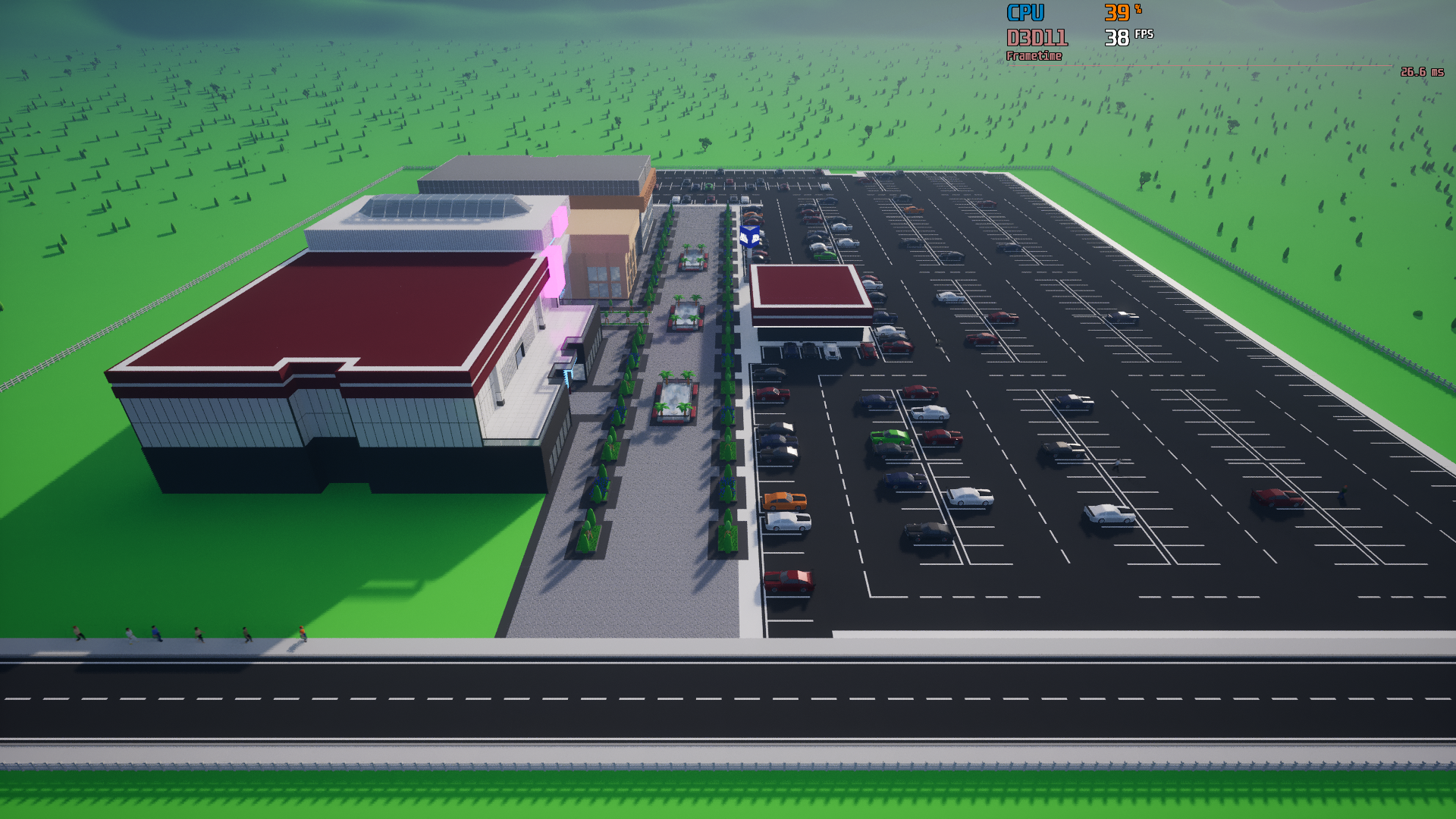
Let's see how the CPU bottleneck looks in practice:
As you can see, no matter how much I absolutely destroy the graphics, the performance stays the same...
Coming up with the solution 🔧
(technical info that you can skip if you want)
By far the biggest contributor to this problem was the customization system - namely the amount of dynamic materials the objects have, and thus the increase of draw calls that your processor needs to send to your graphics card. There weren't many solutions to this problem that I knew of.
That was until I started experimenting with Custom Primitive Data, where I started to see a potential for huge decrease in draw calls. The problem was that I could only fit 4 materials into the CPD, and there are many objects, products and designs that have more than that. That's when I came up with a sort of hybrid material system, where objects with 4 and less materials use CPD that reduce draw calls thanks to instancing, and objects with more than 4 materials use dynamic materials. Behind the curtain, the customization code got a bit more complicated, but in the end, the results are worth it!
The number of draw calls in the 80's Dream map went from 44 000 to 2 000! (end of technical info)
Results: 📄
For 80's Dream map, while using DirectX 11, the CPU bottleneck has been improved by 115%, increasing the FPS from 39 to 84! 📈
Similar thing can be said for DirectX 12 as well, where the CPU bottleneck has been improved by 28%, increasing the FPS from 68 to 87! 📈
Of course, your results may vary! These tests were performed on a Ryzen 5600 with Radeon RX590.
As I mentioned at the beginning, besides these increases, the RAM usage in DirectX 11 has been decreased by up to 50%, and the same thing can be said for load times, which were decreased by 30% in DirectX 11.
Who's going to profit from these improvements?
Everyone who likes to build medium to large malls, and everyone with an older CPU!
Sharper graphics for everyone!⭐
Even in the previous versions of Mall Craze, DirectX 11 has always been the RHI with a superior image sharpness. Mall Craze uses Unreal Engine's TSR as the anti-aliasing method, which produces less artifacts and blur in motion when using DX 11 with Shader Model 5. The problem has always been the performance of DX 11, which in CPU bottleneck situations was far worse in comparison to DX 12 (43% worse), making it good only as a fall-back solution for people who experience instability and crashes with DX 12.
Given how much has DirectX 11 been improved with this update in terms of FPS, RAM usage and load times, it is now comparable to DirectX 12 (within 4%)! This makes it not only a good fall-back RHI for some people, but also a good "daily driver" for everyone! Because of this, DirectX 11 will now be the default RHI for new players.
For those who already played the game, you'll have to change to DirectX 11 manually in the graphics settings if you want to experiment with it.
Lowering the minimum requirements for the game
Thanks to all these improvements, the minimum requirements for the game are now lowered for all 3 main components:
CPU
GPU
RAM
Thank you everyone for your support, and I will see you in the next update! ❤️ - Milan, developer
Full Patch Notes 🔧
Additions & Improvements
Up to 115% higher FPS in DX 11 while being CPU bottlenecked (depends on mall size).
Up to 28% higher FPS in DX 12 while being CPU bottlenecked (depends on mall size).
Up to 50% lower RAM usage in DX 11 (depends on mall size).
30% faster load times in DX 11.
DirectX 11 now the default RHI for new players.
Available Now
https://store.steampowered.com/app/1223530/
Source
Changelog.gg summarizes and formats this update. How we read updates.