Hello everyone, I hope everyone is doing well. Custom Study Sets In this update, you can now build and play your own custom study sets to help with your learning!
In this update5
Full notes
Full Kana Seito Defense update
Read the full published notes in a cleaner layout. The original post stays linked below.
Repeated intro
Hello everyone,
What changed
1 fix5 additions0 changes0 removals
Gameplay
UI and audio
Fixes
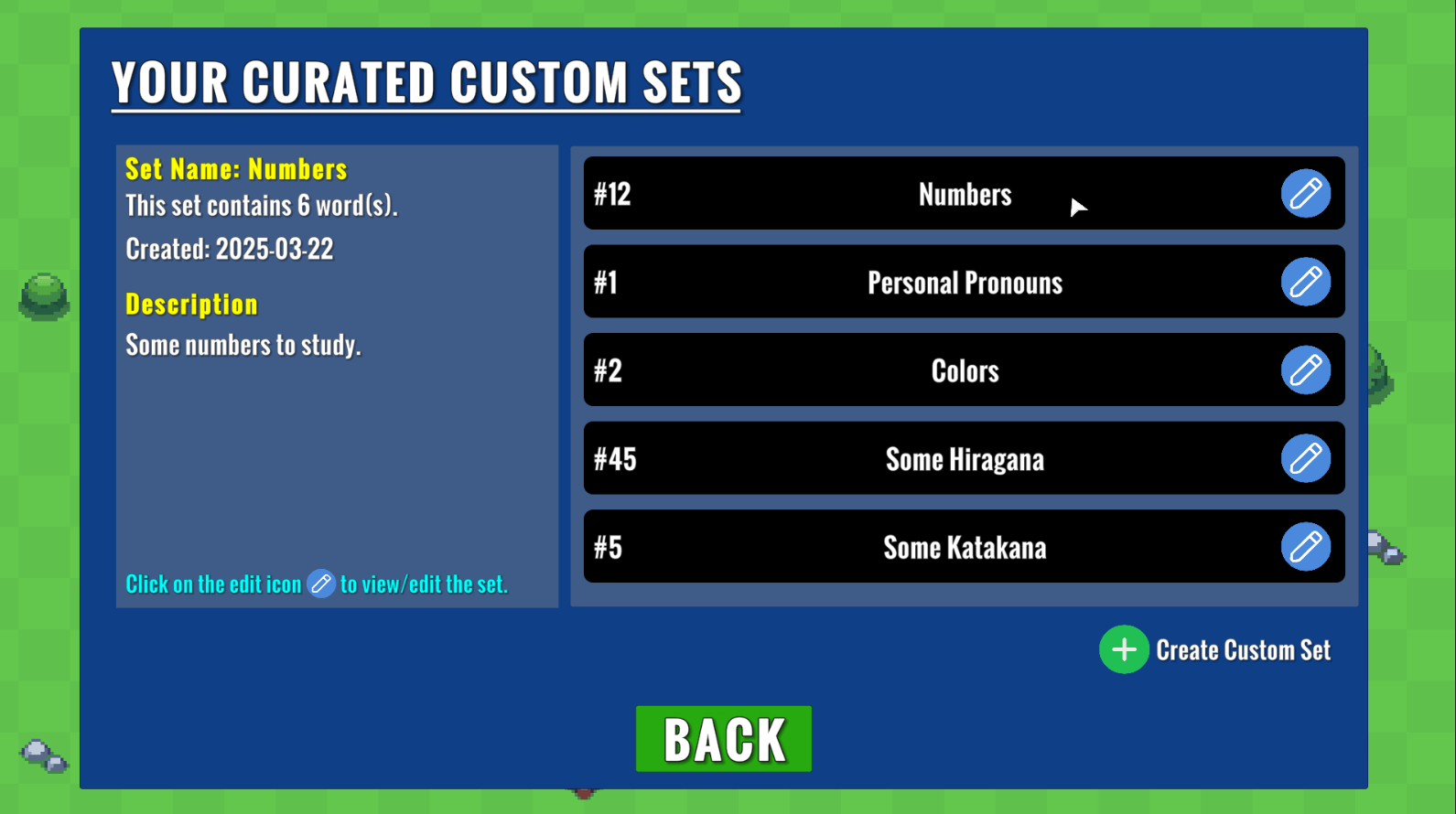
addedCustom Study SetsIn this update, you can now build and play your own custom study sets to help with your learning!
addedWhere you can access your custom setsAs of this update, you can access the UI panel to add/view/edit custom sets through 2 ways : 1.) Main Menu -> Dictionary -> Your custom curated sets 2.) Main Menu -> Play (opens the level selection menu) -> Build / Play Custom Study Sets
addedWhat a custom set containsFor each custom study set, you'll be able to name the custom set anything you like, provide an optional description to give more context, and add words. For a word, you can provide romaji, kana, kanji, and a definition. Romaji and kana are required. A custom set also requires a unique ID.
addedPlaying a custom setPlaying a custom set can be done by pressing the Build / Play Custom Study Sets button in the level selection menu. You'll be able to add, view, and edit custom sets here as you would within the Dictionary menu. Here, the only additional step is to click a valid custom set to play and select configurations at the bottom of the screen.
fixedOther changes in this updateFixed a bug where the Level Review display did not show successful/unsuccessful words typed when playing special game modes like Customize Your Own Level.
addedOther changes in this updateAdded an additional menu after clicking on the Dictionary button in the main menu to help with the user experience.
Kana Seito Defense changes
addedIn this update, you can now build and play your own custom study sets to help with your learning!
addedAs of this update, you can access the UI panel to add/view/edit custom sets through 2 ways : 1.) Main Menu -> Dictionary -> Your custom curated sets 2.) Main Menu -> Play (opens the level selection menu) -> Build / Play Custom Study Sets
addedFor each custom study set, you'll be able to name the custom set anything you like, provide an optional description to give more context, and add words. For a word, you can provide romaji, kana, kanji, and a definition. Romaji and kana are required. A custom set also requires a unique ID.
addedPlaying a custom set can be done by pressing the Build / Play Custom Study Sets button in the level selection menu. You'll be able to add, view, and edit custom sets here as you would within the Dictionary menu. Here, the only additional step is to click a valid custom set to play and select configurations at the bottom of the screen.
fixedFixed a bug where the Level Review display did not show successful/unsuccessful words typed when playing special game modes like Customize Your Own Level.
I hope everyone is doing well.
Custom Study Sets
In this update, you can now build and play your own custom study sets to help with your learning!
Where you can access your custom sets
As of this update, you can access the UI panel to add/view/edit custom sets through 2 ways: 1.) Main Menu -> Dictionary -> Your custom curated sets 2.) Main Menu -> Play (opens the level selection menu) -> Build / Play Custom Study Sets
What a custom set contains
For each custom study set, you'll be able to name the custom set anything you like, provide an optional description to give more context, and add words. For a word, you can provide romaji, kana, kanji, and a definition. Romaji and kana are required. A custom set also requires a unique ID.
Make sure that you save so your custom sets are consistent between play sessions!
You can delete any words from a custom set or delete a custom set entirely. Deleting a custom set will automatically save to reflect the changes.
Playing a custom set
Playing a custom set can be done by pressing the Build / Play Custom Study Sets button in the level selection menu. You'll be able to add, view, and edit custom sets here as you would within the Dictionary menu. Here, the only additional step is to click a valid custom set to play and select configurations at the bottom of the screen.
Other changes in this update
Fixed a bug where the Level Review display did not show successful/unsuccessful words typed when playing special game modes like Customize Your Own Level.
Added an additional menu after clicking on the Dictionary button in the main menu to help with the user experience.
I hope you will find this feature useful and feel free to reach out if you experience any bugs.