
In this update5
Full notes
Full IT Specialist Simulator update
Read the full published notes in a cleaner layout. The original post stays linked below.
What changed
- UI and audio
- Gameplay
- Fixes
IT Specialist Simulator changes
Hello!
Today, we'd like to tell you a little more about the bug reporting system. Why it is important, how it improves the quality of the entire team's work, and how important your contribution is as well. Additionally, we'd like to let you know that the EA 1.3.1 update will be released on July 9 and will fix reported bugs.
How to report a bug?
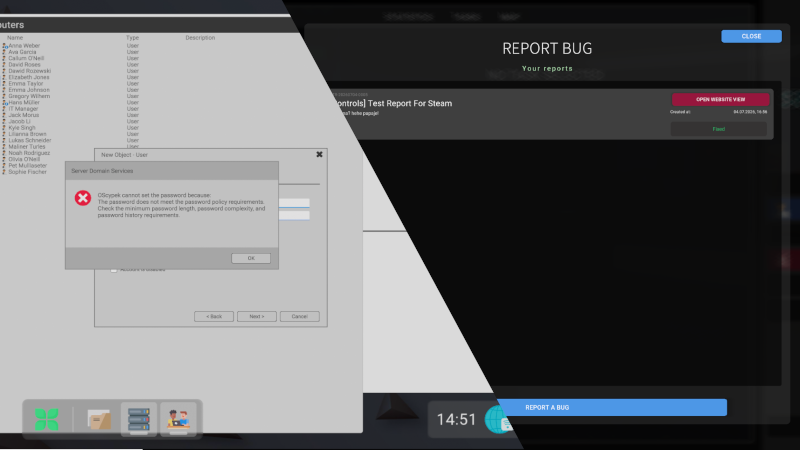
To report a bug, press the "ESC" key on your keyboard and then go to the "Report a Bug" option.
Here, you will see a list of your reports and their statuses (more on that later). Click the "Report a Bug" button.
Of course, fill in all the required information, such as the report description, title, and category. Importantly, you can also take a screenshot. When you're ready, the game will ask you to capture a screenshot using the TAB + S keyboard shortcut. If the screenshot doesn't turn out correctly, don't worry — you can simply take it again.
Steam post imageSteam post image
Above the button, you will find additional options that can be selected.
The first option is a scene snapshot, which allows us to inspect every element in the scene, your current tasks, the state of devices, and the connections between them.
The second option is simply your game save. This makes our work easier when we need to reproduce your current game progress.
Uploading this data may take a little while. However, with a standard internet connection, it should take no more than a minute. We also know there was an issue where the game did not pause during this process — that's correct, and we will fix it in the upcoming update.
After submitting a report, you may see a message informing you that another report can only be submitted after 10 minutes. There is also an additional limit of 10 reports per day. You may also be blocked from creating new reports if your submissions violate basic community standards.
🆕Report Statuses
There are several report statuses. You can check them directly in the game or on the website (using the button in the report). Each status communicates specific information.
🔵 New - we haven't started working on this issue yet (this does not necessarily mean that the report has not already been read by the team)
🔵 Under Analysis - we are analyzing the report, for example the screenshot, report content, or scene snapshot, and comparing it with data in the game engine. This may also mean that we are searching for the cause of the bug and attempting to reproduce it
🟠 In Progress - the issue is currently being fixed
🟣 Waiting for Information - this status means that we cannot do anything more with the report without additional information. If you notice this status and are able to create a new report, please submit one and add "Continuation of report PTR-20260704-0005" to the title — replacing this example with your own report number, of course.
🟢 Fixed - the bug has been fixed and is planned for deployment
🔴 Closed - the bug has already been fixed and there is no need to keep report data such as the scene snapshot, the report is invalid, or the reported issue is not a bug
⚫ Deleted - this is where reports usually go if they are old or violate standard community guidelines
On the website, you will of course receive an appropriate response regarding the bug as well as the estimated time of its implementation into the game.
⭐ Reviews Help Us a Lot
If you enjoy IT Specialist Simulator and would like to support us, leaving a review on Steam helps us a lot.
No pressure — we completely understand if you'd prefer to wait a little longer. However, every honest review helps increase the game's visibility and allows us to continue working on it.
Thank you! 🏆
♣️ Patronite
Additionally, you can read about the most frequently reported issues that are not actually bugs on our Patronite https://www.patreon.com/pixelteamred/posts/most-frequently-162883089
Source
Changelog.gg summarizes and formats this update. How we read updates.