
In this update3
Full notes
Full IT Specialist Simulator update
Read the full published notes in a cleaner layout. The original post stays linked below.
What changed
- Server
- Gameplay
- Store
- Fixes
- UI and audio
- Maps
IT Specialist Simulator changes
Hello everyone!
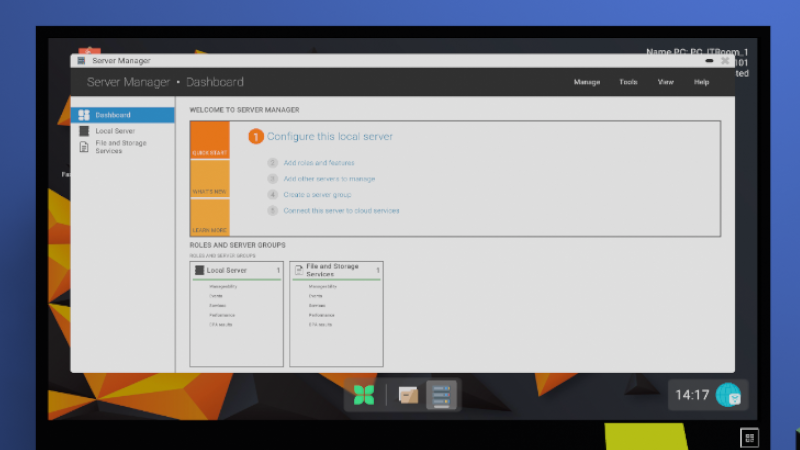
Today is a very good day! Why? Because today a new update for IT Specialist Simulator has been released. A lot of time has passed since the last update. This allowed us to calmly add new gameplay elements and thoroughly test them. We have initially added the server and some of its functionality – the server will continue to be expanded over the next several updates.
Bug Reporting System
We would also like to announce the creation of an in-game bug reporting system. What makes our system stand out from others?
First of all, everything happens directly in the game. You simply describe the issue you encountered during gameplay. You can attach your save file, error information, and even a screenshot.
If you select the screenshot option, the bug report window will temporarily hide and instructions will appear explaining which buttons to use to take a screenshot. Once the screenshot has been taken, the report window will reappear.
Every report you create in the system will remain visible to you. What's more, we'll let you know the current status of your report, where the issue occurred, and when a fix is planned to be released.
We hope this system will bring nothing but benefits and significantly speed up the bug reporting process without requiring you to search for our email address somewhere on Steam or join our Discord server if you don't want to (although we highly encourage you to do so!).
Added:
Server Manager
Server Users and Computers (AD)
New Surfix web browser
New browser feature: Favorite websites
Added a download location path in browser settings
Added a download preview window in the browser
New website: Bujok_Store – an online store where you can purchase items such as patch cables, USB drives, and more.
Package system – every order now arrives in a package that the player must collect from the warehouse and bring to the new dedicated desk in the IT Room.
New desk in the IT Room – a specialized workstation where players can not only open packages but will also repair equipment in future updates.
New package tracking website.
We know some of you have definitely forgotten your in-game bank account PIN! That's why it is now possible to reset your PayApp PIN (tablet application).
New game settings:
Disable camera effect animations while running
Disable camera animations while walking
Changes:
Firewall – added an option on the server to enable or disable the firewall for the Domain profile
Firewall – added an option on the server to allow applications through the firewall
Task-related emails are now automatically removed once the task is completed
The welcome screen at game launch now appears only the first time the game is started
- The login format for all computers has been changed from local login to domain login.xxxx -> [xxxx@storage.local](mailto:xxxx@storage.local). Login authentication now depends on the user's settings on the server. If the account is disabled or locked, login will not be possible.
Server maintenance (including VPN maintenance) has been moved from Day 4 to Day 7 – a large number of players were not reading emails, causing the planned in-game event to be frequently reported as a bug
VirusPlus website: now displays the number of items currently in the shopping cart
Every website now loads each page element individually instead of using the previous traditional page loading system
Several forum threads have been updated
ForumHelp is now powered by a custom-built CMS system
We have completely redesigned the tutorial. It now looks much better and clearly indicates what actions need to be performed in order to progress.
Task generation chances have been adjusted due to the addition of new server-related tasks. The current distribution is as follows:
Computer - 51.11%
Server - 17.78%
Office Printer - 11.11%
RCP - 8.89%
Switch - 4.44%
Access Point - 4.44%
Router - 2.22%
Fixes:
Fixed OScypek Task Manager tasks that required enabling all CPU cores
Fixed an issue related to the office printer task
IP addressing now displays correctly
Added a missing translation for the "Devices & Bluetooth" text in system settings
The warehouse printer had an incorrect IP address for tasks, making them impossible to complete
Fixed adding items to favorites on the VirusPlus Shop website
USB driver categories in the browser now work correctly
Improved the appearance of the "I Forgot My PIN" button in PayApp
Account information is now displayed correctly in account settings
Copying text now properly supports colored fonts
Fixed a TV startup issue where the assigned launch key was not updated and still displayed the default "P" key
Added the missing translation in the Intro level related to the Network application
Added hover animations for the BACK and REFRESH buttons and changed the font size from a fixed 21 to a flexible size (14–18 depending on the selected language)
Fixed an issue with map movement speed relative to mouse movement
Fixed the Notes view where the divider bar overlapped note text
Fixed the ability to minimize the browser during the Intro level
In FREE MODE, the server in the task generator application did not have a name assigned
PDF text highlighting was offset – this issue has now been resolved
The hint in the RCP task involving an incorrect date was difficult to read. The way IP addresses are displayed has been changed
Not all firewall button hover animations were functioning correctly – this has been fixed
The"Save"button on the switch/router page now updates immediately when a letter is changed in a field.
After loading a save, the game could lose references to the LEDs in routers and switches, causing them to stop blinking. This has been fixed.
Improved player movement.
Added a new font dedicated to network ports.
While using a computer, pressing CTRL + R and walking away from the computer at the same time could automatically focus a text field. This has been fixed.
Fixed an issue where the system color selection was not being saved correctly. The selected color was visible, but reopening the settings would show the previously selected color. If you click a wallpaper, the color assigned to that wallpaper will be applied automatically. This is intentional behavior and not a bug.
Fixed a task that could incorrectly award 56 experience points. The reward has been reduced to the correct value.
Improved minimap rendering. The player's position now updates correctly in Ghost Mode as well.
Fixed the position of some computers during animations.
Fixed an issue with monitor settings. If you were in a different view than the menu and clicked the monitor settings button again, UI views could overlap.
Improved virus detection in the VirusPlus application and fixed related tasks.
The context menu in the"Network Connections"application now works correctly.
Fixed an issue where the mouse cursor did not align correctly with the minimap.
Source
Changelog.gg summarizes and formats this update. How we read updates.