INFINITE EMPIRE: Steam Workshop! (and other stuff)
Steam Workshop, Auto-Framing Camera, and Reinforcement Waves Share your ships on the Workshop. The camera frames your fight for you.
Full notes
Full Infinite Empire update
Read the full published notes in a cleaner layout. The original post stays linked below.
What changed
0 fixes2 additions0 changes0 removals
UI and audio
Workshop
addedSteam Workshop, Auto-Framing Camera, and Reinforcement WavesShare your ships on the Workshop. The camera frames your fight for you. Enemy reinforcement director adds variety to tactical battles, and the Sol tutorial runs through to a living galaxy. Not available in the Demo version, sorry! Steam Workshop - Publish any ship you have built straight to the Workshop from the Builder Blueprint button. - Browse what other players have shared and bring their ships into your own game. - Editing a published ship and publishing again updates the original entry. - Preview images are captured from your ship automatically.
addedSteam Workshop, Auto-Framing Camera, and Reinforcement Waveshttps://steamcommunity.com/app/4513600/workshop/ Tactical Camera - The camera picks the closest zoom that keeps your ship and your target on screen, clear of the HUD. - Zooming with the wheel sticks. The camera holds the closeness you chose for as long as the fight stays where it is, and widens only when your target opens the range. - Choosing a new target returns the camera to your preferred framing. - Camera Framing setting: how close the camera sits by default, from near to far. - Camera Lead setting: how far ahead the camera looks. Movement, Cursor, or None. - Auto-Frame Target can be switched off if you would rather hold your own zoom. - All the options can be turned off and on in settings because I know how picky I am, and I assume some of you have the same disease. Reinforcement Waves - Enemy forces arrive in waves, with a readout of what is still held in reserve. - Each engagement has its own shape, and the engage button tells you which fight you are walking into before you commit. Sol Campaign - The Sol tutorial plays through to the handoff into the open galaxy. - New Sol tab with an orbital map of the system, garrison strength at a glance, and clear costs. - Thrix can be recruited and fights alongside you into the galaxy. - Guidance waits its turn instead of stacking on top of other prompts. Steam post image Combat Visuals - Richer hull and module destruction: heavier debris, crap flying out from dying cores and secondary blasts. - Impact sparks retuned, and have blast patterns based on impact angle. - Punchier muzzle flashes. - Engines cast light in a cone instead of like a lantern, the hull struts that peak out when a ship gets blown in half don't look factory fresh now. - Beams read clearly at every zoom, spark only where they actually touch, and scatter into open space when they miss. I'm still not suuuuper happy with how some of them get alias artifacts at long-range zoom, but they're better. - The Tendril Grab is a full five-stage effect, with a pulsing crosshair marking the weak point on the tether. Cut it and the grab breaks. This is the first ability to get non-placeholder VFX! - Overlapping ships stay visually separate instead of turning into The Fly (tm) Sound - Audio range follows the camera, so pulling back to take in a wide fight keeps your own guns, hits, and engines audible. Mostly noticeable for the new camera auto-frame feature. Galaxy Map - Ships on the map are drawn from their actual designs, so you can recognize a fleet by its silhouette. The arrow-head placeholders have been put to rest. - Unexplored space fades out at the frontier instead of looking like Minecraft (tm) - Added some VFX to make your ship easier to find if you have a dark hull texture Builder - Fitting a shield generator makes Emergency Shields available straight away. - Cut openings are respected by armor plating and hull depth. Doughnut ships are now more reliable! - Ships you save keep working as new content arrives. If a design calls for a part that no longer exists, the Builder shows you what is missing rather than loading a broken ship.
Infinite Empire changes
addedShare your ships on the Workshop. The camera frames your fight for you. Enemy reinforcement director adds variety to tactical battles, and the Sol tutorial runs through to a living galaxy. Not available in the Demo version, sorry! Steam Workshop - Publish any ship you have built straight to the Workshop from the Builder Blueprint button. - Browse what other players have shared and bring their ships into your own game. - Editing a published ship and publishing again updates the original entry. - Preview images are captured from your ship automatically.
addedhttps://steamcommunity.com/app/4513600/workshop/ Tactical Camera - The camera picks the closest zoom that keeps your ship and your target on screen, clear of the HUD. - Zooming with the wheel sticks. The camera holds the closeness you chose for as long as the fight stays where it is, and widens only when your target opens the range. - Choosing a new target returns the camera to your preferred framing. - Camera Framing setting: how close the camera sits by default, from near to far. - Camera Lead setting: how far ahead the camera looks. Movement, Cursor, or None. - Auto-Frame Target can be switched off if you would rather hold your own zoom. - All the options can be turned off and on in settings because I know how picky I am, and I assume some of you have the same disease. Reinforcement Waves - Enemy forces arrive in waves, with a readout of what is still held in reserve. - Each engagement has its own shape, and the engage button tells you which fight you are walking into before you commit. Sol Campaign - The Sol tutorial plays through to the handoff into the open galaxy. - New Sol tab with an orbital map of the system, garrison strength at a glance, and clear costs. - Thrix can be recruited and fights alongside you into the galaxy. - Guidance waits its turn instead of stacking on top of other prompts. Steam post image Combat Visuals - Richer hull and module destruction: heavier debris, crap flying out from dying cores and secondary blasts. - Impact sparks retuned, and have blast patterns based on impact angle. - Punchier muzzle flashes. - Engines cast light in a cone instead of like a lantern, the hull struts that peak out when a ship gets blown in half don't look factory fresh now. - Beams read clearly at every zoom, spark only where they actually touch, and scatter into open space when they miss. I'm still not suuuuper happy with how some of them get alias artifacts at long-range zoom, but they're better. - The Tendril Grab is a full five-stage effect, with a pulsing crosshair marking the weak point on the tether. Cut it and the grab breaks. This is the first ability to get non-placeholder VFX! - Overlapping ships stay visually separate instead of turning into The Fly (tm) Sound - Audio range follows the camera, so pulling back to take in a wide fight keeps your own guns, hits, and engines audible. Mostly noticeable for the new camera auto-frame feature. Galaxy Map - Ships on the map are drawn from their actual designs, so you can recognize a fleet by its silhouette. The arrow-head placeholders have been put to rest. - Unexplored space fades out at the frontier instead of looking like Minecraft (tm) - Added some VFX to make your ship easier to find if you have a dark hull texture Builder - Fitting a shield generator makes Emergency Shields available straight away. - Cut openings are respected by armor plating and hull depth. Doughnut ships are now more reliable! - Ships you save keep working as new content arrives. If a design calls for a part that no longer exists, the Builder shows you what is missing rather than loading a broken ship.
Steam Workshop, Auto-Framing Camera, and Reinforcement Waves
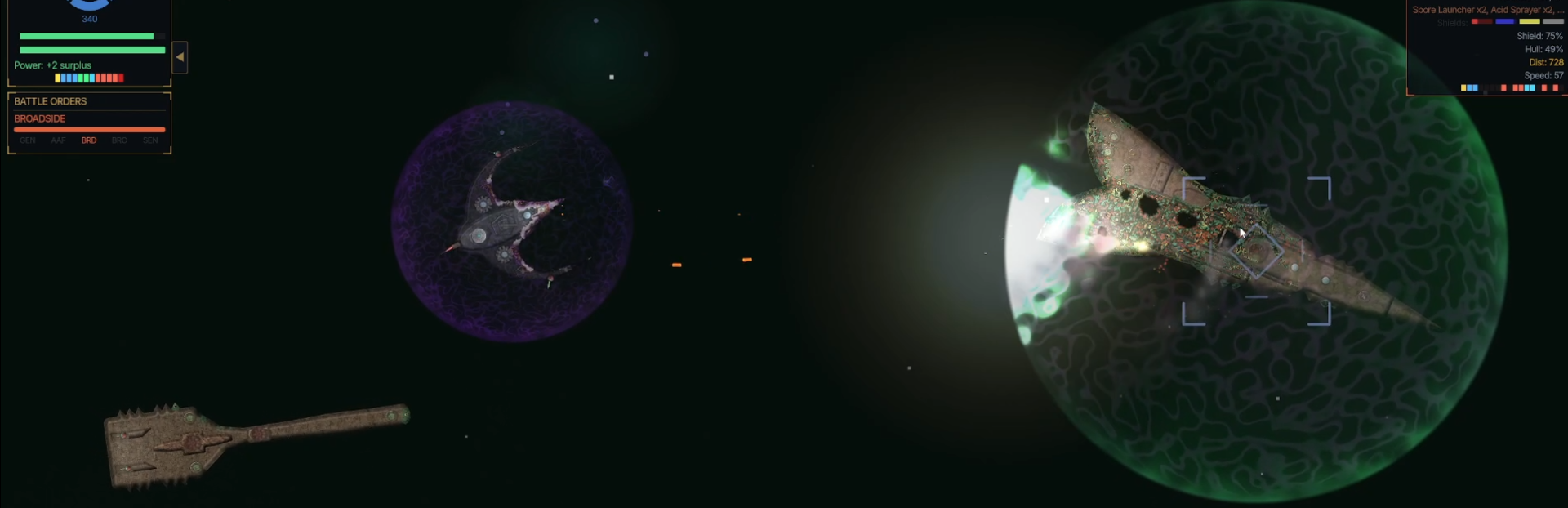
Share your ships on the Workshop. The camera frames your fight for you. Enemy reinforcement director adds variety to tactical battles, and the Sol tutorial runs through to a living galaxy. Not available in the Demo version, sorry!Steam Workshop - Publish any ship you have built straight to the Workshop from the Builder Blueprint button. - Browse what other players have shared and bring their ships into your own game. - Editing a published ship and publishing again updates the original entry. - Preview images are captured from your ship automatically.
https://steamcommunity.com/app/4513600/workshop/Tactical Camera - The camera picks the closest zoom that keeps your ship and your target on screen, clear of the HUD. - Zooming with the wheel sticks. The camera holds the closeness you chose for as long as the fight stays where it is, and widens only when your target opens the range. - Choosing a new target returns the camera to your preferred framing. - Camera Framing setting: how close the camera sits by default, from near to far. - Camera Lead setting: how far ahead the camera looks. Movement, Cursor, or None. - Auto-Frame Target can be switched off if you would rather hold your own zoom. - All the options can be turned off and on in settings because I know how picky I am, and I assume some of you have the same disease. Reinforcement Waves - Enemy forces arrive in waves, with a readout of what is still held in reserve. - Each engagement has its own shape, and the engage button tells you which fight you are walking into before you commit. Sol Campaign - The Sol tutorial plays through to the handoff into the open galaxy. - New Sol tab with an orbital map of the system, garrison strength at a glance, and clear costs. - Thrix can be recruited and fights alongside you into the galaxy. - Guidance waits its turn instead of stacking on top of other prompts. Steam post image Combat Visuals - Richer hull and module destruction: heavier debris, crap flying out from dying cores and secondary blasts. - Impact sparks retuned, and have blast patterns based on impact angle. - Punchier muzzle flashes. - Engines cast light in a cone instead of like a lantern, the hull struts that peak out when a ship gets blown in half don't look factory fresh now. - Beams read clearly at every zoom, spark only where they actually touch, and scatter into open space when they miss. I'm still not suuuuper happy with how some of them get alias artifacts at long-range zoom, but they're better. - The Tendril Grab is a full five-stage effect, with a pulsing crosshair marking the weak point on the tether. Cut it and the grab breaks. This is the first ability to get non-placeholder VFX! - Overlapping ships stay visually separate instead of turning into The Fly (tm) Sound - Audio range follows the camera, so pulling back to take in a wide fight keeps your own guns, hits, and engines audible. Mostly noticeable for the new camera auto-frame feature. Galaxy Map - Ships on the map are drawn from their actual designs, so you can recognize a fleet by its silhouette. The arrow-head placeholders have been put to rest. - Unexplored space fades out at the frontier instead of looking like Minecraft (tm) - Added some VFX to make your ship easier to find if you have a dark hull texture Builder - Fitting a shield generator makes Emergency Shields available straight away. - Cut openings are respected by armor plating and hull depth. Doughnut ships are now more reliable! - Ships you save keep working as new content arrives. If a design calls for a part that no longer exists, the Builder shows you what is missing rather than loading a broken ship.