
Full notes
Full Grand Piano Simulator update
Read the full published notes in a cleaner layout. The original post stays linked below.
What changed
- Maps
- UI and audio
Grand Piano Simulator changes
Create your own personalized performance space. Arrange a wide range of objects, from tables and beds to trees and lights, to design your ideal stage. Freely adjust the layout and size of objects to make it uniquely yours.
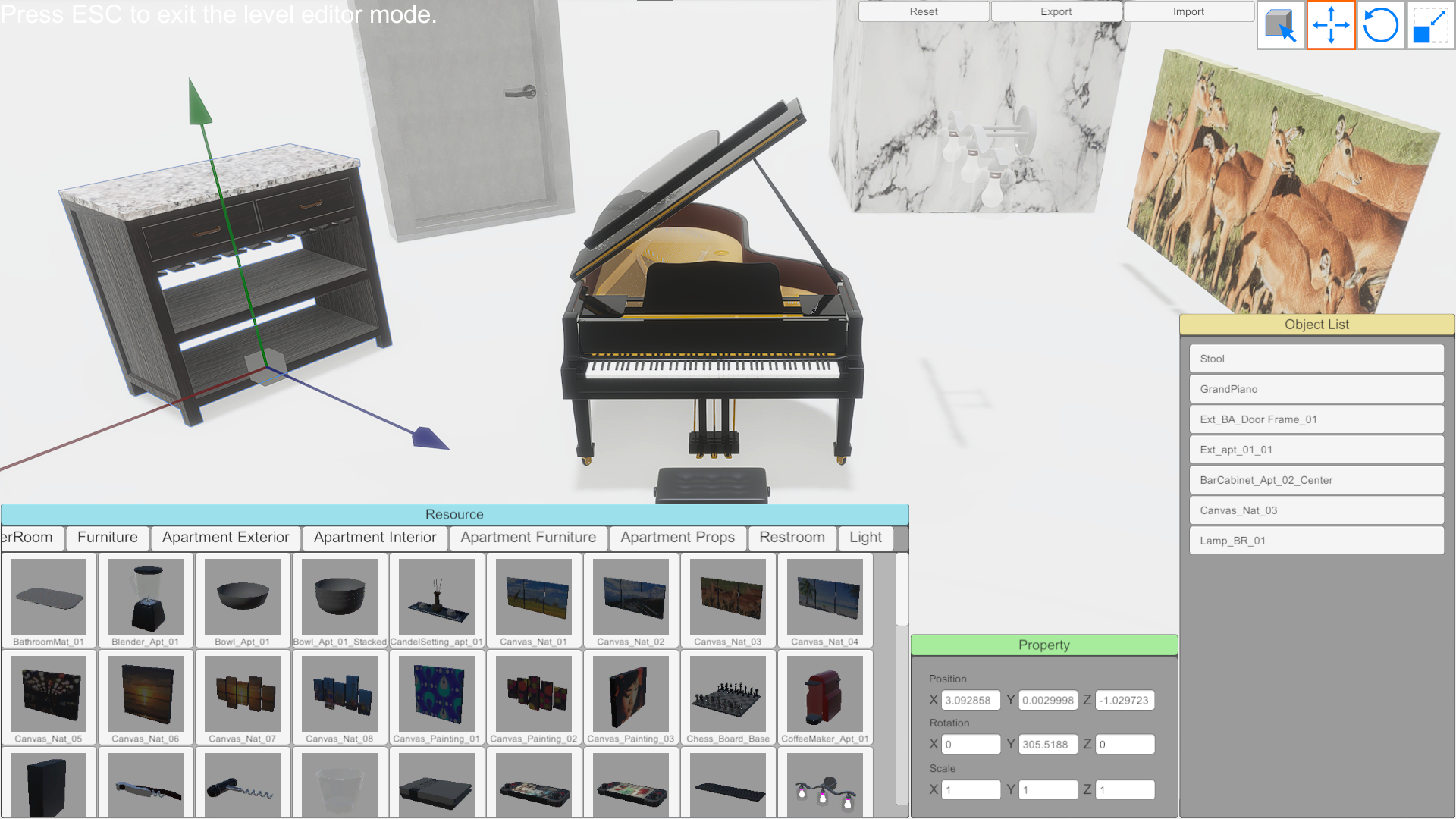
Editor mode can be activated by pressing the Level Editor button within the Options menu.
Four tools are available for your use, each represented by an icon in the upper right corner of the screen. These tools include: ・Selection Tool ・Move Tool ・Rotate Tool ・Scale Tool
To place an object, simply drag and drop it from the resource window located in the lower left corner of the interface.
The properties window allows you to directly modify an object's position, rotation, and scale.
To select and highlight a specific object, click on its corresponding entry in the object list.
To exit editor mode, simply press the Escape key.
Upon exiting, scene data is saved automatically. However, you also have the option to manually save your data using the import and export functions.
Source
Changelog.gg summarizes and formats this update. How we read updates.