
In this update15
Full notes
Full Genterra update
Read the full published notes in a cleaner layout. The original post stays linked below.
Repeated intro
Hello architects!
What changed
- UI and audio
- Gameplay
- Balance
- Events
- Maps
- Performance
Genterra changes
I bring you v0.2.5 with a bunch of UI and Terra Prime changes. I was originally going to include these changes with v0.3.0, when I introduce planet 2, Terra Mare, but decided to release these changes separately so you're prepared.
These changes should be save compatible, but to be safe back up any saves you want to keep. They can be found at %APPDATA%\\Genterra\\saves.
Resource Deposits
I wanted to include resource deposits from the very beginning, but couldn't nail down exactly how I wanted to portray them. I think I have it figured it.
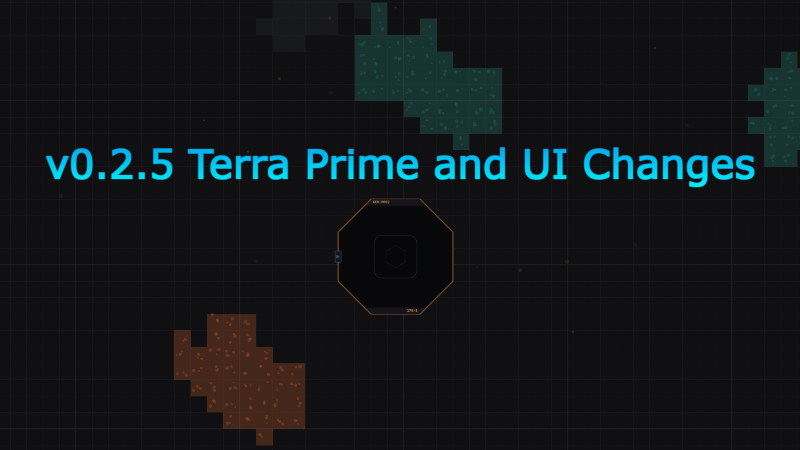
Terra Prime now has iron, copper, and coal resource deposits for your extractors. You can no longer place extractors just anywhere, but I think this is a worthwhile change as it makes logistics more fun.
Each cell has a random value driven by a game seed (which we'll get to in a bit) and depletes as the extractor does its job. The extractor is six cells in size, so it totals the amount of resources under it, which can be seen in the building inspector.
The deposits do NOT get richer and bigger the farther out you go. It is a uniform density.
Extractors now auto select the resource they are placed on top of. In cases where the extractor is spanning multiple resource types, the resource with the most wins.
Who knows, maybe there's more deposits out there. If only there was a building to find them...
UI Changes
I promise to not keep making changes to UI. As I playtest, I find what I feel are better ways to portray certain actions and better placement options for UI elements.
I have moved the Research, Inventory, Database, and Upgrade buttons to the bottom right of the screen and made them only icons. I think this is a cleaner approach and matches other games in the factory genre.
There are also a few more buttons down there as well, such as one for the Build menu and a new UI called the Help Center. As you progress through the game, entries will be added to the Help Center to help you better understand certain mechanics.
The bottom center build menu has been replaced with a hotbar. 'Q' is the default button for the Build menu now. With the Build menu open, you can drag buildings to the hotbar or hover over the building an click the corresponding hotbar slot for easy access.
I also updated the System Config UI to be more inline with the theme of the game.
RWG
With the inclusion of resource deposits, we now have the concept of game seeds. When starting a new game, you will now be prompted for a session name (more on this in a bit) and an optional seed.
Save Games and Sessions
I decided to change how the game saves its session. I took inspiration from how Satisfactory does its save game management by including a way to group your saves. When starting a new game, you will be required to give a session name that all saves for that session gets grouped under. The saves for that game will now be in its own subfolder in the save directory. You are able to delete individual saves and entire save sessions.
Any saves from before this change are still accessible, they just don't get grouped.
Autosave now rotates between three different slots. This allows you to go back even further in time if you made a mistake.
Power
I changed the power logic from being a complete shutdown when over capacity to being a brownout where buildings slow down based on how much into a brownout you are. This is more forgiving than strictly shutting down all buildings when power draw is greater than power generated.
Recipe Balance
I updated some recipes to be better balanced with production chains. Some ratios are now easier to figure out quickly.
ARIA
The tutorial has now been moved from being in the text log to having it's own pop up in the upper right of the screen. I'm leaning on the idea of removing the text log altogether and just relying on other ways to alert players to various factory happenings, but haven't pulled the trigger yet. Would love to know if people find the text log useful or not.
GenCore
The GenCore is designed to be the building that helps players get started. It provides enough storage to hold one stack of every item in the game as well as the ability to auto craft iron plates and copper wire, albeit really slow, in order to prevent any soft locking due to building deletions (although that should never happen).
There is now a minigame in the GenCore to help speed the process of the autocrafting. It used to be you could just hit am "Assist" button and it would shave a quarter second off the 10s autocraft time. The new minigame allows you to instantly craft the item as long as you succeed in the minigame. But be careful, a fail and the crafting of the current item resets.
Minimap
The minimap is now collapsible. It also shows you what coordinate you are currently centered on.
Full Changelog
New Features & Systems
Resource deposits are now physical. Iron, copper, and coal exist as ore patches on the map instead of being mined from nowhere. Extractors must be placed on a deposit (off-deposit placement is refused), and patches deplete permanently as you mine. Every new save guarantees a starter iron and copper patch near your GenCore.
Extractors auto-bind to the ore under them — no recipe to pick. Covering more deposit cells makes a patch last longer (not mine faster). Hover tooltips show remaining ore per cell, the whole deposit's total when zoomed out, and a preview of what a placement would tap. The building inspector shows a live Ore Reserve bar.
GenCore Assist mini-game. The old button-mash is replaced by a timing meter — hit the perfect window to instantly finish a craft, the wider window to halve the remaining time. Missing does nothing, so mashing is no longer optimal.
Help Center. An in-game reference of mechanics articles that unlock as you encounter each system, with unread badges. Pauses the factory while reading.
Bottom-screen hotbar (keys 1-9, 0). Drag buildings or belt tiers into slots; the tutorial follows whatever slot you assign.
New full-screen Build Menu (Q) with Basic/Advanced grouping, a preview pane, and drag-to-hotbar.
Per-session save system. Saves are grouped under the mission you name at New Game. The Load screen is a two-pane session browser with per-save and whole-session delete. New games open a setup screen for the mission name and an optional resource-deposit seed (viewable/copyable later in Settings).
Rotating autosaves — three slots per session, always overwriting the oldest.
Collapsible minimap with a coordinate readout, and a zoom % indicator above the zoom controls.
Gameplay & Balance
Power brownouts instead of blackouts. When power runs short, buildings slow down proportionally instead of switching off, and the Power HUD shows a red Brownout % readout.
Coal plants burn fuel in proportion to power actually used, with solar spent first — so coal sits idle (burning nothing) when solar covers your load.
Solar panels need less babysitting — dust grace period raised from 3 to 5 minutes.
- Recipe rebalance across the Planet 1 chain for cleaner ratios and faster cyclesIron Rod & Copper Wire at 60/min (clean 1:1 with a smelter), Coal Dust at 30/min, Steel Beam & Steel Plate at 15/min, and Belt Mk2 throughput greatly increased (30/min, batch-crafted) — per-belt cost unchanged.
Cheaper early buildings: Constructor 20 iron plate (was 50), Basic Storage 30 (was 50).
Research Rocket is far cheaper to build — 100 iron plate + 50 copper wire (was 300/200) — so you start researching sooner. It also can't be relocated while holding contributed research (a tooltip explains why); demolishing it forfeits its contents.
Tech-tree rebalance & reorder: several tiers cost more for better pacing, side branches reorganized, and Orbital Commerce (the Orbital Dispatcher / selling for credits) moved earlier so it funds later upgrades. Research tier numbers now reflect true tree depth.
- Global upgradesStorage Capacity, Output Buffer, and Auto-Dispatch are now bought once and persist, on a new Global tab.
Quality of Life / UI
Settings redesigned into a centered modal with a category rail and click-outside-to-close, plus a Mission Info section with the seed and a copy button.
Belt bridges redesigned to read as an overpass — a raised deck with a soft shadow — so crossings are recognizable at a glance (replacing the old corner-bracket look).
Unconfigured buildings now show a clean empty-slot icon instead of a dashed question mark.
Right-click a selected belt → "Delete Selected,"matching how buildings already worked.
Belt Mk1 rails brightened to a neutral silver so tiers are easy to tell apart.
Build-menu glyphs and the GenCore now adopt the planet's accent color and correct shapes; the encyclopedia lists items in unlock order; quit/menu dialogs restyled and more readable; new title-screen typography.
Bug Fixes
- A batch of belt/bridge building fixesbridges now auto-create correctly when you cross or start a belt on another belt; rotating a belt no longer makes items "warp" to the wrong line; moving a selection that splits a belt no longer warps items to the moved half; bridges consistently render the horizontal belt underneath; belts off a splitter connect to the splitter directly above instead of an adjacent one; cross-tier corners hand off items correctly; and a stuck-belt-after-rotate-and-extend bug is fixed.
The deposit tooltip now draws in front of paste-preview ghosts instead of behind them.
Extractor ore-reserve total updates correctly when you move the extractor.
Save data, settings, and logs moved to a "Genterra" folder, with automatic one-time migration from the old folder (old folder left intact as backup).
Fixed phantom"AUTO SAVE" / "QUICK SAVE" sessions appearing in the Load screen (whose Delete could wipe a real save). Loading/deleting also falls back to older flat save locations, so pre-update saves still work.
Content & Text
GenCore, Coal Plant, and many research-tier descriptions reworded; new Help Center article content for Terra Prime mechanics.
Thank you for your support and be on the lookout for planet 2 in v0.3.0 coming soon!
Source
Changelog.gg summarizes and formats this update. How we read updates.