
In this update4
Full notes
Full Generation Ship update
Read the full published notes in a cleaner layout. The original post stays linked below.
What changed
- Gameplay
- Balance
- UI and audio
- Performance
- Fixes
- Events
Generation Ship changes
Howdy, galactic wanderers!
The primary focus of this iteration was to restructure the whole transportation system.
Revolutionizing Storage Management
As Generation Ship continues its journey through development, a key focus has been placed on refining crew management for diverse tasks, prompting a substantial overhaul of the storage system. The traditional resource boxes have transformed into visual elements, simplifying the system and boosting efficiency by eliminating outdated code.
Redesigned Storage Units
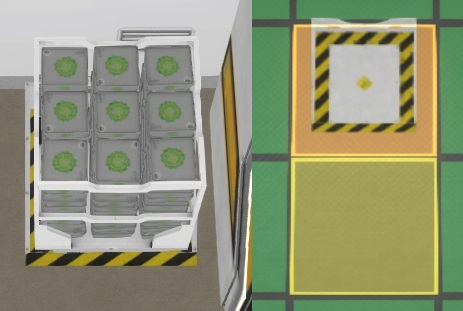
With crew members now taking on the task of moving resources themselves, the need for transporting drones is under consideration for future updates. Meanwhile, storage units have been revamped to offer better functionality. The 1x1 storage now accommodates a single box, while the updated 1x2 and 2x3 versions provide space for 9 and 24 boxes, respectively, optimizing storage room layouts.
Resource Visuals Refinement
Resources are now visually sorted by type, allowing for a clearer view of the quantities available. If three resource types occupy three columns, they will stack, simplifying resource tracking.
The new Resource Management
Connections between storages have been replaced with a more intuitive setup. Users can now specify desired resource quantities, configure them as input or output, and crew members will automatically fill or empty the storage. Additionally, a new section in the selected entity enables task prioritization and accessibility restrictions for all in/out connections of a storage.
Grouping Feature for the PiMenu
The pimenu receives a substantial upgrade with a new grouping feature, making item management more intuitive and user-friendly.
Dynamic Bars Visibility
Bars now remain visible for a longer duration and scale with the distance, providing a more dynamic and user-friendly interface.
Easier GameSpeed Control
To enhance the gaming experience during waiting periods, shortcuts have been added for adjusting speeds using the 1-9 keys.
Full ChangeLog
Fixes
Closing Arrived Persons Hint will stay closed now
Better Layout for Too fast in Tutorial Popup
New Room Button is not highlighted anymore, when a blueprint is selected
Flickering Out of Bounds indicator for Tutorial
Fixed Problem when Person has too much water, getting to an activity loop
Fire spreads out too fast.
Some Serializing issues for Productivity items
Quality of a resourceBox was shown wrong in some special cases
Maybe wrong translations when pluginmanager initialized twice
Rounding Errors on some special cases lead to not exact amounts
Persons idling didn't do tasks with priority 1
Checking now for available Path to the target rooms with pimenu
Some Choose Popups were not opening
Interior Item Prototype didn't respect ship spinning
Rare case where resource Value can get nan
Error Logging when trying to render a path between 2 elements without a usable connection.
Person not putting things to dismantled storage
When working of door, the person was wrong rotated
Show Fire Risk when a fire broke out
Sort Connections Button was not working anymore
Wrong Avatar was used for some Helps
Out of Screen Indicator was not shown in some cases
Overlapping text in intro
Engines were on in the intro
Fixed Playing speech twice in some cases
By default new Player Blueprints not get to the Translation
Fire Burning Problem Icon was not fullsize
Wrong Problem Icon was shown in the Special Event Panel for unconciousness when the problem changed
Percent value of the Report sending was not shown
Opening Dynamic Translations not showing the correct value for some special cases
Ui disappeard in a special case due to a strange unity bug.
Endless simulation loop in a special case with Slots using Cheats.
Prevent overlapping of UnderConstruction text in the Progress Element
Fixed Exception with ResidentIcon
Added
Shortcut 1-9 now defines different speed option
Added a Task Tooltip
Support for overtaking Worker Slots
Support Overtaking Service Tasks with the pimenu
Added TaskPanel to all Selection Panels
ShipSection can have problems now
More Problem Elements to Special Event Panels
Game Feedback Dialog
Added Special Event Help to the Help Window
New Problem Popup with Interactive Help
Visualize Usable Person Slots as Model Changes
EventHistory ago got a tooltip with the exact time
Improved
Show all problems of a mission instead of just a single one.
Game Feedback dialoge is now always on top
Construction/Maintenance Bars scale dynamic to the distance
Changed Group hotkey usage to Alt+1 and so on, to have space for speed change
Construction Sides show now all Problems instead of just the first one
Make Help windows easy closable
Support larger amount of options
Highlight best connection in resource overlay
Performance improved for Path checks
PiMenu entries of Person with Interior Items can now use Transportslots even more
Replaced expensive simulation method to gain simulation speed on large ships
Tooling for Translation
Better placement for some Tutorial Texts and highlights
Person stop Balance Task if resources is removed from the storage
Border Color for warning, info and success boxes
Moved details of Room and InteriorItem down, and added General Problems to all Selection Panels to that place.
Padding of upper buttons in selection panels is now dynamic
Padding to highscore elements
Balancing
Canceling Crafted items needs to be emptied the containers now first
We hope you enjoy these new features and improvements. As always, your feedback is invaluable in shaping the game's development. Stay tuned for more updates, and thank you for your continued support!
If you encounter any issues or have questions, please don't hesitate to reach out to us. Together, we'll make this game even better!
Want to see more?
I also post the progress and more pictures to our Discord:
And don't forget to wishlist and follow us to keep up to date.
Source
Changelog.gg summarizes and formats this update. How we read updates.