
In this update5
Full notes
Full Generation Ship update
Read the full published notes in a cleaner layout. The original post stays linked below.
Repeated intro
Hello, fellow space enthusiasts!
What changed
- Gameplay
- Balance
- Events
- UI and audio
- Fixes
- Performance
Generation Ship changes
We're excited to bring you the latest update for Generation Ship. In this iteration, we've added some blazing hot features and made several improvements. Let's dive right in!
New Trailer
One of the significant tasks we undertook was creating a new trailer that better reflects the gameplay. Check it out here: https://youtu.be/3WJcO4HAoZc
FIRE !
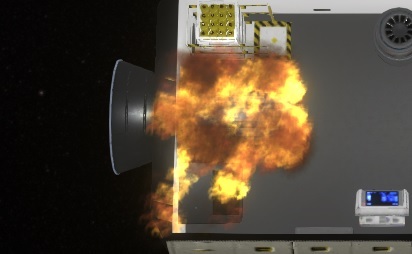
The highlight of this update is the introduction of fire mechanics. As we teased in previous updates, fire is related to the N² (nitrogen) level in the air. Low N² combined with adverse conditions will increase the chances of a fire outbreak.
Fires in the game have realistic effects: - They consume oxygen in the air, converting it to CO2, and rapidly raise room temperatures. - They reduce interior item and room condition. - While a fire is burning, interior items in the affected things cannot be used.
We've added visual fire effects that intensify over time when no action is taken.
In case of a fire emergency, there's a special event and some helpful guidance.
If the fire level becomes too high, it can spread to nearby interior items, so swift action is crucial.
You have two options to combat fires: Equip your crew with fire extinguishers, a new equipment slot that utilizes CO² bottles to put out fires.
In space, you can open exterior doors to reduce oxygen levels, eventually extinguishing the fire.
Oxygen Mask
Fighting fires in low oxygen environments can lead to crew members losing consciousness due to increased CO² levels. To counter this, we've added an oxygen mask slot. When worn, crew members will use their own oxygen instead of the ship's air.
Storable Blueprints
Blueprints can now be reused in other games.
We've also enhanced the user interface for blueprints and added a preview feature.
UI Improvements
We've made several UI improvements in this update. The "Energy Depleted" panel has been rewritten to provide clearer problem identification.
Improve Tasks
Tasks have also received significant enhancements. They now display a more detailed status, making it easier to understand why a task may be disabled or ready.
For disabled tasks, we've provided reasons, so players can quickly identify why a task is not available. Reasons could include the interior item's resource being full or the room being fully maintained.
We've also added a priority icon with up to 5 stars, indicating the importance of a task. Crew members may still choose lower-priority tasks based on their working room, skills, or proximity.
Full ChangeLog
Fixes
Fixed Exception when opening Loading without savegames
Animation Positions for Cooling Plate
Fixed wrong detected Problem with supply ships without resource boxes
Warning for new Persons triggers an Metabolism Stopped in rare situations
When Overtaken a Task by another Person, Both persons were doing the task.
Warning when using the AssignWorker buton
Fixed some Errors and Warnings
Person will stop their Transport Activity if the storage is going empty while walking to it.
Construction was possible without Tools in belt
Construction Belt can just be done when its filled completely
Some Unconcious Problems for the User were not shown
Full Slot is not recognised in some rare cases
Errors when Mood goes below zero
Some rare Exceptions
Fixed specialcase in History when Inteiror Resources are moved
ForceOpen at door behaves now same as open for connection
Medical Bed was not working
Some rare UI Errors
Prevent Metabolism Stoped Warning when Person goes on a mission
Loading Game with Inflating Walls cause wrong Heat Alert
Small inaccuracies storing doubles in Savegame
Cylinder Deform was not applyed for Prototypes while place rooms
Spinning Engines in Savegames behaved wrong.
Tooltip of OperateType of TransportSlot not changed when changing the operate Type
Full AutoCorrection throws an Exception
Shift for Cheat Resources was not working for Interior Configuration
Readded missing Side Connection Model.
SpecialCase where Demo Popup was not in front
Flickering of ContinueButton while waiting for Login
Not starting on some Linux Systems
Tutorial was not shown in some rare cases
AutoFocus in the whole game is removed, due to a bug in unity with no workarounds.
Starting Engine room to have longer O2 support
ResourceFinding Tutorial hinted to the wrong place
Fixed some special interioritems were not shown in Blueprint storage overview
Fixed Dock Storage was shown in Blueprints storage overview
Savegame could contain unparsable double Value in very rare cases
Logging of Exception Stacktraces
Feedback was not send in on special condition
Camera was not aligned correct on very low fps and high speed
Added
O2 Mask to survive in low oxygen/high CO2 environments
Ctrl+Mouse Wheel Cheat support for Person Slots
Ctrl+MouseWheel cheats resourceBox fillsize
Priority Icon for Tasks
Added Problems to Tasks
Sounds for PiMenu - Open/Close
Additional °C, Bar and Humidity Percent Marker Text to the Air Values to make it better readable
Focus Buttons instead of click on the icon in Selection Panels
Added Ctrl+MWheel on ResourceContainers as shortcut for changing container-value
Hardware Check in front of the game with some infos..
Auto Balancer Algorithm, to adjust the Center Of Mass as good as possible.
Blueprints have now Screenshot Icons
Blueprints can be saved in UserFolder, so can be reused in new Games
Welcome Text after register was sucessful
Ship Generator now using a Savable Playback System
Improved
Colorized Construction, Maintenance and Fire Bars different, to show the difference better
Renamed Construction Slot to Tool Belt everywhere
Updated to new Unity Packages
Better PiMenu Problem for Person
Storage OVerview shows single ResourceType of storage if available
Faster reacting on critical need values
Button for Cancel rooms and interior items
Added Energy and Heat to Interior Item Details
UI for Productivity hides energy and heatenergy when they have no influce
Warning Window when Energy is depleted
Close also copies the Storage Settings and set the StartRotation
Hide Recipes for Workbench that can't be placed
Reduced Animation Speed of Items while placing
Store Animation Position in savegame
Reduced Noise of Rocket Engines when far away
Persons PiMenu not show FillsTate with error, when person has the needed resource
Placement of rooms don't restrict rotation on manual rotation
FpsElement number format
Show Needed SkillLevels on Interior Item Preview
Moved Skills from Activity to Slots
Better Opening Times of Report Window on large ships
Big Performance Update for huge ships.
Disabled Light, when they are not visible to improve Performance
Reduced Lightcount for rooms
Removed Startup Camera, so its directly focused after loading a game.
Updated Feedback Screen
Updated to new Unity Version
Improved Building Generators Performance
Changed text of dismantle storages, To not intend players to remove all storages.
Layout of Blueprint Preview
Changed Date Format of SaveGames to ISO 8601
Move all GameData to a single spot
Balancing
Reduced Periority of Working.
Removed
Speed and Efficiency
We hope you enjoy these new features and improvements. As always, your feedback is invaluable in shaping the game's development. Stay tuned for more updates, and thank you for your continued support!
If you encounter any issues or have questions, please don't hesitate to reach out to us. Together, we'll make this game even better!
Want to see more?
I also post the progress and more pictures to our Discord:
And don't forget to wishlist and follow us to keep up to date.
Source
Changelog.gg summarizes and formats this update. How we read updates.