GearStorm v. 1.613 Day/Night Ratio Setting, Auto Graphics Settings
Loyal Customers, We are rolling out a small update adding automated system testing and graphics settings to make our first time player experience better and help people tune the game.
Full notes
Full GearStorm - Armored Survival update
Read the full published notes in a cleaner layout. The original post stays linked below.
What changed
0 fixes6 additions0 changes0 removals
UI and audio
Server
Gameplay
addedLoyal Customers, We are rolling out a small update adding automated system testing and graphics settings to make our first time player experience better and help people tune the game. We also included a very frequently requested feature to change the percentage of the day that is night and persist that setting and the day length setting!
addedAutomatic Graphics Settings When First Starting the Game: To avoid issues when first starting GearStorm, we now have a auto-system benchmark running that automatically adjust the initial graphics settings for your system. For those of you that already own the game, your graphics settings may change only the first time you run it after this benchmark. Feel free to go into the options->graphics settings and set things like you want them again and they will persist.
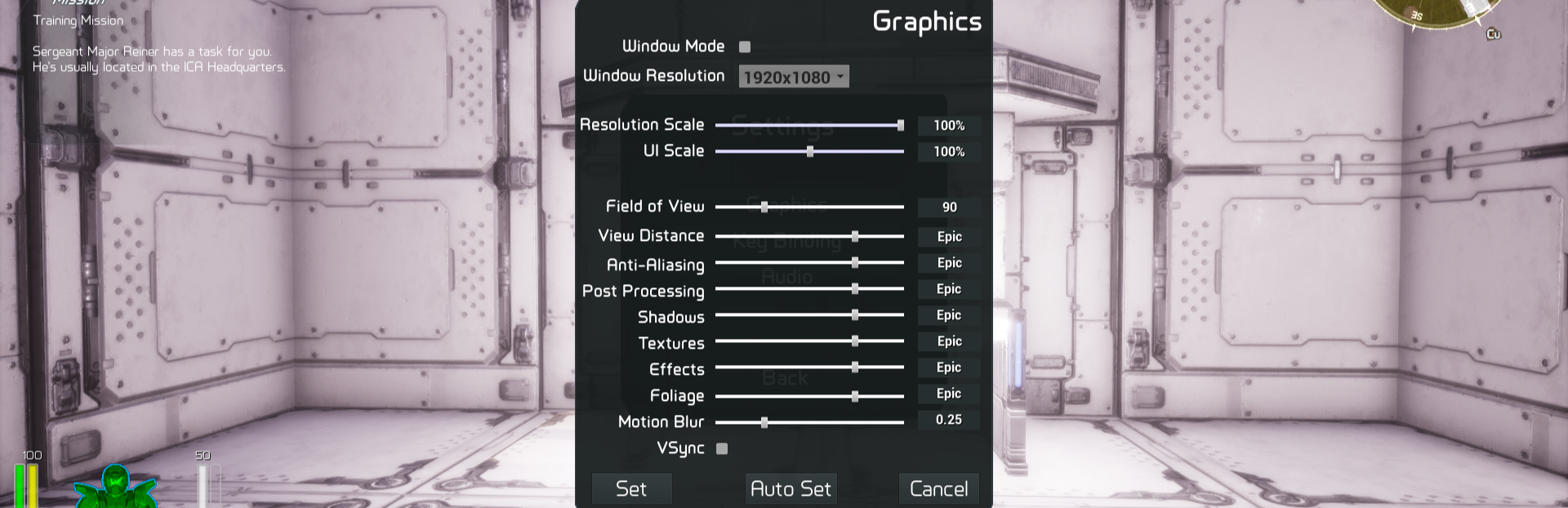
addedAutomatic Graphics Settings Button: We have added the automatic system bench-marking tool to the graphics settings dialog so you can benchmark your system and get suggested graphics settings anytime you want.
addedNight Percentage Setting: Responding to our community request to add the ability for the server admin to change the percentage of the 24-hour day of the map that is night we have added a setting to the "Game Settings" screen under the GameMaster menu (backspace by default). This and the other game settings on this screen now persist for all your maps on that server.
addedAdding a option for night percentage on the game setting dialog, persisting day length and night percentage to game.ini when changed.
addedAdding auto-scalability on startup and in graphics options
GearStorm - Armored Survival changes
addedLoyal Customers, We are rolling out a small update adding automated system testing and graphics settings to make our first time player experience better and help people tune the game. We also included a very frequently requested feature to change the percentage of the day that is night and persist that setting and the day length setting!
addedAutomatic Graphics Settings When First Starting the Game: To avoid issues when first starting GearStorm, we now have a auto-system benchmark running that automatically adjust the initial graphics settings for your system. For those of you that already own the game, your graphics settings may change only the first time you run it after this benchmark. Feel free to go into the options->graphics settings and set things like you want them again and they will persist.
addedAutomatic Graphics Settings Button: We have added the automatic system bench-marking tool to the graphics settings dialog so you can benchmark your system and get suggested graphics settings anytime you want.
addedNight Percentage Setting: Responding to our community request to add the ability for the server admin to change the percentage of the 24-hour day of the map that is night we have added a setting to the "Game Settings" screen under the GameMaster menu (backspace by default). This and the other game settings on this screen now persist for all your maps on that server.
addedAdding a option for night percentage on the game setting dialog, persisting day length and night percentage to game.ini when changed.
Loyal Customers, We are rolling out a small update adding automated system testing and graphics settings to make our first time player experience better and help people tune the game. We also included a very frequently requested feature to change the percentage of the day that is night and persist that setting and the day length setting!
Automatic Graphics Settings When First Starting the Game: To avoid issues when first starting GearStorm, we now have a auto-system benchmark running that automatically adjust the initial graphics settings for your system. For those of you that already own the game, your graphics settings may change only the first time you run it after this benchmark. Feel free to go into the options->graphics settings and set things like you want them again and they will persist.
Automatic Graphics Settings Button: We have added the automatic system bench-marking tool to the graphics settings dialog so you can benchmark your system and get suggested graphics settings anytime you want.
Night Percentage Setting: Responding to our community request to add the ability for the server admin to change the percentage of the 24-hour day of the map that is night we have added a setting to the "Game Settings" screen under the GameMaster menu (backspace by default). This and the other game settings on this screen now persist for all your maps on that server.
The full change log can be found below, if you enjoy GearStorm, tell your friends about it, show it on your stream (We always look for streamers and we'll plug their clips on our social media), share it on your social media, don't be shy to tag us! -------------------------------------------------------------- Full change log below:
Adding a option for night percentage on the game setting dialog, persisting day length and night percentage to game.ini when changed.
Changing link to 4NetPlayers
Adding auto-scalability on startup and in graphics options