
HomeGamesUpdatesPricingMethodology
Steam News26 January 20265mo ago

Update v0.8.9.5.2: UI Reinforcements & New Minis

A Foundation for the Future This update introduces a comprehensive overhaul of the Main Menu and several core submenus.

In this update3

Full notes

Full Game Master Engine update

Read the full published notes in a cleaner layout. The original post stays linked below.

What changed

0 fixes9 additions2 changes0 removals
  • UI and audio
  • Workshop
  • Gameplay
  • Maps
addedA Foundation for the FutureThis update introduces a comprehensive overhaul of the Main Menu and several core submenus. While these screens are sleeker and more intuitive today, think of this new UI as a robust functional skeleton . We have built this architecture specifically so we can, in future updates, layer on additional depth, interactive flair, and advanced customization options.
changedA Foundation for the FutureOur goal is to ensure that as GME grows, the interface remains a powerful, seamless bridge between your imagination and the tabletop.
addedStreamlined Interface & Workshop IntegrationWe’ve overhauled the Main Menu and several submenus to provide a more intuitive and efficient experience. These improvements were designed with GME's long-term growth in mind, ensuring the platform remains easy to navigate as we continue to add new features.
addedStreamlined Interface & Workshop IntegrationGeneralized Menu Improvements: Our core navigation menus, including the Create New Map and Load Existing Map screens, have been redesigned for better clarity and usability.
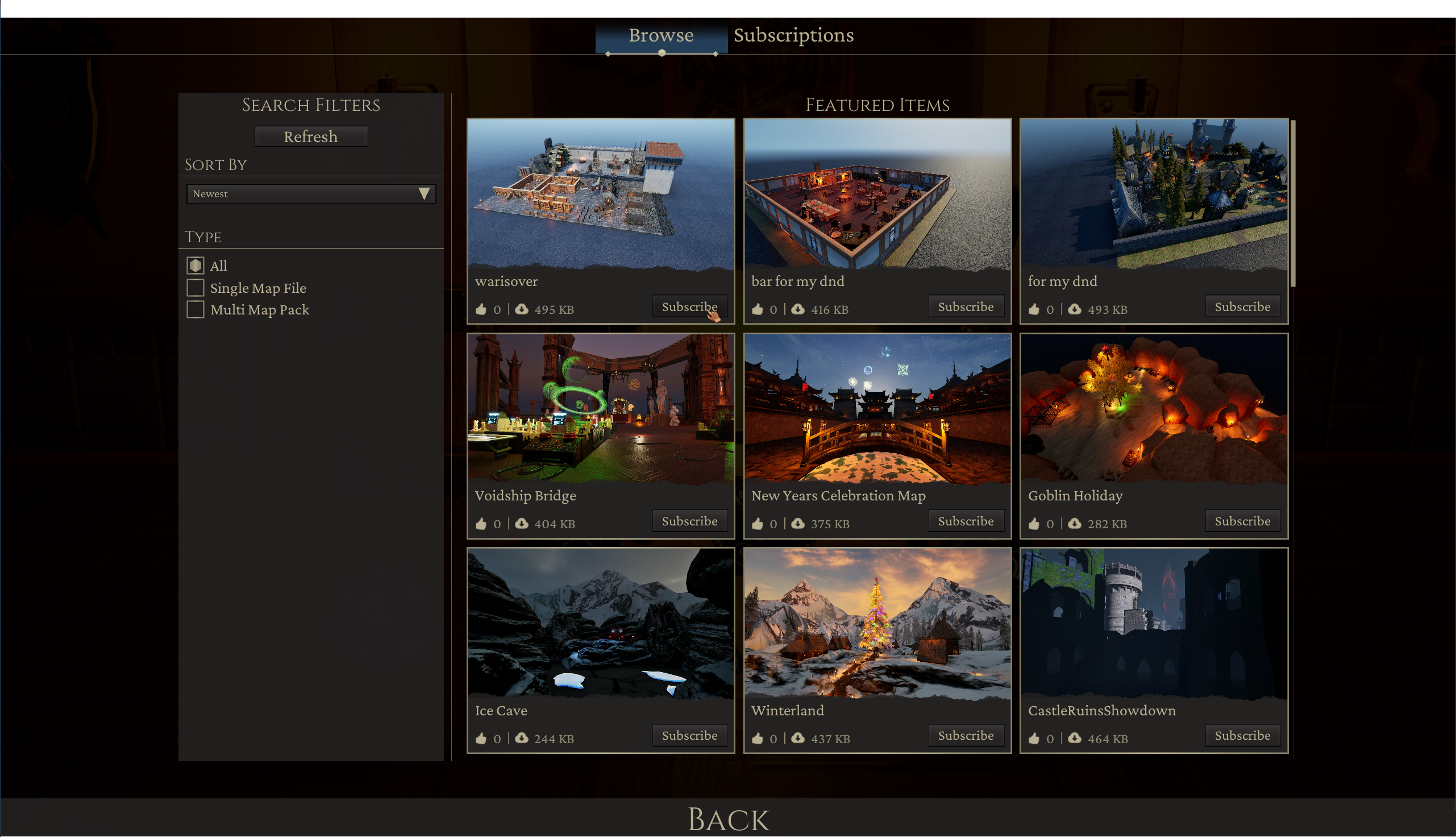
addedStreamlined Interface & Workshop IntegrationEnhanced Steam Workshop Browsing: We’ve made significant updates to how you interact with community content. The Browse and Subscriptions menus now offer a much smoother experience, making it easier than ever to find, subscribe to, and manage new maps and assets from the Steam Workshop.
addedThe New "Create Map" Menu & TemplatesStarting a new map shouldn't always mean staring at a blank void. We’re introducing Map Templates to give you a head start.

Game Master Engine changes

addedThis update introduces a comprehensive overhaul of the Main Menu and several core submenus. While these screens are sleeker and more intuitive today, think of this new UI as a robust functional skeleton . We have built this architecture specifically so we can, in future updates, layer on additional depth, interactive flair, and advanced customization options.
changedOur goal is to ensure that as GME grows, the interface remains a powerful, seamless bridge between your imagination and the tabletop.
addedWe’ve overhauled the Main Menu and several submenus to provide a more intuitive and efficient experience. These improvements were designed with GME's long-term growth in mind, ensuring the platform remains easy to navigate as we continue to add new features.
addedGeneralized Menu Improvements: Our core navigation menus, including the Create New Map and Load Existing Map screens, have been redesigned for better clarity and usability.
addedEnhanced Steam Workshop Browsing: We’ve made significant updates to how you interact with community content. The Browse and Subscriptions menus now offer a much smoother experience, making it easier than ever to find, subscribe to, and manage new maps and assets from the Steam Workshop.

A Foundation for the Future

This update introduces a comprehensive overhaul of the Main Menu and several core submenus. While these screens are sleeker and more intuitive today, think of this new UI as a robust functional skeleton. We have built this architecture specifically so we can, in future updates, layer on additional depth, interactive flair, and advanced customization options.

Our goal is to ensure that as GME grows, the interface remains a powerful, seamless bridge between your imagination and the tabletop.

Streamlined Interface & Workshop Integration

We’ve overhauled the Main Menu and several submenus to provide a more intuitive and efficient experience. These improvements were designed with GME's long-term growth in mind, ensuring the platform remains easy to navigate as we continue to add new features.

  • Generalized Menu ImprovementsOur core navigation menus, including the Create New Map and Load Existing Map screens, have been redesigned for better clarity and usability.
  • Enhanced Steam Workshop BrowsingWe’ve made significant updates to how you interact with community content. The Browse and Subscriptions menus now offer a much smoother experience, making it easier than ever to find, subscribe to, and manage new maps and assets from the Steam Workshop.

The New "Create Map" Menu & Templates

Starting a new map shouldn't always mean staring at a blank void. We’re introducing Map Templates to give you a head start.

  • Don't Start from Scratch: You can now pick a base like the Roadside Campsite or Frozen Ice Floes and just start building on top of it.

  • More on the Way: This is just the first batch. We’re planning to flood this menu with tons of templates, dungeons, cities, you name it, so you can get to the actual gaming part faster.

New Assets: Tuber in Trouble

Following the recent free release of our Tuber in Trouble adventure module PDF, we are excited to bring those assets directly into GME. You can now use these new thematic pieces to build and play through this whimsical, puzzle-heavy level 1 adventure.

  • New Minis & Bosses: Bring your encounters to life with high-detail models, including the Sentinel Golem and the Wolf-Bat.

  • Thematic Set PiecesWe've added various environmental assets and props inspired by the module, such as ornate glowing gates and specialized "Tuber" items, to help recreate the wizard's unique tower.

Source

Steam News / 26 January 2026

Open original post

Changelog.gg summarizes and formats this update. How we read updates.