
HomeGamesUpdatesPricingMethodology
Steam News13 September 20241y ago

Create better 3D worlds with the Water Removal Tool

Hi FWsim fans! In 2023, we added a feature to load Google Earth 3D scenery into FWsim (avabile under Show -> Scenery -> "Real Location").

Full notes

Full FWsim - Fireworks Display Simulator update

Read the full published notes in a cleaner layout. The original post stays linked below.

What changed

0 fixes3 additions1 change0 removals
  • Gameplay
addedIn 2023, we added a feature to load Google Earth 3D scenery into FWsim (avabile under Show -> Scenery -> "Real Location").
addedWe also added a water system, allowing you to add water to the scenery (available under Show -> Scenery).
addedWith your mouse, you can now erase the water. (Use the mouse wheel to make the brush bigger or smaller)
changedClose the window, and the changes will be saved. Your environment will now look correct.

FWsim - Fireworks Display Simulator changes

addedIn 2023, we added a feature to load Google Earth 3D scenery into FWsim (avabile under Show -> Scenery -> "Real Location").
addedWe also added a water system, allowing you to add water to the scenery (available under Show -> Scenery).
addedWith your mouse, you can now erase the water. (Use the mouse wheel to make the brush bigger or smaller)
changedClose the window, and the changes will be saved. Your environment will now look correct.

Hi FWsim fans!

In 2023, we added a feature to load Google Earth 3D scenery into FWsim (avabile under Show -> Scenery -> "Real Location").

We also added a water system, allowing you to add water to the scenery (available under Show -> Scenery).

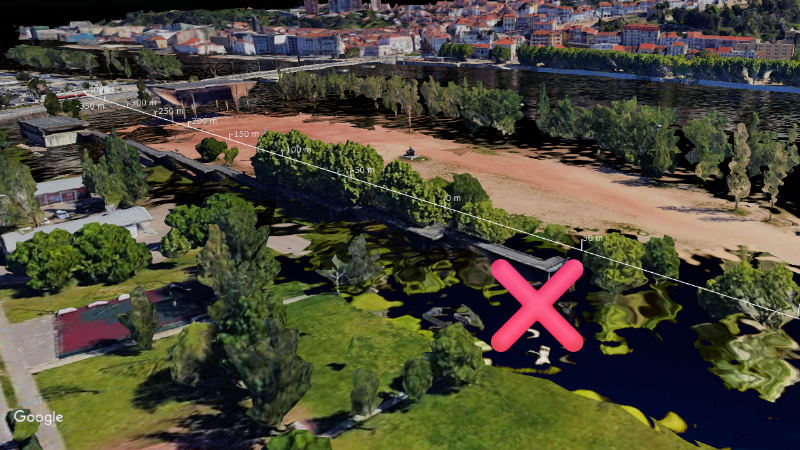
Usually, this works really well: set the water height correctly, and it blends in nicely with the Google Earth data

However, in some locations there is a "spillover" effect, where water enters areas that should be dry:

Here's how to solve this:

  1. Open the Water Removal Tool from the menu bar

  1. With your mouse, you can now erase the water. (Use the mouse wheel to make the brush bigger or smaller)

  1. Close the window, and the changes will be saved. Your environment will now look correct.

Source

Steam News / 13 September 2024

Open original post

Changelog.gg summarizes and formats this update. How we read updates.