
HomeGamesUpdatesPricingMethodology
Steam News15 September 20232y ago

The Entire World in 3D - FWsim 3.5 Beta 1

Dear FWsim Community, we are excited to announce this beta update with the following features: Loading the entire World in 3D FWsim could load 3D models in the past.

Full notes

Full FWsim - Fireworks Display Simulator update

Read the full published notes in a cleaner layout. The original post stays linked below.

What changed

0 fixes2 additions7 changes0 removals
  • Compatibility
  • Gameplay
  • Maps
changedwe are excited to announce this beta update with the following features:
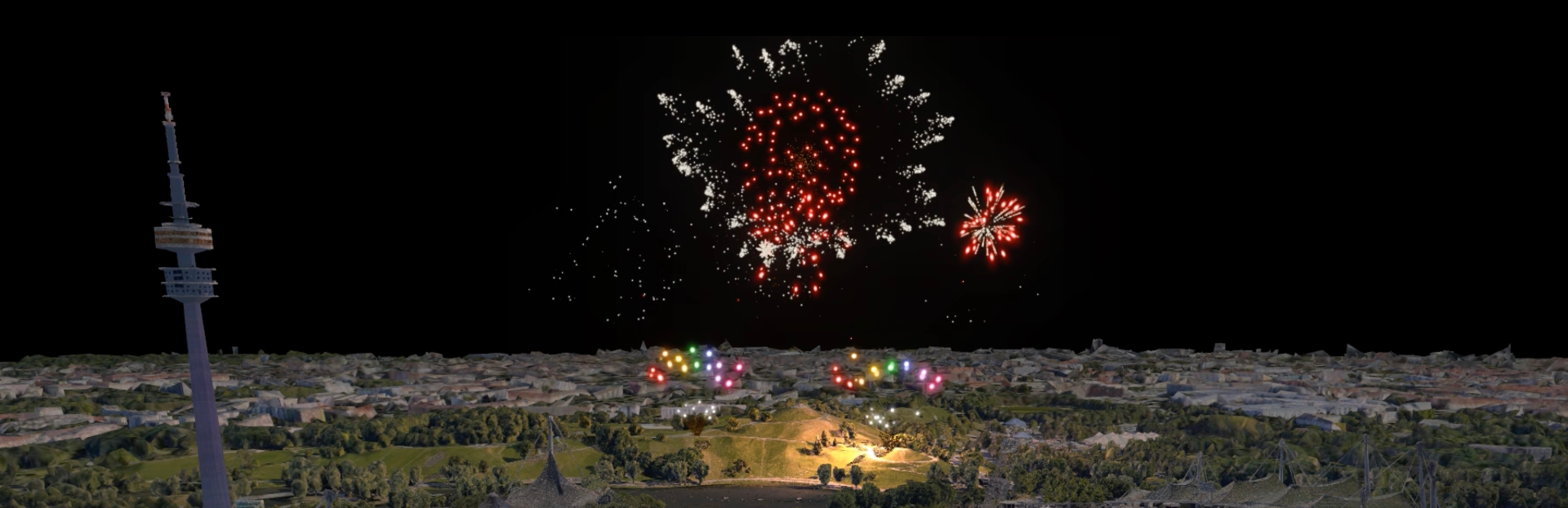
changedLoading the entire World in 3DFWsim could load 3D models in the past. But if you wanted to simulate a real place, you might face challenges. You’d either have to make your own 3D models or try to find the desired building models online. Yet, typically, you’d only find isolated buildings, not the entire landscape.
changedLoading the entire World in 3DOur data is provided by Google and consists of 3D terrain (hills and mountains) for the entire surface of the earth. It also includes 3D buildings for thousands of cities. The data is downloaded on request. Please note, since we rely on an external data provider, there is a risk this feature might stop working in the future.
changedLoading the entire World in 3DFind the geographical coordinates (latitude and longitude) in decimal degrees, for example 51,503° / 0.00° for a location in London. To get coordinates, simply open Google Maps and right-click on the point you want: Steam post image
addedLoading the entire World in 3DOpen an existing show in FWsim or create a new one.
changedLoading the entire World in 3DDepending on the location you load, your camera might be below the terrain. If you don’t see anything, move your camera upwards.

FWsim - Fireworks Display Simulator changes

changedwe are excited to announce this beta update with the following features:
changedFWsim could load 3D models in the past. But if you wanted to simulate a real place, you might face challenges. You’d either have to make your own 3D models or try to find the desired building models online. Yet, typically, you’d only find isolated buildings, not the entire landscape.
changedOur data is provided by Google and consists of 3D terrain (hills and mountains) for the entire surface of the earth. It also includes 3D buildings for thousands of cities. The data is downloaded on request. Please note, since we rely on an external data provider, there is a risk this feature might stop working in the future.
changedFind the geographical coordinates (latitude and longitude) in decimal degrees, for example 51,503° / 0.00° for a location in London. To get coordinates, simply open Google Maps and right-click on the point you want: Steam post image
addedOpen an existing show in FWsim or create a new one.

Dear FWsim Community,

we are excited to announce this beta update with the following features:

Loading the entire World in 3D

FWsim could load 3D models in the past. But if you wanted to simulate a real place, you might face challenges. You’d either have to make your own 3D models or try to find the desired building models online. Yet, typically, you’d only find isolated buildings, not the entire landscape.

The latest version, FWsim 3.5, solves this problem. Now, you can launch fireworks anywhere in the world, in 3D. It not only provides the location you want, but also includes the entire surrounding area.

Our data is provided by Google and consists of 3D terrain (hills and mountains) for the entire surface of the earth. It also includes 3D buildings for thousands of cities. The data is downloaded on request. Please note, since we rely on an external data provider, there is a risk this feature might stop working in the future.

Here’s how to use it:

  1. Find the geographical coordinates (latitude and longitude) in decimal degrees, for example 51,503° / 0.00° for a location in London. To get coordinates, simply open Google Maps and right-click on the point you want: Steam post image

  2. Open an existing show in FWsim or create a new one.

  3. Click Show → Scenery, and select the “Real Location” option.

  4. Enter your coordinates and click “Load”. Please make sure to use the right decimal separators. For example, if your Windows is set to German number format, you need to enter “51,50178” whereas on an English computer you would type “51.50178”.

  5. Depending on the location you load, your camera might be below the terrain. If you don’t see anything, move your camera upwards.

If you would like to preview interesting locations, or find out how good the data is at certain places, please use Google Earth.

Better placement of Fireworks on Buildings

In previous versions of FWsim, it was difficult to place fireworks on buildings. In this version, this is much easier and more intuitive.

How to activate the Beta

Please right-click FWsim in your Steam Library, and select “Properties”. There you can choose to participate in the beta:

Show us your work!

We look forwards to seeing what you do with the new features. You can post your shows here in the discussions, or at the FWsim community forum.

Source

Steam News / 15 September 2023

Open original post

Changelog.gg summarizes and formats this update. How we read updates.