
HomeGamesUpdatesPricingMethodology
Steam News30 July 20268d ago

Update 1.0.49 - Rotatable Activities & Better Minimization

Today’s update is a small one, but it brings a few useful improvements! Start menu fix We fixed an issue that could prevent some players from starting the game because the Continue, Load, and New Grove buttons on the st

In this update4

Full notes

Full Focus Grove update

Read the full published notes in a cleaner layout. The original post stays linked below.

What changed

1 fix2 additions3 changes1 removal
  • Gameplay
  • Fixes
changedToday’s update is a small one, but it brings a few useful improvements!
fixedStart menu fixWe fixed an issue that could prevent some players from starting the game because the Continue , Load , and New Grove buttons on the start screen could not be clicked.
changedStart menu fixThis should help players who were previously unable to get past the initial menu.
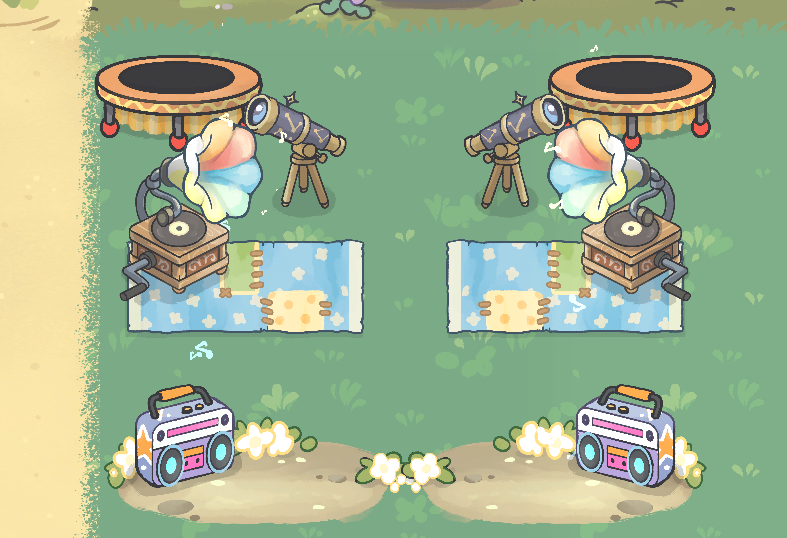
addedRotatable activity spotsYou can now rotate Dance Spots, Telescopes, and Trampolines, making it easier to fit them naturally into your grove.
addedNew minimization optionsWe added more control over what happens when Focus Grove is minimized. You can now choose to minimize the game:
changedNew minimization optionsThe new without tools option was added because some users experienced the Windows taskbar appearing automatically. Previously, keeping the tools available required part of the game window to remain displayed. Choosing the new option now hides Focus Grove completely.

Focus Grove changes

changedToday’s update is a small one, but it brings a few useful improvements!
fixedWe fixed an issue that could prevent some players from starting the game because the Continue , Load , and New Grove buttons on the start screen could not be clicked.
changedThis should help players who were previously unable to get past the initial menu.
addedYou can now rotate Dance Spots, Telescopes, and Trampolines, making it easier to fit them naturally into your grove.
addedWe added more control over what happens when Focus Grove is minimized. You can now choose to minimize the game:

Today’s update is a small one, but it brings a few useful improvements!

Start menu fix

We fixed an issue that could prevent some players from starting the game because the Continue, Load, and New Grove buttons on the start screen could not be clicked.

This should help players who were previously unable to get past the initial menu.

Rotatable activity spots

You can now rotate Dance Spots, Telescopes, and Trampolines, making it easier to fit them naturally into your grove.

New minimization options

We added more control over what happens when Focus Grove is minimized. You can now choose to minimize the game:

  • to the Mini Pomodoro Timer,

  • completely to the system tray,

    • with tools,

    • or without tools.

The new without tools option was added because some users experienced the Windows taskbar appearing automatically. Previously, keeping the tools available required part of the game window to remain displayed. Choosing the new option now hides Focus Grove completely.

Woodling improvements

We also made a small improvement to Woodling behavior. A Woodling should no longer get stuck after finishing a build when several of them are working on the same object, such as a Chessboard.

That is all for today’s small update - but a much bigger announcement is coming very soon! :)

Source

Steam News / 30 July 2026

Open original post

Changelog.gg summarizes and formats this update. How we read updates.