
In this update4
Full notes
Full Flyout update
Read the full published notes in a cleaner layout. The original post stays linked below.
What changed
- Gameplay
- UI and audio
- Performance
- Fixes
- Balance
Flyout changes
The promised times are upon us!
Quality of Life update brings many changes and fixes, including the very highly requested "Undo/Redo"!
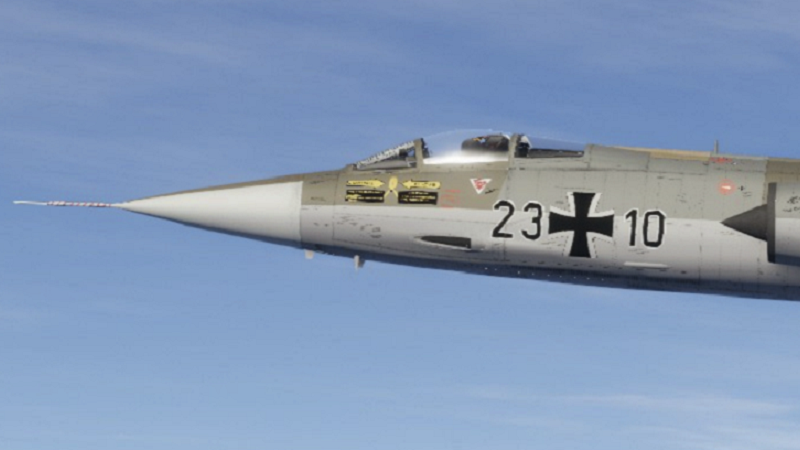
Steam post imageImmaculate F-104 in Luftwaffe markings made by "PauleWaule" on the Flyout Discord!
After a short dev_test, we are ready to roll out the "QOL Update". Included in this update of course is the "Undo/Redo" feature, and other highly requested changes such as a paint palette, camera clip distance, input field options for precision adjustment, and many more which we will go over in the change log! Steam post image We look forward to see how these changes improve your workflow, and as always we love seeing the incredible builds you all share with us!
Full Change Log:
Added:
Undo and Redo for nearly every action you can make in editor
New Cylinder part as a fuel tank
Warnings in editor related to disconnected parts and overwriting existing save files
Palette in Paint mode saves more colors - Ability to control clip distance for camera in editor
Pressing Right Mouse Button while scaling part now resets it back like with movement or rotation
Movement, Rotation and Scaling tools are now FPS independent and follow your mouse. Can set editor settings of those to 1
Blueprint toggle button to quickly hide/show them
Input fields for decimal numbers now accept separators other than dot
Right Mouse Button to cancel now present in Cross Section Editor
Center button to Cross Section Editor to return view to default
Straighten 3D and Bezier tools for Cross Section Editor
Field for Z-offset of Vertex in Cross Section Editor
Mirror button to Jammer (power/hidden automatically, bands manually), lights and other elements in editor which didn't have it before
Pressing P in editor now hides UI, Grid and current pink line in Cross Section Editor
Pressing G in editor now switches between Local and Global orientation
Target Mach warning for Rocket Motors attached to missiles with that value set
During flight missile info panel will now show its name and time of guidance
Using Trim with Gamepad/Joystick
Ability to delete Subassemblies by holding Shift while clicking on them
Game will ignore keyboard inputs when UnityExplorer external mod has active overlay
Changed
World Objects would be loaded from any .txt file in AppData. IDs for areas no longer need to be sequential. No action needed for users with AreaData in intended forlder.
Radar Cross Section score now depends on distance at which SAMs will see you
Improved soft-locking behavior for mouse-free operations
Blend tool now acts on selected points only if they are selected
Rotor scale now shows diameter - Default size of Drop Tank is now for 1135L / 300 gal
Missile Objects' material settings can be applied to other parts
Symmetry now affects most actions in editor. Disabling symmetry might allow for modification of single part only - Stock crafts no longer have warning about saving before flight
Camera no longer moves when game is paused
Speed of camera movement in cockpit view using dedicated keys
Fixed
Gamepad/Joystick not resetting properly
Joystick maxed inputs on spawn
Basic Wheel having too high resistance
Landing Gear not having high enough rolling resistance
Landing Gear having different size in editor when clicked for some variants
Rotated Landing Gear being unstable (if it still does - increase diameter/spring)
Angular Acceleration not properly updating for inputs
Camera in cockpit view rotating while paused
Custom Solid Fuels not loading properly
Local rotation of already rotated part
Objects are no longer moved/rotated/scaled when cursor is over UI
Opacity of blueprints not persisting across loads
Blueprints remaining after creating new craft
Vertex in Cross Section Editor not updating position when scale / rotation / offset is changed
Straighten tool with point 0 selected
Solar panel collider
Drop Tank collider of end bits when scale is set to 0
Missile with dual seeker thinking it has lock too early under certain conditions
3-spool Turbines no longer have IPC and HPC tied
Rotor area and lift performance error
Typing in fields in editor triggering hotkeys
Custom Input name not refreshing in editor
Gun & Drum allowed calibers not matching in editor
Infinite loading bug with certain imported meshes
Exploding upon loading screen end with starting speed over Mach 1
Imported meshes not loading on another craft after launching to flight
Imported meshes not copying over to new craft when Save As feature is used
Bluetooth fuel for jettisoned parts
Mirroring persisting to duplicated parts under certain conditions
Wing getting messed up when switching sides
Moving tool floating after exiting Wing Edit mode
Separated wing pieces having weird interactions in Wing Edit mode
Mirrored wing points moving in opposite direction in specific scenario
Hitboxes of wing elements not updating while editing
Blurry UI when un-hidden during pause
Pressing Space in Cross Section Editor on scaled Fuselage would jump to wrong place
Not being able to box select points after cancelling move in Cross Section Editor
Wrong blade rotation when changing blade count on Propeller that is rotated
Mirrored turbine name after applying preset
Decimal point in Lofting Cut not saving correctly
Decimal point in Cruise Trim not saving correctly
Missile Cruise Guidance terminal mode activation too soon over the ocean
Missile Cruise Guidance over long distances
Pausing on Loading Screen under certain scenario soft-locking the game
Display of decimal numbers in Gauges
Rocket Motor sometimes not having a trail behind it
Fuel Dump's trail at certain scales moving in wrong direction
Fuel Dump having multiple info panels open, inconsistent toggle behavior
Fuel Dump trail re-connecting with old if re-enabled
Fuel Dump draining fuel with Infinite Fuel enabled
Fuel Tank order when current one is destroyed
Certain fuel tanks not having dry weight
"Paint All" in paint mode not saving
Paint from Subassemblies not saving
Paint from Subassemblies being identical for all instances
Part materials save corruption under unknown circumstances
Changing material no longer gets rid of paint
AreaData folder not existing in AppData
Gearbox having bolts visible with Hole material
Source
Changelog.gg summarizes and formats this update. How we read updates.