
In this update3
Full notes
Full F-22: Air Dominance Fighter update
Read the full published notes in a cleaner layout. The original post stays linked below.
What changed
- Gameplay
- Performance
- Fixes
- Maps
F-22: Air Dominance Fighter changes
Changes
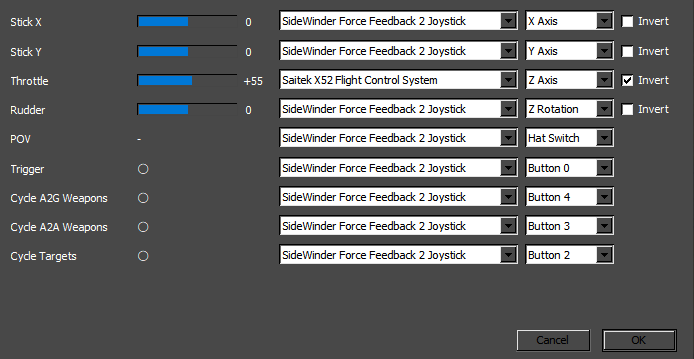
various improvements for HOTAS and advanced joysticks
updated help file
fixed crash with F-22 debris
fixed crash when exiting the game via taskbar
fixed fatal error on exiting the game from Windows
For HOTAS Users
Disable additional software like vJoy, Joystick Gremlin, or HID Hide.
Start the game and open the controls mapping dialog via Options > Map Controls …
Assign axes and buttons.
Click OK to save your settings.
The public HOTAS testing branch we launched two days ago is now superseded. You can come back to the default branch.
Which joysticks are supported?
All DirectInput-compatible devices should work. Users in our forums and on Discord confirmed the following devices work well:
Gravis Thunderbird with GamePort to USB converter from LogiLink (Discord)
HOTAS Warthog (Discord)
Logitech G X56 (Forums)
Logitech Extreme 3D (Discord)
Logitech Extreme 3D Pro (Forums)
Microsoft SideWinder Precison 2 (Discord)
Microsoft SideWinder ForceFeedback Pro (Forums)
Rawcore Javelin (Discord)
Saitek Pro Flight Combat Rudder Pedals (Discord)
Saitek X52 Flight Control System (always worked) (Discord)
Saitek Pro Flight X-56 Rhino (Forums)
Thrustmaster T.Eng (Forums)
Thrustmaster T.Flight Hotas One (Discord)
Thrustmaster T.16000M (Forums)
VKB Gladiator (always worked) (Forums)
Winwing Ursa Minor Fighter Joystick (Discord)
If you experience trouble with your flight stick, let us know by commenting!
Thank you to all the users who tested and contributed with their feedback!
Source
Changelog.gg summarizes and formats this update. How we read updates.