
Full notes
Full EXA: The Infinite Instrument update
Read the full published notes in a cleaner layout. The original post stays linked below.
What changed
- Workshop
- Compatibility
- UI and audio
- Fixes
- Gameplay
- Performance
EXA: The Infinite Instrument changes
A huge step for the growing EXA community: you can now share your layouts and bundles with everyone else who plays EXA! These new features are built using the Steam Workshop, allowing you to publish, update, search, subscribe, download, and vote on these shared items – all without leaving VR. The ability to share layouts and bundles with other players creates many new possibilities for collaboration, and makes it faster than ever to jump right into music-making, with an ever-growing collection of pre-built instruments, loops, layouts, and even entire songs. These new community features demanded a new way to search, sort, and filter results – capabilities which also found their way into the existing “Load” menus. For players with tons of saved layouts and bundles, sorting and filtering their item lists becomes a big time-saver. This release also includes an improved metronome interface (with number-pad for exact entry) and several bug fixes (including a major one related to Windows MR devices). Thank you to the EXA community for the feedback and ideas! Please watch/share the new update video below, and read through this page to learn more.
DEV UPDATE VIDEO
https://www.youtube.com/watch?v=NfAJsm7DIzQ (https://www.youtube.com/watch?v=NfAJsm7DIzQ)
ANNOUNCEMENTS
STEAM WORKSHOP (BETA)
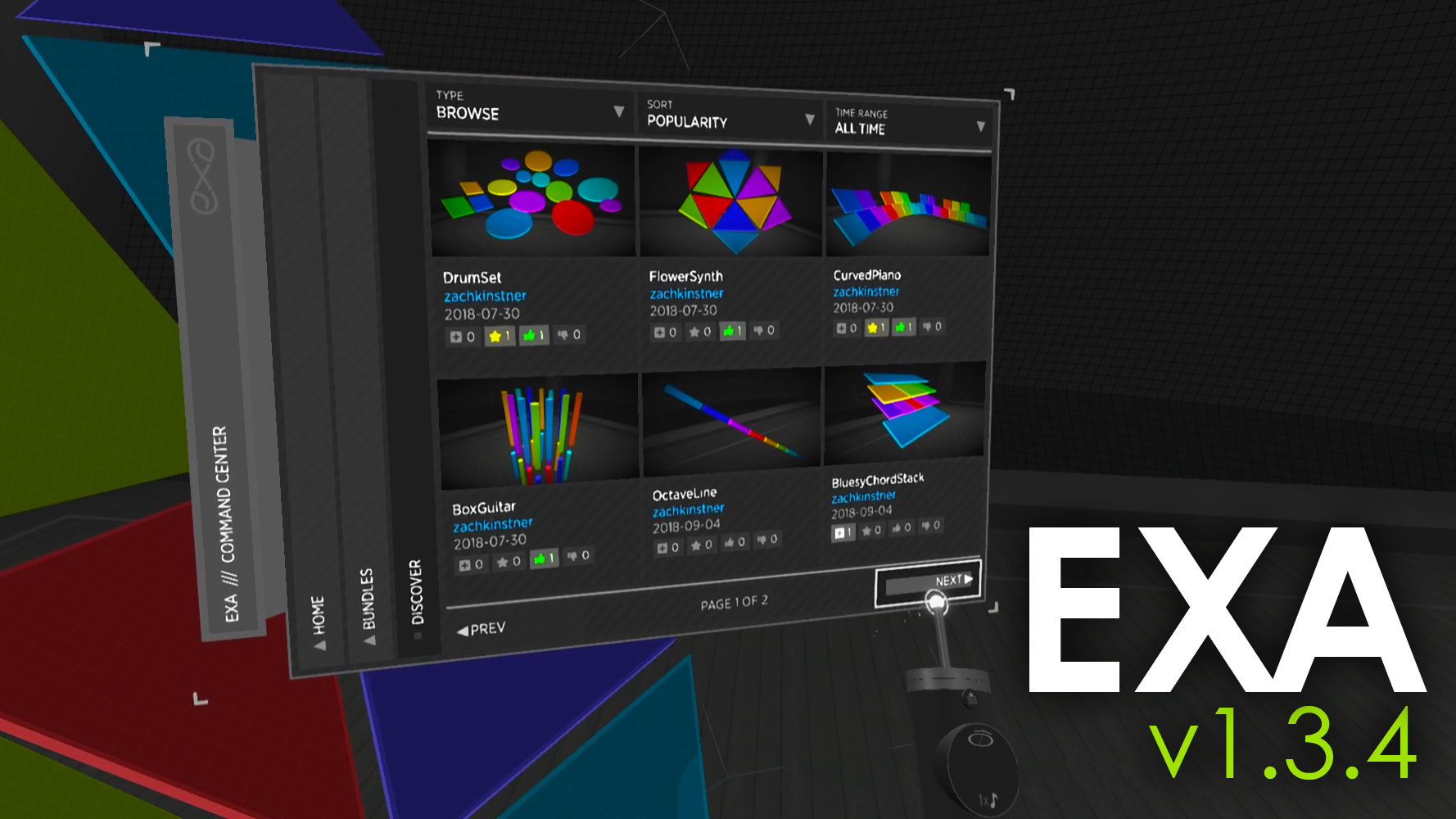
The “Layouts” and “Bundles” menus are now divided into two sections. The first, “Local”, contains the original save/load functionality. The second, called “Community (beta)”, contains new functionality for publishing items to Steam Workshop and for browsing, subscribing to, voting for, and downloading items that have been published to Steam Workshop by other EXA players.
These new community features are marked as “beta” because they can’t be fully tested until players start using and participating with them. There’s a higher-than-usual chance of things going wrong here – please post any issues that you find to the EXA discussion board .
To publish a layout or bundle to Steam Workshop, use the command center to navigate to the “Layouts > Publish” or “Bundles > Publish” menu page. This page shows all of your locally-saved layout/bundle items, displaying a blue badge beneath the image of any item that you’ve already published. Select an item to visit its detail page, where you’ll find a “Publish” button. Or, if the item is already published, you’ll find “Update” and “Unpublish” buttons.
Note: EXA determines an item’s “published” state by searching your list of published items for one with a matching name – there is no other ID or behind-the-scenes connection. If you wish to change the name of an item, you should change it locally and via Steam Workshop to avoid losing this name-based relationship.
To use a layout or bundle that has been published to Steam Workshop, use the command center to navigate to the “Layouts > Discover” or “Bundles > Discover” menu page. This page shows items that have been published by you and all other EXA players. Each item is displayed with its thumbnail image, author, date, and badges that show subscription and voting information. Select an item to visit its detail page, where you’ll find a “Subscribe” button (and other voting buttons). EXA automatically downloads the item upon subscribing to it, and upon completion, you are able to use that item!
- NoteThese new community features are built to use Steam Workshop, which requires you to be logged into Steam. If you are not logged into Steam, EXA will function normally, but the community features will be disabled.
FILTERS / SORTS
All browsing-style menu pages for layouts and bundles now include sorting and filtering options at the top of the page. Sorting and filtering was a necessity for the new Steam Workshop features, and is also quite convenient for browsing your locally-saved items.
To use these new options, select one of the buttons that appear across the top of the menu page. In most cases, a small menu will appear above the button, providing other choices for sorting or filtering. Some menus offer a text filter, which will open a full keyboard when its button is selected. To close the popup menu, select the original sort/filter button again.
The “Load” menus include options for sorting (by date or alphabetically) and a text filter (matches any part of the item’s name, not case-sensitive).
The “Publish” menus include the same options as the “Load” menus, plus a “State” filter (for all, published, unpublished items).
The “Discover” menus include a more complicated set of options, based on the search functionality that Steam Workshop provides. The first button switches between searching modes (“Browse”, “Me”, “Friends”). The “Browse” mode has sorting options (by popularity within time-range, publish date, subscription count, voting score). The “Me” mode has filters (for your subscribed, published, favorited, up/down voted items) and sorting options (by title, date). The “Friends” mode has filters (for items published or favorited by your Steam friends).
OTHER
- Improved the metronome interfaceMoved the “beats per minute” and “beats per measure” sliders into separate menus. Added a number-pad interface for exact “beats per minute” entry. Increased the maximum “beats per measure” from 6 to 7. Added large-text numbers to the new metronome menu buttons.
Listed EXA as officially supporting Windows MR. This has worked, unofficially, for a long time, with one major bug related to WMR headphone usage. This bug is now fixed (see the section below).
Published all current “EXA-Show” layouts to the Steam Workshop.
Created and published several bundles to the Steam Workshop.
Disabled the loop's "delete" button while the loop's duration-changing handles are active.
Improved EXA’s Steam homepage with new descriptions and several animations.
FIXES
Fixed the blue-screen-of-death crashing issue that occurs when launching EXA while using a Windows MR device with headphones plugged into it. The crash was due to EXA’s attempt to test the audio output device via the “WD-MKS” audio host (EXA now only tests the “MME” and “WASAPI” hosts).
Fixed issue causing the sequencer buttons to become invisible. This was caused by the command center’s “Create” page retaining some references to the newly-created sequencer (which was originally a miniature version embedded within the page), and then “fading out” the sequencer’s buttons upon closing the “Create” page.
Fixed issue causing the MIDI menu to display yellow warning text (which said: could not find ‘’) for rows that were previously set to "None".
Fixed issue causing the MIDI menu to auto-select the "None" radio button for rows that were previously set to a now-missing device. The menu now opens with no selected radio buttons.
Fixed issue that allowed the loop delete button and "strike-ringer" tutorial animation to function within a miniature-mode bundle.
Fixed the scenario where both Oculus and SteamVR are running, and Unity gives priority to SteamVR. EXA now shows a desktop-display error message when this occurs, with notes about how to ensure EXA runs in “native Oculus mode” -- rather than running in “Vive mode” and receiving Oculus input via SteamVR.
Fixed the scenario where SteamVR fails to initialize properly upon app startup. EXA now shows a desktop-display error message when this occurs.
Fixed issue causing a loop, with notes that have been trimmed from the start of the loop, to still have the ending/trailing sounds of those notes audible at the start of the loop. This was a regression issue, related to recent changes that allowed sequencers to play “in-progress” notes upon moving the playhead.
Fixed issue that occurs when a grouped loop is attached to a section, the layout is saved, then the layout is reloaded. Upon reload, the grouped loop is no longer positioned within the section. With this fix, the loop is now automatically removed from its group upon being attached to a section.
Source
Changelog.gg summarizes and formats this update. How we read updates.