What changed
0 fixes6 additions2 changes0 removals
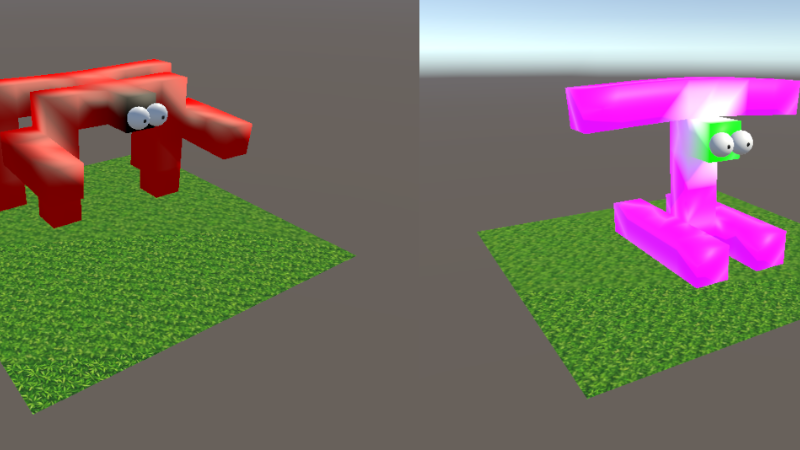
addedEVOLVE YOUR OWN AI ROBOT! ============================== ------------------------------------------------ NEW FEATURES: Soft voxel robot Creator: Create your own Soft Voxel Robot! Animat Info panel: press E on a robot to view animal stats and energy indicators! Genealogy Tree: press Q on a robot to view family history and genealogy! Research Points: earn research points by evolving better robots! Updated UI: pause button, new tutorial text, and more! Vision Rays button: click to toggle vision rays on/off! Pick up animats: left click on an animat to pick it up! This game jam brings plenty of new awesome features! Read on for more info! =============================================================== Soft voxel robot Creator
addedSteam post image A new editor is added to create your own soft voxel robot. Design your robot and load them in the simulation to evolve their AI brain! =============================================================== Animat Info panel Steam post image
addedThe player can now press 'E' on an animat to pull up information about it. This includes its name, its energy levels, its number of neurons, and more. =============================================================== Genealogy Tree
changedSteam post image We implemented a simple genealogy tree with a depth of 1 generation. This is used to see the ancestor(s) of the currently viewed animat. The tree shows on a UI panel when the user presses ‘Q’ while looking at an animat. In future iterations, we plan to track a full genealogy tree implementation for each animat, which will be passed down to and extended by future generations. =============================================================== Research Points
addedSteam post image A new points system has been added to help the user quantify their evolutionary progress. Robots which walk further, eat more food, and reproduce more often, will score more points. Robots which sit around, or do not interact with the environment will score fewer points. =============================================================== Updated UI
addedSteam post image Added new Introduction : the text helps new players to understand the game (paragraph in middle of screen) Added new Pause button: press the pause button to freeze the simulation. The user can still fly around and inspect things (purple button on the right) Added "Minimum Population" box to change the size of the animal population (black box, bottom left) Research points earned are indicated at the top (brown box, yellow text) ============================================================== Vision Rays button
ERAIASON changes
addedEVOLVE YOUR OWN AI ROBOT! ============================== ------------------------------------------------ NEW FEATURES: Soft voxel robot Creator: Create your own Soft Voxel Robot! Animat Info panel: press E on a robot to view animal stats and energy indicators! Genealogy Tree: press Q on a robot to view family history and genealogy! Research Points: earn research points by evolving better robots! Updated UI: pause button, new tutorial text, and more! Vision Rays button: click to toggle vision rays on/off! Pick up animats: left click on an animat to pick it up! This game jam brings plenty of new awesome features! Read on for more info! =============================================================== Soft voxel robot Creator
addedSteam post image A new editor is added to create your own soft voxel robot. Design your robot and load them in the simulation to evolve their AI brain! =============================================================== Animat Info panel Steam post image
addedThe player can now press 'E' on an animat to pull up information about it. This includes its name, its energy levels, its number of neurons, and more. =============================================================== Genealogy Tree
changedSteam post image We implemented a simple genealogy tree with a depth of 1 generation. This is used to see the ancestor(s) of the currently viewed animat. The tree shows on a UI panel when the user presses ‘Q’ while looking at an animat. In future iterations, we plan to track a full genealogy tree implementation for each animat, which will be passed down to and extended by future generations. =============================================================== Research Points
addedSteam post image A new points system has been added to help the user quantify their evolutionary progress. Robots which walk further, eat more food, and reproduce more often, will score more points. Robots which sit around, or do not interact with the environment will score fewer points. =============================================================== Updated UI
EVOLVE YOUR OWN AI ROBOT! ============================== ------------------------------------------------ NEW FEATURES: Soft voxel robot Creator: Create your own Soft Voxel Robot!
Animat Info panel
press E on a robot to view animal stats and energy indicators!
Genealogy Tree
press Q on a robot to view family history and genealogy!
Research Points
earn research points by evolving better robots!
Updated UI
pause button, new tutorial text, and more!
Vision Rays button
click to toggle vision rays on/off!
Pick up animats
left click on an animat to pick it up! This game jam brings plenty of new awesome features! Read on for more info! =============================================================== Soft voxel robot Creator
Steam post image A new editor is added to create your own soft voxel robot. Design your robot and load them in the simulation to evolve their AI brain! =============================================================== Animat Info panel Steam post image
The player can now press 'E' on an animat to pull up information about it. This includes its name, its energy levels, its number of neurons, and more. =============================================================== Genealogy Tree
Steam post image We implemented a simple genealogy tree with a depth of 1 generation. This is used to see the ancestor(s) of the currently viewed animat. The tree shows on a UI panel when the user presses ‘Q’ while looking at an animat. In future iterations, we plan to track a full genealogy tree implementation for each animat, which will be passed down to and extended by future generations. =============================================================== Research Points
Steam post image A new points system has been added to help the user quantify their evolutionary progress. Robots which walk further, eat more food, and reproduce more often, will score more points. Robots which sit around, or do not interact with the environment will score fewer points. =============================================================== Updated UI
Steam post image Added new Introduction
the text helps new players to understand the game (paragraph in middle of screen)
Added new Pause button
press the pause button to freeze the simulation. The user can still fly around and inspect things (purple button on the right) Added "Minimum Population" box to change the size of the animal population (black box, bottom left) Research points earned are indicated at the top (brown box, yellow text) ============================================================== Vision Rays button
Steam post image The vision rays button toggles visual rays which indicate the robot's visual field. A dark ray indicates that nothing is detected, whereas a lit ray indicates that the robot sees something. If the ray turns green, the robot is eating, if it turns blue, the robot is mating, and if it turns red, the robot is attacking. =============================================================== Pick up animats
Steam post image The user can now left click and hold to pick up objects in the world, including food blocks and animats. This can be used to move objects around and customize the environment. ===============================================================