Most of Droning On is structured. The Bootcamp mode teaches you the language one concept at a time. Puzzle mode hands you a problem that requires unique solutions.
In this update2
Full notes
Full Droning On update
Read the full published notes in a cleaner layout. The original post stays linked below.
What changed
0 fixes1 addition4 changes0 removals
UI and audio
Gameplay
changedMost of Droning On is structured. The Bootcamp mode teaches you the language one concept at a time. Puzzle mode hands you a problem that requires unique solutions. Endurance throws the maze-solving problem at you in a way that gives you an endless stream of challenges. All of that is great, but none of it is the kind of space where you can just... try things.
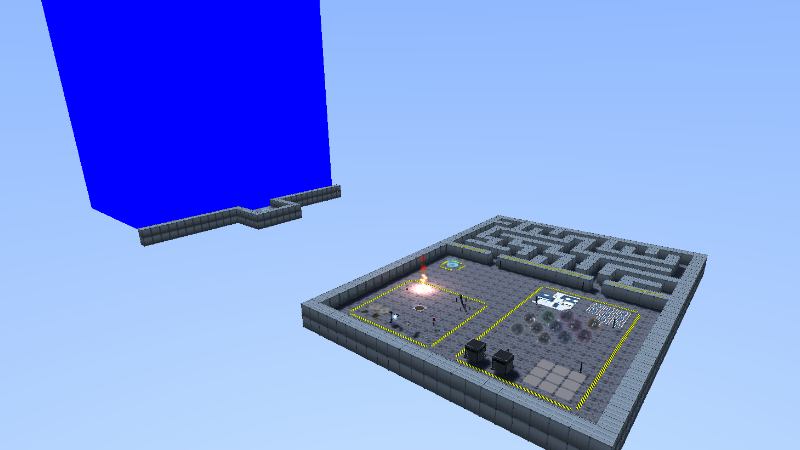
changedThe SandboxThe Sandbox is a single open level with no objective, no timer, and no failure state. It's split into a few themed zones, each built around a different category of mechanic. Most things in the level have a reset button right next to them, so once you've solved (or broken) something, you can reset them without needing to reload the level.
changedThe SandboxInteractable Zone: Stations, barriers, switches, sliding tiles, and everything else Gizmo can interact with. Each complex interaction (sliding tiles, match cards, minesweeper) has a button next to it to easily reset it - re-randomizing it each time. A good place to test scripts that need to get the state of an interactable, or try solving algorithms in a smaller space. Steam post image
addedThe SandboxMaze Zone: A regeneratable maze for simple pathfinding scripts. Each maze entrance has a button that generates a new layout within the bounds of that section. Useful when you want to know if your solution actually generalizes or if it just happens to work for the layout you wrote it for. Steam post image
changedThe SandboxTheater Zone: A staging area with green/blue screen toggles and a skybox toggle button. Mostly, it's there for screenshots and showing off. Steam post image
Droning On changes
changedMost of Droning On is structured. The Bootcamp mode teaches you the language one concept at a time. Puzzle mode hands you a problem that requires unique solutions. Endurance throws the maze-solving problem at you in a way that gives you an endless stream of challenges. All of that is great, but none of it is the kind of space where you can just... try things.
changedThe Sandbox is a single open level with no objective, no timer, and no failure state. It's split into a few themed zones, each built around a different category of mechanic. Most things in the level have a reset button right next to them, so once you've solved (or broken) something, you can reset them without needing to reload the level.
changedInteractable Zone: Stations, barriers, switches, sliding tiles, and everything else Gizmo can interact with. Each complex interaction (sliding tiles, match cards, minesweeper) has a button next to it to easily reset it - re-randomizing it each time. A good place to test scripts that need to get the state of an interactable, or try solving algorithms in a smaller space. Steam post image
addedMaze Zone: A regeneratable maze for simple pathfinding scripts. Each maze entrance has a button that generates a new layout within the bounds of that section. Useful when you want to know if your solution actually generalizes or if it just happens to work for the layout you wrote it for. Steam post image
changedTheater Zone: A staging area with green/blue screen toggles and a skybox toggle button. Mostly, it's there for screenshots and showing off. Steam post image
Most of Droning On is structured. The Bootcamp mode teaches you the language one concept at a time. Puzzle mode hands you a problem that requires unique solutions. Endurance throws the maze-solving problem at you in a way that gives you an endless stream of challenges. All of that is great, but none of it is the kind of space where you can just... try things.
The Sandbox
The Sandbox is a single open level with no objective, no timer, and no failure state. It's split into a few themed zones, each built around a different category of mechanic. Most things in the level have a reset button right next to them, so once you've solved (or broken) something, you can reset them without needing to reload the level.
Hazard Zone: Every hazard in the game is grouped into one zone. Want to see what [c]move()[/c] does when you walk straight into a spike trap? Now you can, on purpose, as many times as you want. Steam post image
Interactable Zone: Stations, barriers, switches, sliding tiles, and everything else Gizmo can interact with. Each complex interaction (sliding tiles, match cards, minesweeper) has a button next to it to easily reset it - re-randomizing it each time. A good place to test scripts that need to get the state of an interactable, or try solving algorithms in a smaller space. Steam post image
AddedMaze ZoneA regeneratable maze for simple pathfinding scripts. Each maze entrance has a button that generates a new layout within the bounds of that section. Useful when you want to know if your solution actually generalizes or if it just happens to work for the layout you wrote it for. Steam post image
Theater Zone: A staging area with green/blue screen toggles and a skybox toggle button. Mostly, it's there for screenshots and showing off. Steam post image
Why?
Programming is a discipline you learn better by doing. You can read about a function all day, but you don't actually understand it until you've tried to use it in practice. The structured parts of Droning On are great at guiding that process, but they're also, by design, on rails. The sandbox is the one place that isn't.
It's the place where you can pull a function out of its context and see how it behaves. Run the same script against five different maze layouts, step into a hazard, and see what happens. Loop a [c]beep() [/c]because it's funny or make bit-style music. Sometimes, the most useful thing someone can do is poke at a mechanic until they understand it, and there should be a space that allows for that.
Thanks for reading. As always, your feedback is welcome. If you haven't already, drop a wishlist and come hang out in the Discord. It's the best place to share feedback, follow development, and engage.