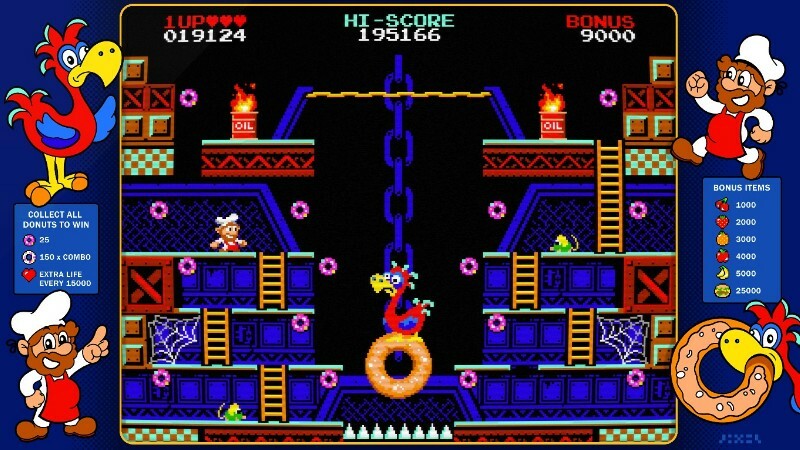
There have been a couple of recent updates to Donut Dodo, so it's about time to list what is new or what issues have been addressed.
Full notes
Full Donut Dodo update
Read the full published notes in a cleaner layout. The original post stays linked below.
What changed
2 fixes2 additions1 change0 removals
Fixes
UI and audio
Events
Gameplay
Performance
fixedThere have been a couple of recent updates to Donut Dodo, so it's about time to list what is new or what issues have been addressed.
addedBezel: Most notably, from a visual point of view, the game has received an illustrated 80s style arcade bezel. To accompany it, new bezel options have been added to the settings menu, where you can choose between different designs or turn them off altogether.
fixedWeekly Challenge: The weekly challenge was not always resetting correctly, to be in synch with the online leaderboards. This has been addressed and hopefully fixed for good.
addedArcade Shortcuts: Many are playing Donut Dodo on their arcade cabinet, and have been requesting that "Add Credit" and "1P Start" are mapped to keys "5" and "1" respectively, like in MAME. This should have been straightforward, but the main menu had to be rebuilt for this to work correctly. The feature is now fully implemented.
changedOptimizations: Most players will likely not notice this, but the game now uses 50% less RAM and 20% less CPU power, making it more snappy and responsive on older hardware.
Donut Dodo changes
fixedThere have been a couple of recent updates to Donut Dodo, so it's about time to list what is new or what issues have been addressed.
addedBezel: Most notably, from a visual point of view, the game has received an illustrated 80s style arcade bezel. To accompany it, new bezel options have been added to the settings menu, where you can choose between different designs or turn them off altogether.
fixedWeekly Challenge: The weekly challenge was not always resetting correctly, to be in synch with the online leaderboards. This has been addressed and hopefully fixed for good.
addedArcade Shortcuts: Many are playing Donut Dodo on their arcade cabinet, and have been requesting that "Add Credit" and "1P Start" are mapped to keys "5" and "1" respectively, like in MAME. This should have been straightforward, but the main menu had to be rebuilt for this to work correctly. The feature is now fully implemented.
changedOptimizations: Most players will likely not notice this, but the game now uses 50% less RAM and 20% less CPU power, making it more snappy and responsive on older hardware.
There have been a couple of recent updates to Donut Dodo, so it's about time to list what is new or what issues have been addressed.
Bezel: Most notably, from a visual point of view, the game has received an illustrated 80s style arcade bezel. To accompany it, new bezel options have been added to the settings menu, where you can choose between different designs or turn them off altogether.
Weekly Challenge: The weekly challenge was not always resetting correctly, to be in synch with the online leaderboards. This has been addressed and hopefully fixed for good.
Arcade Shortcuts: Many are playing Donut Dodo on their arcade cabinet, and have been requesting that "Add Credit" and "1P Start" are mapped to keys "5" and "1" respectively, like in MAME. This should have been straightforward, but the main menu had to be rebuilt for this to work correctly. The feature is now fully implemented.
Optimizations: Most players will likely not notice this, but the game now uses 50% less RAM and 20% less CPU power, making it more snappy and responsive on older hardware.
Other than that, some minor fixes were worked on here and there, for an overall better experience.
Keep those amazing scores coming! The world record is now just under 400K! Thanks again for all your kind feedback, and happy gaming with Donut Dodo!