What changed
0 fixes1 addition3 changes0 removals
addedThis is a major update of the game content, we have a new in game tool (toy), the Magic Wand! Only available in Single-player mode. Steam post image The purpose of this game should be that let everyone can have fun with domino games. I used to say that I will not add those "cheat functions" in this domino game, and would like to keep it as a "strong patience required" game. However, this requirement seems to be not suitable for a lot of people. So, here it is, a "high technology" product has been added into DomiCard, the Magic Wand. Wish there are more benefits than drawbacks.
changedHow to use it: Open the inventory and drag it to an item bar, press the right number(keyboard button) and you will see the Magic Wand is following your mouse.
changedTo draw a line of Dominoes: hold "L Shift" and the mouse left button, start to draw! Also, you can pick a colour, and use a different type of dominoes.
changedTo auto generate dominoes with a PNG image: firstly, open the Menu (press "ESC", or Steam post image ). Click on the PNG button, pick a local saved PNG file and then place it into the game (the image can be scaled or rotated in game). Secondly, use the Magic Wand, one left mouse button click to see the square of fake dominoes, click again if you don't like them. If you like them, hold "L Shift" and click left button again you will find the magic!
DomiCard changes
addedThis is a major update of the game content, we have a new in game tool (toy), the Magic Wand! Only available in Single-player mode. Steam post image The purpose of this game should be that let everyone can have fun with domino games. I used to say that I will not add those "cheat functions" in this domino game, and would like to keep it as a "strong patience required" game. However, this requirement seems to be not suitable for a lot of people. So, here it is, a "high technology" product has been added into DomiCard, the Magic Wand. Wish there are more benefits than drawbacks.
changedHow to use it: Open the inventory and drag it to an item bar, press the right number(keyboard button) and you will see the Magic Wand is following your mouse.
changedTo draw a line of Dominoes: hold "L Shift" and the mouse left button, start to draw! Also, you can pick a colour, and use a different type of dominoes.
changedTo auto generate dominoes with a PNG image: firstly, open the Menu (press "ESC", or Steam post image ). Click on the PNG button, pick a local saved PNG file and then place it into the game (the image can be scaled or rotated in game). Secondly, use the Magic Wand, one left mouse button click to see the square of fake dominoes, click again if you don't like them. If you like them, hold "L Shift" and click left button again you will find the magic!
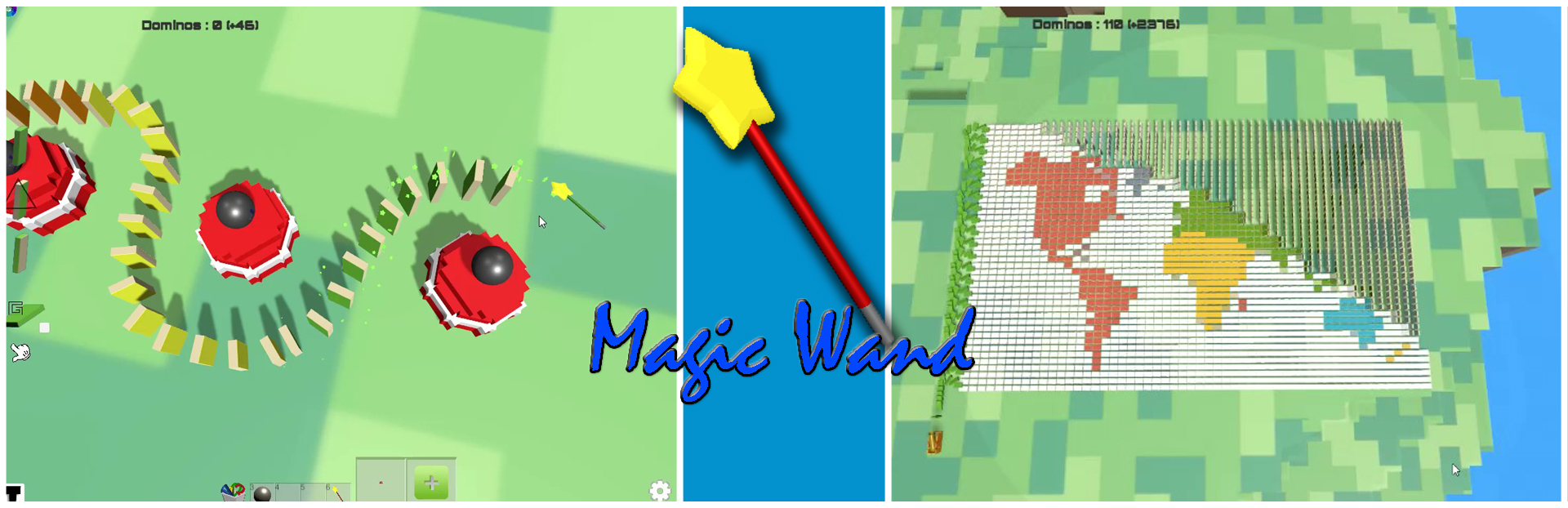
This is a major update of the game content, we have a new in game tool (toy), the Magic Wand! Only available in Single-player mode. Steam post image The purpose of this game should be that let everyone can have fun with domino games. I used to say that I will not add those "cheat functions" in this domino game, and would like to keep it as a "strong patience required" game. However, this requirement seems to be not suitable for a lot of people. So, here it is, a "high technology" product has been added into DomiCard, the Magic Wand. Wish there are more benefits than drawbacks.
How to use it: Open the inventory and drag it to an item bar, press the right number(keyboard button) and you will see the Magic Wand is following your mouse.
To draw a line of Dominoes: hold "L Shift" and the mouse left button, start to draw! Also, you can pick a colour, and use a different type of dominoes.
To auto generate dominoes with a PNG image: firstly, open the Menu (press "ESC", or Steam post image). Click on the PNG button, pick a local saved PNG file and then place it into the game (the image can be scaled or rotated in game). Secondly, use the Magic Wand, one left mouse button click to see the square of fake dominoes, click again if you don't like them. If you like them, hold "L Shift" and click left button again you will find the magic!
Please keep this in mind, save your work frequently!