
HomeGamesUpdatesPricingMethodology
Steam News6 May 20262mo ago

Update: Building Tools!

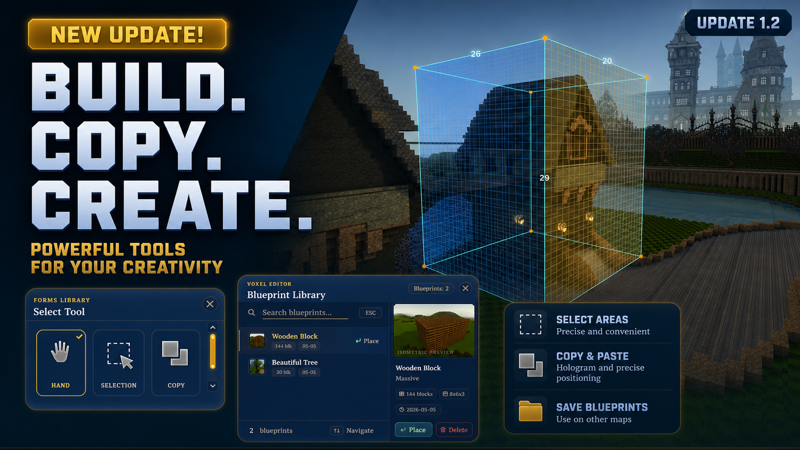
Building tools have been added to the game! Accessible with the \ key. Hand — classic block and decoration placement and removal Selection — a rectangular selection that lets you fill the selected area with any block

Full notes

Full Digger Online update

Read the full published notes in a cleaner layout. The original post stays linked below.

What changed

0 fixes3 additions2 changes0 removals
  • Gameplay
  • Maps
addedBuilding tools have been added to the game! Accessible with the \ key.
changedHand — classic block and decoration placement and removal
changedCopy — lets you select an area and copy it, choosing any desired rotation. This tool also allows you to save the selected area to a file, so that later in the Blueprint Library menu [G] you can load the saved blueprint and place it on any map.
addedNew shapes have also been added, significantly expanding your creative possibilities:
addedDemonstration of the new tools in action:

Digger Online changes

addedBuilding tools have been added to the game! Accessible with the \ key.
changedHand — classic block and decoration placement and removal
changedCopy — lets you select an area and copy it, choosing any desired rotation. This tool also allows you to save the selected area to a file, so that later in the Blueprint Library menu [G] you can load the saved blueprint and place it on any map.
addedNew shapes have also been added, significantly expanding your creative possibilities:
addedDemonstration of the new tools in action:

Building tools have been added to the game! Accessible with the \ key.

  1. Hand — classic block and decoration placement and removal

  2. Selection — a rectangular selection that lets you fill the selected area with any block type or shape, as well as clear that area

  3. Copy — lets you select an area and copy it, choosing any desired rotation. This tool also allows you to save the selected area to a file, so that later in the Blueprint Library menu [G] you can load the saved blueprint and place it on any map.

New shapes have also been added, significantly expanding your creative possibilities:

Demonstration of the new tools in action:

Source

Steam News / 6 May 2026

Open original post

Changelog.gg summarizes and formats this update. How we read updates.