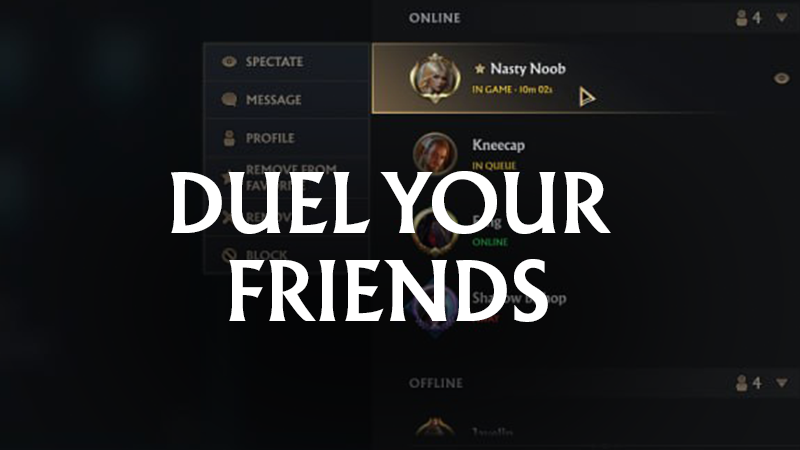
Do you want to play with your friends and challenge them to duels? The Friends system will be available from the very beginning. What awaits you in DFIANCE: DOMINANCE?
In this update1
Full notes
Full Dfiance: Dominance update
Read the full published notes in a cleaner layout. The original post stays linked below.
What changed
0 fixes1 addition5 changes1 removal
Events
UI and audio
changedDo you want to play with your friends and challenge them to duels? The Friends system will be available from the very beginning.What awaits you in DFIANCE: DOMINANCE? – the friends list and everything that comes with it.
addedDo you want to play with your friends and challenge them to duels? The Friends system will be available from the very beginning.Adding friends is simple: just send an invite using the Player ID. If you join the game through the referral system, your friends will automatically appear on your list.
changedDo you want to play with your friends and challenge them to duels? The Friends system will be available from the very beginning.Without opening any extra menus, you can check how many of your friends are currently online – the counter is visible directly on the button. One click expands the panel with the full list and details: – player name and icon – account level – status (Online, Busy, Offline) – current in-game activity (if applicable)
changedDo you want to play with your friends and challenge them to duels? The Friends system will be available from the very beginning.Statuses update automatically, but you can also set them manually. Want some peace? Set yourself to Offline – your status will be remembered even after restarting the game.
changedDo you want to play with your friends and challenge them to duels? The Friends system will be available from the very beginning.A friend’s profile is always within reach – just click their name or icon to see the details.
changedDo you want to play with your friends and challenge them to duels? The Friends system will be available from the very beginning.Most importantly: you can invite friends to custom matches. Both players choose their own decks according to deck-building rules. It’s pure competition – no rewards, no progress in quests or achievements. Only skill and results matter.
Dfiance: Dominance changes
changedWhat awaits you in DFIANCE: DOMINANCE? – the friends list and everything that comes with it.
addedAdding friends is simple: just send an invite using the Player ID. If you join the game through the referral system, your friends will automatically appear on your list.
changedWithout opening any extra menus, you can check how many of your friends are currently online – the counter is visible directly on the button. One click expands the panel with the full list and details: – player name and icon – account level – status (Online, Busy, Offline) – current in-game activity (if applicable)
changedStatuses update automatically, but you can also set them manually. Want some peace? Set yourself to Offline – your status will be remembered even after restarting the game.
changedA friend’s profile is always within reach – just click their name or icon to see the details.
Do you want to play with your friends and challenge them to duels? The Friends system will be available from the very beginning.
What awaits you in DFIANCE: DOMINANCE? – the friends list and everything that comes with it.
Adding friends is simple: just send an invite using the Player ID. If you join the game through the referral system, your friends will automatically appear on your list.
Without opening any extra menus, you can check how many of your friends are currently online – the counter is visible directly on the button. One click expands the panel with the full list and details: – player name and icon – account level – status (Online, Busy, Offline) – current in-game activity (if applicable)
Statuses update automatically, but you can also set them manually. Want some peace? Set yourself to Offline – your status will be remembered even after restarting the game.
A friend’s profile is always within reach – just click their name or icon to see the details.
Most importantly: you can invite friends to custom matches. Both players choose their own decks according to deck-building rules. It’s pure competition – no rewards, no progress in quests or achievements. Only skill and results matter.
If needed, you can remove a friend from your list at any time.