
In this update2
Full notes
Full Cryospace - survival horror in space update
Read the full published notes in a cleaner layout. The original post stays linked below.
What changed
- UI and audio
Cryospace - survival horror in space changes
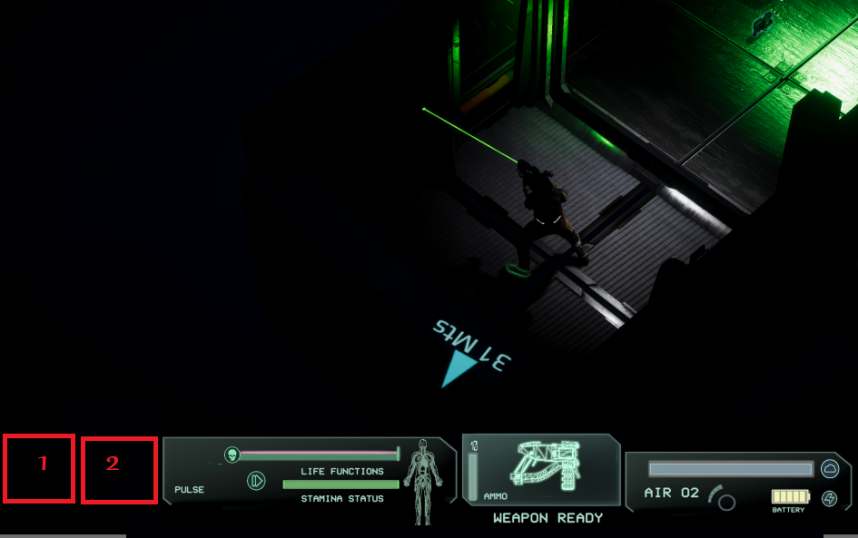
We all know that a user interface (UI) is “the space” where interactions between humans and games occur. HUD, on the other hand, that’s a head-up display: a transparent display that presents data without distracting gamers.
We have been working on it for several days. Where on screen and how to show the valuable information. What kind of “resources” should be on HUD? What color and style should it have?
Check out a few of our ideas!
We took inspiration from classical hack n slash games, like Diablo, and also classical survival horrors like Resident Evil.
We make some tweaks and then look for space designated for NPCs, because sometimes our hero will have some company.
In terms of style, we are looking for something really simple and useful. That’s why not many colors and a few elements.
If you look closely, you will find some inspirations from famous movie series we all love and admire. You surely know what we have in mind - Alien(s), of course. ‘Cause in space, no one can hear you scream.
That retro-sf look can be found also in the equipment window.
Of course, we still have a lot of other work to do. There are some enemies that we are still preparing for you - how they look, how they fight, and how they will die…
What’s next?
Demo of course. That means that we have to face our own fears and start to balance all elements - weapons, enemies, oxygen and batteries, etc. - because the conglomerate of all that will create the true survival horror experience we are looking for. All that and of course, the story, atmosphere, sounds, music, and animations :)
After all, you don’t wanna leave Earth to be safe, right? CryoSpace team
Source
Changelog.gg summarizes and formats this update. How we read updates.