
In this update9
Full notes
Full Crazy Islands update
Read the full published notes in a cleaner layout. The original post stays linked below.
What changed
- Performance
- Gameplay
- Fixes
- UI and audio
- Events
- Balance
Crazy Islands changes
Networking and Multiplayer
increased stability
better error handling of hosting/ joining with better feedback
fixed some edge scenario crashes on Linux and Windows
made Steam Multiplayer more reliable
fixed issues with the overlay not popping up when trying to invite friends into your Steam Lobby
when the host is leaving by just hard quitting the game (exit out instead of designed quit game) you will not be stuck in an empty scene anymore
The game will now automaticly start the Steam Service if Steam is not already running
Dead Steam Lobbies will be removed automaticly now
The error handling should now be much more stable for every host and join option, while also informing the player about issues that occur during the host/join process. This makes it easier for us as developers to understand what went wrong and when, while also providing the player with more useful feedback.
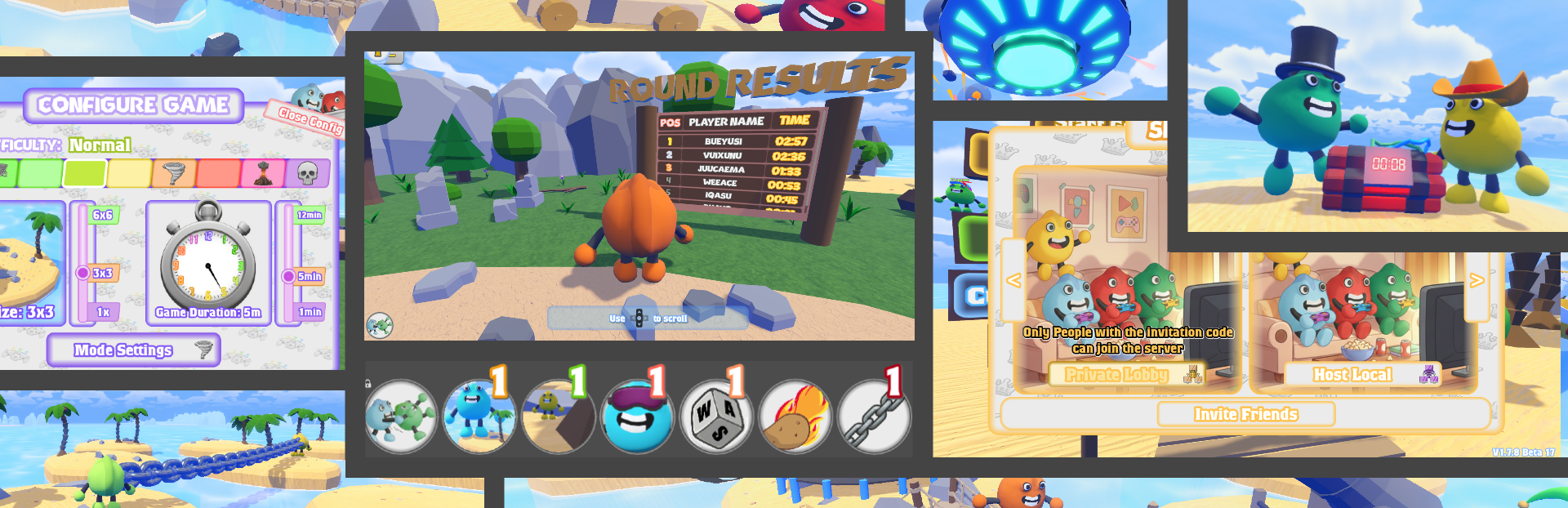
During this rework of Steam multiplayer and local/relay hosting, we also improved the hosting user interface, making it easier to understand and navigate (for example, no longer showing tips for every option when hovering over buttons).
Steam post imageSteam post image
During intensive Steam multiplayer testing, we discovered a particularly annoying bug related to the game’s server browser, which caused the game to crash whenever someone created a Steam lobby. This was due to internal timing issues and inadequate error handling. The issue has now been resolved.
Another edge-case bug occasionally caused the game to crash when starting it after hosting via Steam or a private lobby. This issue has also been fixed.
This are only some of the many improvements and there may still be some hidden edge-case scenarios related to networking, but overall stability and reliability should be significantly improved.
Testing and tracking down every possible scenario is a very tedious task and can sometimes be quite challenging to resolve. That’s why we rely on your feedback.
New Game Configuration menu
We reworked the entire Game Configuration Menu while also adding a new feature:
Custumizable Island Grid Size
This Window is now split up into Game Mode and Difficulty Configs making it easier to navigate especially when using a controller.
Steam post imageSteam post image
New Event and Event Changes
There are now indicators for several events making it easier for the player to grasp what is going on
(In Engine Screenshot) Only the active ones are shown. If an event is bound to a duration somehow this is displayed with a timer.
Some events got buffed or nerfed to ensure the game stays ballanced while others received a visual or technical overhaul.
And there is a new cool event called Chained Together.
You will be able to choose a player that will be chained to you for some time. If you are eliminated, they will be eliminated as well—and vice versa.
Reworked Settings and Quality Presets
reworked the settings GUI
now easier to navigate
put anti-aliasing option into deticated Option Button
put quality-presets into dedicated Option Button
fixed bugs related to controller tips not showing up
Map Changes
new Round Results Leaderboard
The Results will be displayed after a round is over and are updating live during a new game.
Full Linux Support
working Steam Overlay
new DEbug Launch Option
several bug fixes
The game is now playable on linux too without compromises. This also includes a working Steam Overlay which was broken before.
The Linux version also got a second launch option which enables a Debug Console where you can see what is going on under the hood if the game causes problems. In addition to that several other weird issues are fixed now.
Crossplay between Linux and Windows
Crossplay - via Steam, Private or Local - is now possible without issues. Tested with Windows 10/11, Ubuntu, CachyOs and Bazzite so far Here is an example during development (one Steam Account on Ubuntu (WSL) and another on WIndows)
Others
There’s much more to talk about, but to summarize, here is a list of other bug fixes and adjustments: fixed crashes related to wrong loading order of game scene
moved to Godot 4.6.1.stable (better performance, more reliable)
changed the logic of multiple events
fixed bugged tutorial and tutorial softlocks (edge cases)
reworked player spawning when game starts
reworked player state management during game loading process
added new matching Patterns to several UI Backgrounds
reworked Events Spawn Logic and Syncing (now safer and faster)
fixed bug where ship UIs won't go away on game start
fixed status bar issues
reworked some core logic of Event Tools (events that reward you with items/ tools you can use) to make them more stable and reliable
added new option to exit tutorial
fixed crashes/ freezes related to event precompilation
fixed 4 critical null pointer issues
reworked Water Renderer (now faster, way more memory efficient)
resolved 2 critical memory leaks
made several RPC (Remote Peer Calls) safer/ faster
lowered overall network traffic by optimizing core components
fixed issues with transition scene being stuck or unreliable (edge case scenarios)
fixed issues related to window resizing on linux
fixed a ton of smaller linux bugs
added missing await to Menu scene on transition (fixes several weird crashes/ freezes, [edge case scenarios])
reworked player showcase logic in menu (not bugged anymore)
moved to new stable Steam API and Steam Godot module
added new debug argument: --skip_tutorial
reworked entire multiplayer error handling
made scene loading safer (especially when using Steam to host)
fixed crashes related to bad shader code
reworked sky shader -> performance increased on integrated GPUs
fixed crashes and bugs related to NVIDIA VSYNC
fixed crashes due to bad edge case logic in sever browser
fixed players not being teleported back to lobby when host hard quits
fixed steam auth logic to avoid crashes or false positives on game start
made multiplayer hosting safer + added more robust error handling and error info for user
made multiplayer joining safer + added more robust error handling and error info for user
made performance mode switching in WaterRenderer spam-safe
reworked settings managment
refined quality presets
removed crappy performance water
removed crappy "My Pc can handle everything" and "Potato Mode" mode (now Perfomance and Quality Preset)
reworked buggy environment choosing in thunder event
reworked bugs related to controller tips not showing up on all interactive GUI-Elements
and much more fixed bugs
Source
Changelog.gg summarizes and formats this update. How we read updates.