
HomeGamesUpdatesPricingMethodology
Steam News25 July 202511mo ago

Friday Blog 258 - First Video of the Top-Down View

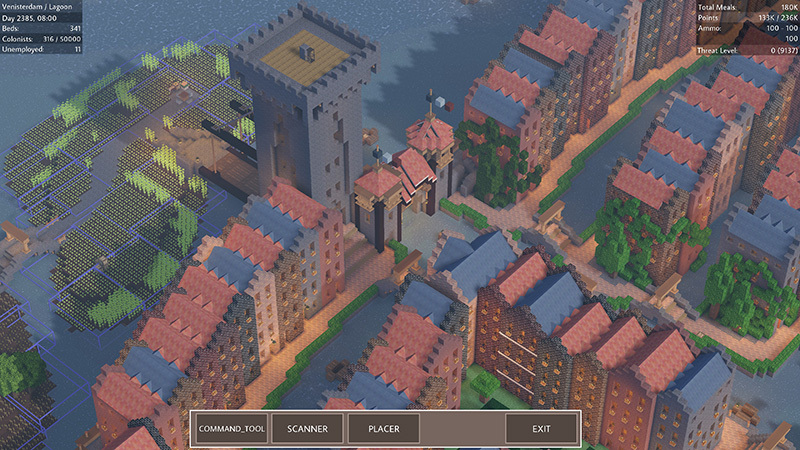
We made good progress with the top-down view this month! This short video shows what it currently looks like in the internal development build. Watch it here: https://youtu.

Full notes

Full Colony Survival update

Read the full published notes in a cleaner layout. The original post stays linked below.

What changed

0 fixes1 addition2 changes0 removals
  • UI and audio
  • Gameplay
changedWe made good progress with the top-down view this month! This short video shows what it currently looks like in the internal development build. Watch it here: https://youtu.be/OCcjfFNz_ZM It's all work-in-progress, so it will look different when it's publicly released. The interface is very basic. And when you place a blueprint of a building, it's constructed instantly. Of course, that's not the intention.
addedThe video demonstrates the new features, currently called the "scanner" and "placer". The scanner allows you to select a part of the world and save it as a blueprint. The placer allows you to select a blueprint and place it in the world. The core of the feature is currently working, but there's still a lot to do before we can release it. For example, at the moment blueprints disappear when you return to the main menu and then reload the world.
changedThe top-down perspective looks and feels visually distinct from regular gameplay, and I love how it’s turning out. We’ll keep working on it and hope to release it publicly later this year!

Colony Survival changes

changedWe made good progress with the top-down view this month! This short video shows what it currently looks like in the internal development build. Watch it here: https://youtu.be/OCcjfFNz_ZM It's all work-in-progress, so it will look different when it's publicly released. The interface is very basic. And when you place a blueprint of a building, it's constructed instantly. Of course, that's not the intention.
addedThe video demonstrates the new features, currently called the "scanner" and "placer". The scanner allows you to select a part of the world and save it as a blueprint. The placer allows you to select a blueprint and place it in the world. The core of the feature is currently working, but there's still a lot to do before we can release it. For example, at the moment blueprints disappear when you return to the main menu and then reload the world.
changedThe top-down perspective looks and feels visually distinct from regular gameplay, and I love how it’s turning out. We’ll keep working on it and hope to release it publicly later this year!

We made good progress with the top-down view this month! This short video shows what it currently looks like in the internal development build. Watch it here: https://youtu.be/OCcjfFNz_ZM It's all work-in-progress, so it will look different when it's publicly released. The interface is very basic. And when you place a blueprint of a building, it's constructed instantly. Of course, that's not the intention.

The video demonstrates the new features, currently called the "scanner" and "placer". The scanner allows you to select a part of the world and save it as a blueprint. The placer allows you to select a blueprint and place it in the world. The core of the feature is currently working, but there's still a lot to do before we can release it. For example, at the moment blueprints disappear when you return to the main menu and then reload the world.

The video mentions the orthographic perspective, but it's hard to explain without images. So here are two screenshots from Blender to illustrate the difference! First, a regular perspective, as used by your own eyes and current first-person Colony Survival:

Secondly, the orthographic perspective:

All the cubes are the same size. In a regular perspective, distant cubes appear smaller. In the orthographic perpsective, all cubes appear the exact same size.

Lots of top-down strategy games use this perspective, and we tried to make it work for Colony Survival as well. Our game engine, Unity, has a special option for it, but it changes so much in the way things are rendered that we ended up with a lot of visual glitches. Instead of trying to patch them all, we chose a very similar solution: use the equivalent of a telescope. A really powerful telescope has a visual result that is very close to an orthographic perspective!

The top-down perspective looks and feels visually distinct from regular gameplay, and I love how it’s turning out. We’ll keep working on it and hope to release it publicly later this year!

Bedankt voor het lezen :D

Reddit // Twitter // YouTube // Website // Discord

Source

Steam News / 25 July 2025

Open original post

Changelog.gg summarizes and formats this update. How we read updates.