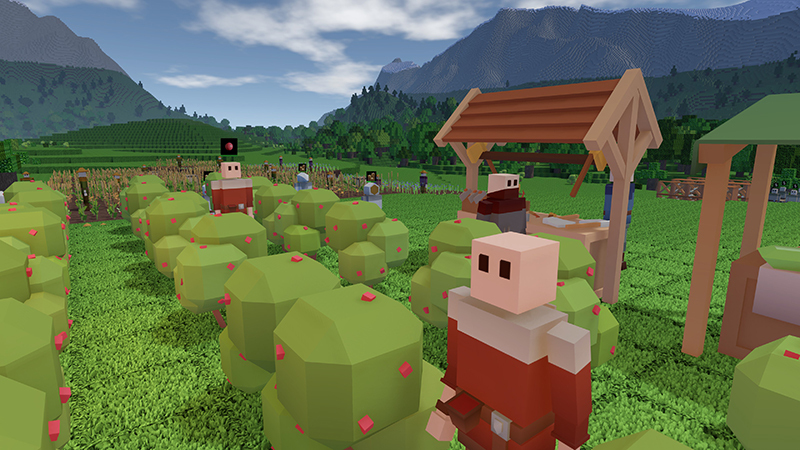
Update 0.17: “Quests & Counters” is Available Right Now!
A big new update is live on Steam right now! It should make the game a lot more accessible to new players, and it should speed up some of the slowest days of starting a new colony.
Full notes
Full Colony Survival update
Read the full published notes in a cleaner layout. The original post stays linked below.
What changed
0 fixes3 additions2 changes0 removals
Gameplay
Events
UI and audio
Server
addedA big new update is live on Steam right now! It should make the game a lot more accessible to new players, and it should speed up some of the slowest days of starting a new colony.
addedThere is a new tab next to the stockpile: “Quests”. These are missions that should guide you through the core of the game. They contain a goal and instructions on how to achieve it. When you’ve fulfilled its requirements, you can claim the reward of the Quest. The rewards are items like food, resources and some unique decorative objects.
changed0.17 contains more noticeable changes. One of them concerns the Notifications menu. The old one was a work-in-progress disaster. It looks much better in 0.17, and it has been deeply connected to the regular first-person gameplay. When something significant happens, like the death of a colonist or a Quest being ready to complete, an icon will pop up in the top right corner of the screen. The message that notifies you of a colonist death also contains a button that allows you to visualize the death location.
addedWhile we’re talking about the top right corner of the screen: the counters that tracked your ammo have been enhanced as well. They are now customizable! There’s a button for it in the Colony tab. You can decide which items you want to be tracked and displayed. The first ammo types are the default, but they can be removed, replaced or added to.
changedMultiplayer has been improved as well. Pressing ‘tab’ will bring up a list of currently online players. Requests like sharing a colony can be accepted via the Notifications menu. And servers will now connect to the server browser automatically, without any need for port forwarding or other modifications.
Colony Survival changes
addedA big new update is live on Steam right now! It should make the game a lot more accessible to new players, and it should speed up some of the slowest days of starting a new colony.
addedThere is a new tab next to the stockpile: “Quests”. These are missions that should guide you through the core of the game. They contain a goal and instructions on how to achieve it. When you’ve fulfilled its requirements, you can claim the reward of the Quest. The rewards are items like food, resources and some unique decorative objects.
changed0.17 contains more noticeable changes. One of them concerns the Notifications menu. The old one was a work-in-progress disaster. It looks much better in 0.17, and it has been deeply connected to the regular first-person gameplay. When something significant happens, like the death of a colonist or a Quest being ready to complete, an icon will pop up in the top right corner of the screen. The message that notifies you of a colonist death also contains a button that allows you to visualize the death location.
addedWhile we’re talking about the top right corner of the screen: the counters that tracked your ammo have been enhanced as well. They are now customizable! There’s a button for it in the Colony tab. You can decide which items you want to be tracked and displayed. The first ammo types are the default, but they can be removed, replaced or added to.
changedMultiplayer has been improved as well. Pressing ‘tab’ will bring up a list of currently online players. Requests like sharing a colony can be accepted via the Notifications menu. And servers will now connect to the server browser automatically, without any need for port forwarding or other modifications.
A big new update is live on Steam right now! It should make the game a lot more accessible to new players, and it should speed up some of the slowest days of starting a new colony.
There is a new tab next to the stockpile: “Quests”. These are missions that should guide you through the core of the game. They contain a goal and instructions on how to achieve it. When you’ve fulfilled its requirements, you can claim the reward of the Quest. The rewards are items like food, resources and some unique decorative objects.
None of the old content is locked behind Quests. If you know how the game works, you can fully ignore Quests. It’s not a slow, mandatory tutorial.
0.17 contains more noticeable changes. One of them concerns the Notifications menu. The old one was a work-in-progress disaster. It looks much better in 0.17, and it has been deeply connected to the regular first-person gameplay. When something significant happens, like the death of a colonist or a Quest being ready to complete, an icon will pop up in the top right corner of the screen. The message that notifies you of a colonist death also contains a button that allows you to visualize the death location.
While we’re talking about the top right corner of the screen: the counters that tracked your ammo have been enhanced as well. They are now customizable! There’s a button for it in the Colony tab. You can decide which items you want to be tracked and displayed. The first ammo types are the default, but they can be removed, replaced or added to.
Multiplayer has been improved as well. Pressing ‘tab’ will bring up a list of currently online players. Requests like sharing a colony can be accepted via the Notifications menu. And servers will now connect to the server browser automatically, without any need for port forwarding or other modifications.